Join us at FabCon Atlanta from March 16 - 20, 2026, for the ultimate Fabric, Power BI, AI and SQL community-led event. Save $200 with code FABCOMM.
Register now!The Power BI Data Visualization World Championships is back! Get ahead of the game and start preparing now! Learn more
Hi PowerBi Friends,
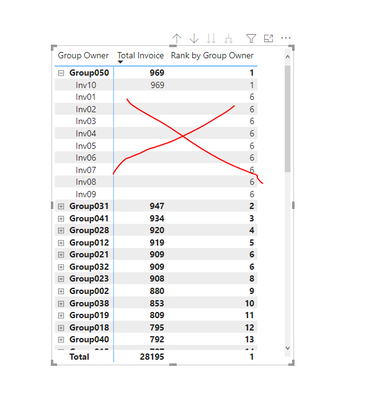
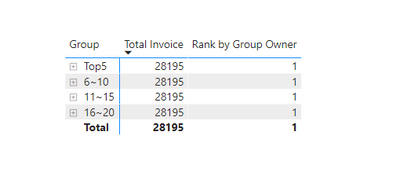
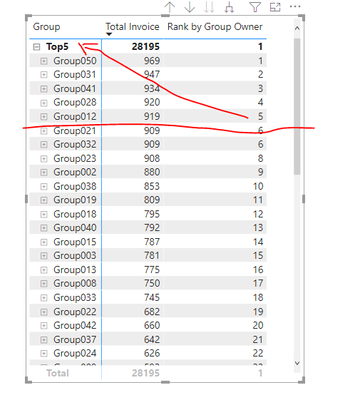
I have a sample data and wanted to group/encapsulate it based on the TopN given. In addition, I am getting a null value here showing which I think is not good idea to be included as well. Do I need to have a custom table and have a relationship into it? Attached is the sample pbix file which you can play around. Thanks for the help!
https://www.dropbox.com/s/xszrjtxt9oo8k76/sampledata.pbix?dl=0
End Result would be like this
Solved! Go to Solution.
@rbalza So, is your issue your ranking?? If so, take a look at this as it has some good examples that you may find useful:
https://community.powerbi.com/t5/Quick-Measures-Gallery/To-Bleep-with-RANKX/m-p/1042520#M452
@rbalza So, is your issue your ranking?? If so, take a look at this as it has some good examples that you may find useful:
https://community.powerbi.com/t5/Quick-Measures-Gallery/To-Bleep-with-RANKX/m-p/1042520#M452
The Power BI Data Visualization World Championships is back! Get ahead of the game and start preparing now!
Check out the November 2025 Power BI update to learn about new features.
| User | Count |
|---|---|
| 20 | |
| 10 | |
| 9 | |
| 4 | |
| 4 |
| User | Count |
|---|---|
| 34 | |
| 32 | |
| 20 | |
| 12 | |
| 11 |