Join us at FabCon Atlanta from March 16 - 20, 2026, for the ultimate Fabric, Power BI, AI and SQL community-led event. Save $200 with code FABCOMM.
Register now!The Power BI Data Visualization World Championships is back! Get ahead of the game and start preparing now! Learn more
Hi,
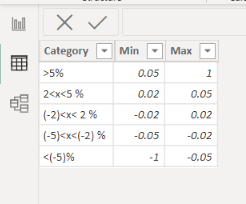
I have a table with percentages, and I want to add another table with only five values:
>5%
2<x<5 %
(-2)<x< 2 %
(-5)<x<(-2) %
<(-5)%
How can I do this in Power BI Desktop?
(One of the columns the percentages are based on is from another table.
I tried something like this:
Thanks,
Sigrid
Solved! Go to Solution.
Hi,
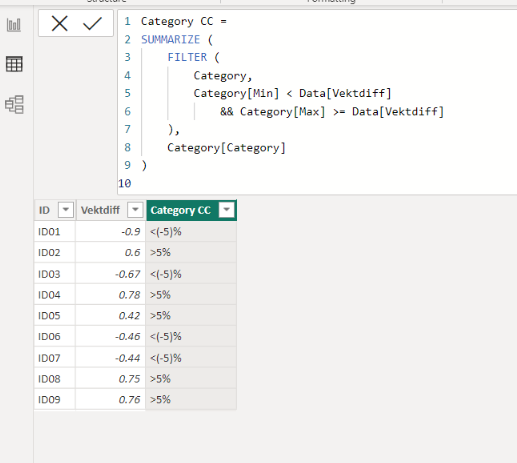
I am not sure if I understood your question correctly, but I tried to create a sample pbix file like below.
Please check the below picture and the attached pbix file.
I hope the below can provide some ideas on how to create a solution for your datamodel.
It is for creating a new column.
Category CC =
SUMMARIZE (
FILTER (
Category,
Category[Min] < Data[Vektdiff]
&& Category[Max] >= Data[Vektdiff]
),
Category[Category]
)
Hi,
I am not sure if I understood your question correctly, but I tried to create a sample pbix file like below.
Please check the below picture and the attached pbix file.
I hope the below can provide some ideas on how to create a solution for your datamodel.
It is for creating a new column.
Category CC =
SUMMARIZE (
FILTER (
Category,
Category[Min] < Data[Vektdiff]
&& Category[Max] >= Data[Vektdiff]
),
Category[Category]
)
Wow, that was perfect!! Thank you so much! You totally made my morning! =D
The Power BI Data Visualization World Championships is back! Get ahead of the game and start preparing now!
Check out the November 2025 Power BI update to learn about new features.
| User | Count |
|---|---|
| 20 | |
| 11 | |
| 10 | |
| 4 | |
| 4 |
| User | Count |
|---|---|
| 32 | |
| 28 | |
| 19 | |
| 11 | |
| 10 |