FabCon is coming to Atlanta
Join us at FabCon Atlanta from March 16 - 20, 2026, for the ultimate Fabric, Power BI, AI and SQL community-led event. Save $200 with code FABCOMM.
Register now!- Power BI forums
- Get Help with Power BI
- Desktop
- Service
- Report Server
- Power Query
- Mobile Apps
- Developer
- DAX Commands and Tips
- Custom Visuals Development Discussion
- Health and Life Sciences
- Power BI Spanish forums
- Translated Spanish Desktop
- Training and Consulting
- Instructor Led Training
- Dashboard in a Day for Women, by Women
- Galleries
- Data Stories Gallery
- Themes Gallery
- Contests Gallery
- QuickViz Gallery
- Quick Measures Gallery
- Visual Calculations Gallery
- Notebook Gallery
- Translytical Task Flow Gallery
- TMDL Gallery
- R Script Showcase
- Webinars and Video Gallery
- Ideas
- Custom Visuals Ideas (read-only)
- Issues
- Issues
- Events
- Upcoming Events
The Power BI Data Visualization World Championships is back! Get ahead of the game and start preparing now! Learn more
- Power BI forums
- Forums
- Get Help with Power BI
- DAX Commands and Tips
- Re: Dynamic Title that matches the SLICER's select...
- Subscribe to RSS Feed
- Mark Topic as New
- Mark Topic as Read
- Float this Topic for Current User
- Bookmark
- Subscribe
- Printer Friendly Page


- Mark as New
- Bookmark
- Subscribe
- Mute
- Subscribe to RSS Feed
- Permalink
- Report Inappropriate Content
Dynamic Title that matches the SLICER's selection instead of MAX range in my current data
Hi everyone,
I have a table that shows a list of projects and a few different values for each project. Two values that we have created slicers for are the "Open Date" and "% of Confidence". What I would like to show in the Title is the value entered into the slicer, not the MAX value that I currently have available in my data.
My data visuals look like this:
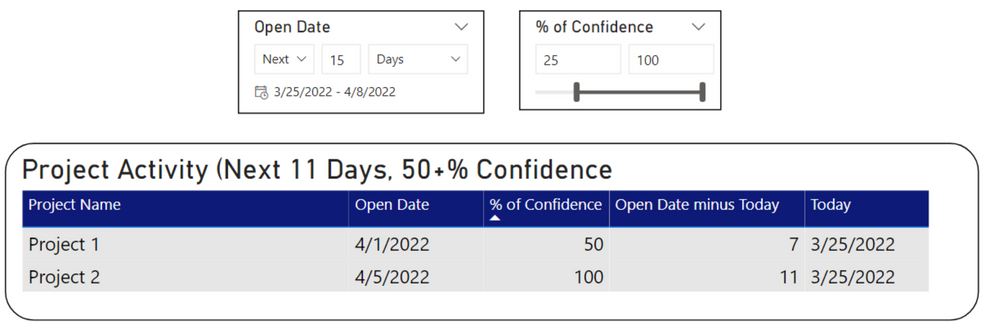
What I would like for it to show (to match my data slicers): "Project Activity (Next 15 Days, 25+% Confidence"
My DAX Measure that I am currently using for my dynamic title looks like this:
Title 1 =

"Project Activity (Next " & MAX (Append1[Open Date minus Today]) & " Days, " & MIN (Append1[% of Confidence]) & "+% Confidence"
I think that I either need to find a way to add a full range of all dates and confidence percentages for the "MAX" feature to show in the title correctly, but I'm really not sure on how to achieve that.
Thank you!
Solved! Go to Solution.


- Mark as New
- Bookmark
- Subscribe
- Mute
- Subscribe to RSS Feed
- Permalink
- Report Inappropriate Content
@NB689
Here is a sample file with the solution https://www.dropbox.com/t/TNd8TRAhoEb7fxLT
First you need to create a simple date table
Date = CALENDAR ( TODAY ( ), DATE ( YEAR ( MAX ( Append1[Open Date] ) ), 12, 31 ))Then create the % confidence selection table
% of Confidence Selection =
SELECTCOLUMNS ( GENERATESERIES ( 0, 100, 1 ), "% of Confidence", [Value] )
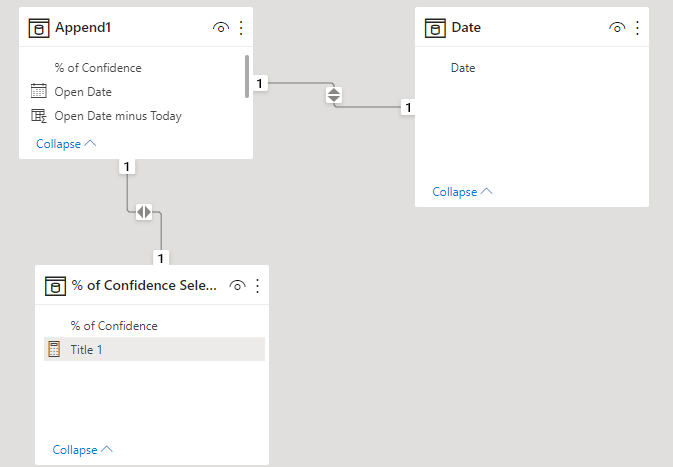
Then create the relationships
The tilte measure would be
Title 1 =
VAR NumberOfDays =
    CALCULATE(
        DATEDIFF ( TODAY(), MAX ('Date'[Date] ), DAY ) + 1,
        CROSSFILTER ( 'Date'[Date], Append1[Open Date], None )
    )
VAR Confidence =
    CALCULATE (
        MIN ('% of Confidence Selection'[% of Confidence] ),
        CROSSFILTER ( 'Date'[Date], Append1[Open Date], None )
    )
RETURN
"Project Activity (Next " & NumberOfDays & " Days, "
    & Confidence & "+% Confidence"
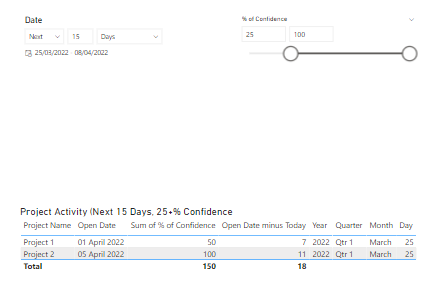
And this is how the report looks like
- Mark as New
- Bookmark
- Subscribe
- Mute
- Subscribe to RSS Feed
- Permalink
- Report Inappropriate Content
@NB689
Here is a sample file with the solution https://www.dropbox.com/t/TNd8TRAhoEb7fxLT
First you need to create a simple date table
Date = CALENDAR ( TODAY ( ), DATE ( YEAR ( MAX ( Append1[Open Date] ) ), 12, 31 ))Then create the % confidence selection table
% of Confidence Selection =
SELECTCOLUMNS ( GENERATESERIES ( 0, 100, 1 ), "% of Confidence", [Value] )
Then create the relationships
The tilte measure would be
Title 1 =
VAR NumberOfDays =
    CALCULATE(
        DATEDIFF ( TODAY(), MAX ('Date'[Date] ), DAY ) + 1,
        CROSSFILTER ( 'Date'[Date], Append1[Open Date], None )
    )
VAR Confidence =
    CALCULATE (
        MIN ('% of Confidence Selection'[% of Confidence] ),
        CROSSFILTER ( 'Date'[Date], Append1[Open Date], None )
    )
RETURN
"Project Activity (Next " & NumberOfDays & " Days, "
    & Confidence & "+% Confidence"
And this is how the report looks like
- Mark as New
- Bookmark
- Subscribe
- Mute
- Subscribe to RSS Feed
- Permalink
- Report Inappropriate Content
That worked! Thank you so much
- Mark as New
- Bookmark
- Subscribe
- Mute
- Subscribe to RSS Feed
- Permalink
- Report Inappropriate Content
Hi @NB689
You can try
Title 1 =
"Project Activity (Next " & SELECTEDVALUE ( Append1[Open Date minus Today] ) & " Days, "
& SELECTEDVALUE ( Append1[% of Confidence] ) & "+% Confidence"- Mark as New
- Bookmark
- Subscribe
- Mute
- Subscribe to RSS Feed
- Permalink
- Report Inappropriate Content
When I try that I'm getting this.

- Mark as New
- Bookmark
- Subscribe
- Mute
- Subscribe to RSS Feed
- Permalink
- Report Inappropriate Content
One idea came to my mind is that you can create a filter table with the just the numbers between 0% - 100% and then create a relationship between this table and your table via the % of confidance column. When the slicer is based on this column then we can retrieve the exact Min and Max.
Regarding the time as I mentioned in my previous reply, just subtract the MAX - MIN to get the number of days
- Mark as New
- Bookmark
- Subscribe
- Mute
- Subscribe to RSS Feed
- Permalink
- Report Inappropriate Content
We can use the following to retrieve the number of days
MAX( Append1[Open Date minus Today] ) - MIN ( Append1[Open Date minus Today] )However, I have no idea how to retrieve the value of a slicer. I'm interested to know as well

Helpful resources

Power BI Dataviz World Championships
The Power BI Data Visualization World Championships is back! Get ahead of the game and start preparing now!

Power BI Monthly Update - November 2025
Check out the November 2025 Power BI update to learn about new features.

FabCon Atlanta 2026
Join us at FabCon Atlanta, March 16-20, for the ultimate Fabric, Power BI, AI and SQL community-led event. Save $200 with code FABCOMM.

| User | Count |
|---|---|
| 20 | |
| 10 | |
| 9 | |
| 4 | |
| 4 |


| User | Count |
|---|---|
| 32 | |
| 31 | |
| 18 | |
| 12 | |
| 11 |


