Get Fabric or SQL Certified for Free.
Get certified for free when you join Fabric Data Days 2026 and dive into Fabric, Power BI, SQL, AI, and other essential data skills.
Join now- Power BI forums
- Get Help with Power BI
- Desktop
- Service
- Report Server
- Power Query
- Mobile Apps
- Developer
- DAX Commands and Tips
- Custom Visuals Development Discussion
- Health and Life Sciences
- Power BI Spanish forums
- Translated Spanish Desktop
- Training and Consulting
- Instructor Led Training
- Dashboard in a Day for Women, by Women
- Galleries
- Data Stories Gallery
- Themes Gallery
- Contests Gallery
- QuickViz Gallery
- Quick Measures Gallery
- Visual Calculations Gallery
- Notebook Gallery
- Translytical Task Flow Gallery
- TMDL Gallery
- R Script Showcase
- Webinars and Video Gallery
- Ideas
- Custom Visuals Ideas (read-only)
- Issues
- Issues
- Events
- Upcoming Events
Try your skills in the Power BI Dataviz World Championship! Round one ends June 26. Join now
- Power BI forums
- Forums
- Get Help with Power BI
- DAX Commands and Tips
- Re: Dynamic Customer Grouping
- Subscribe to RSS Feed
- Mark Topic as New
- Mark Topic as Read
- Float this Topic for Current User
- Bookmark
- Subscribe
- Printer Friendly Page

- Mark as New
- Bookmark
- Subscribe
- Mute
- Subscribe to RSS Feed
- Permalink
- Report Inappropriate Content
Dynamic Customer Grouping
I work for an organization that owns 15 companies.
1. I want to show the number of customers that purchased from 1 company, 2 companies, 3 companies, etc.
2. I also want to know the number of customers for different combinations of these companies. (Cross company customers)
3. I want this to be dynamic so when the user selects a date range on the slicer, everything updates accordingly.
A simple example of data I have:
| transaction_key | customer_key | company_key | sale_amount | date_key |
| 123 | A | 1 | 55 | |
| 234 | B | 2 | 50 | |
| 567 | C | 3 | 90 | |
| 891 | B | 2 | 56 | |
| 987 | D | 1 | 13 |
How can I achieve this in Power BI?
Solved! Go to Solution.


- Mark as New
- Bookmark
- Subscribe
- Mute
- Subscribe to RSS Feed
- Permalink
- Report Inappropriate Content
@spacerocket22 , You have to create a measure
count(Table[company_key]), As a measure, this can not be used as a filter. You need to create an independent table manually or using generateseries with 1 to 100(say). And create new measure/s that uses this table.
Refer to my dynamic segementation video. You case = join will work no need of range unless you need a range
https://www.youtube.com/watch?v=CuczXPj0N-k


- Mark as New
- Bookmark
- Subscribe
- Mute
- Subscribe to RSS Feed
- Permalink
- Report Inappropriate Content
@spacerocket22 please try this step by step
Step 1: create a date table
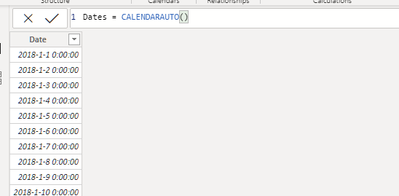
Step 2: create a dimension table

Step 3: create relationship between Dates[Date] and FactTable[date_key]. of cause, you need convert your data in column of date_key to Date Type.
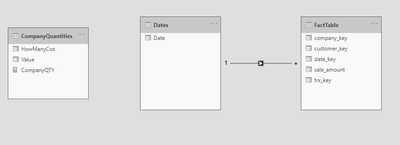
Step 4: create a measure

Step 5: draw the column and measure into a tabulor visual, and date to slicer
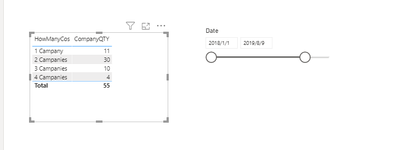
that's all.
- Mark as New
- Bookmark
- Subscribe
- Mute
- Subscribe to RSS Feed
- Permalink
- Report Inappropriate Content
@spacerocket22 please try this step by step
Step 1: create a date table
Step 2: create a dimension table
Step 3: create relationship between Dates[Date] and FactTable[date_key]. of cause, you need convert your data in column of date_key to Date Type.
Step 4: create a measure
Step 5: draw the column and measure into a tabulor visual, and date to slicer
that's all.
- Mark as New
- Bookmark
- Subscribe
- Mute
- Subscribe to RSS Feed
- Permalink
- Report Inappropriate Content
@wdx223_Daniel Amazingg. This workss!!
Any idea on how we can achieve part 2 I mentioned?
Like finding the exact company pairs with respect to number of customers?
For ex:
number of customers that buy from company 1 and company 2?
number of customers that buy from company 1 and company 2 and company 3?
And all possible combinations?
- Mark as New
- Bookmark
- Subscribe
- Mute
- Subscribe to RSS Feed
- Permalink
- Report Inappropriate Content
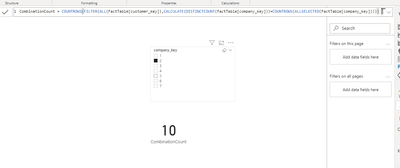
@spacerocket22 might this work, draw company_key in a list slicer, then you can assign your combination.
- Mark as New
- Bookmark
- Subscribe
- Mute
- Subscribe to RSS Feed
- Permalink
- Report Inappropriate Content
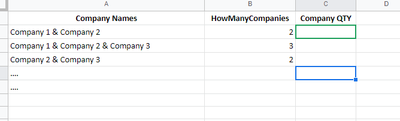
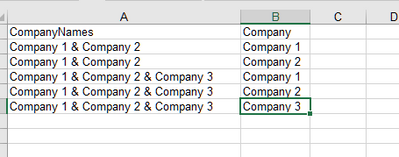
I wish to list the company names as combinations as well.
Any ideas?
Something like this:
- Mark as New
- Bookmark
- Subscribe
- Mute
- Subscribe to RSS Feed
- Permalink
- Report Inappropriate Content
- Mark as New
- Bookmark
- Subscribe
- Mute
- Subscribe to RSS Feed
- Permalink
- Report Inappropriate Content
@spacerocket22 , You have to create a measure
count(Table[company_key]), As a measure, this can not be used as a filter. You need to create an independent table manually or using generateseries with 1 to 100(say). And create new measure/s that uses this table.
Refer to my dynamic segementation video. You case = join will work no need of range unless you need a range
- Mark as New
- Bookmark
- Subscribe
- Mute
- Subscribe to RSS Feed
- Permalink
- Report Inappropriate Content
@amitchandak Great video. Thanks a lot for this!!
This solves my first question, yes. I can know the number of customers with respect to the number of companies they transact in, but I cannot know the company combinations using this. Given that there are 15 companies, the combinations are a lot.
I can use the same method to get combinations (manually creating a table with possible combinations) but that might be a lot of manual work and measures. Any other solutions for finding combination wise customers?
- Mark as New
- Bookmark
- Subscribe
- Mute
- Subscribe to RSS Feed
- Permalink
- Report Inappropriate Content
@wdx223_Daniel
Thank you for this.
Attaching a sample data file with 70 transactions, 30 customers, and 7 companies.
https://docs.google.com/spreadsheets/d/1aZSttC8ne2xzWg1H_LFCIsFEWr_pjSmq5WGpdl8P_d0/edit?usp=sharing
- Mark as New
- Bookmark
- Subscribe
- Mute
- Subscribe to RSS Feed
- Permalink
- Report Inappropriate Content

Helpful resources

Data Days 2026
Don't miss out on Data Days, June 15 through August 7. Learn Fabric, Power BI, SQL, AI and more.

Power BI Monthly Update - May 2026
Check out the May 2026 Power BI update to learn about new features.

Power BI DataViz World Championships - June 2026
A new Power BI DataViz World Championship is coming this June! Don't miss out on submitting your entry.

| User | Count |
|---|---|
| 2 | |
| 2 | |
| 2 | |
| 1 | |
| 1 |


