Join us at FabCon Atlanta from March 16 - 20, 2026, for the ultimate Fabric, Power BI, AI and SQL community-led event. Save $200 with code FABCOMM.
Register now!The Power BI Data Visualization World Championships is back! Get ahead of the game and start preparing now! Learn more
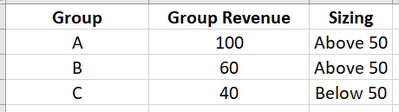
Hi everyone, I am a beginner in Power BI, thinking i'm able to achieve as stated below:
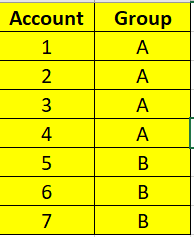
I have 2 tables in my data as stated below.
So my desired outputs are:
Then when i press Above 50
I also be able to get the list of the accounts
Thank you in advance.
Solved! Go to Solution.
Hi, @Anonymous
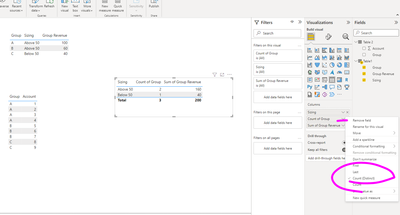
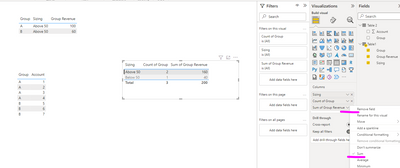
If you have created a relationship between Table1 and Table2 based on the field [Group],
you just need to change the summarize type for some fields in the table visual.
Best Regards,
Community Support Team _ Eason
@Anonymous , Join these two tables on a group
The first visual table you have to measure
distinctcount(Table[group])
The second visual should just work with columns and filter
If you do not want to join, the second visual table
use a measure in visual
countx(filter(Table2, table2[group] in values(Table1[Group]) ) )
The Power BI Data Visualization World Championships is back! Get ahead of the game and start preparing now!
| User | Count |
|---|---|
| 14 | |
| 7 | |
| 4 | |
| 4 | |
| 3 |
| User | Count |
|---|---|
| 23 | |
| 10 | |
| 10 | |
| 6 | |
| 5 |