This time we’re going bigger than ever. Fabric, Power BI, SQL, AI and more. We're covering it all. You won't want to miss it.
Learn moreLevel up your Power BI skills this month - build one visual each week and tell better stories with data! Get started
Hi All,
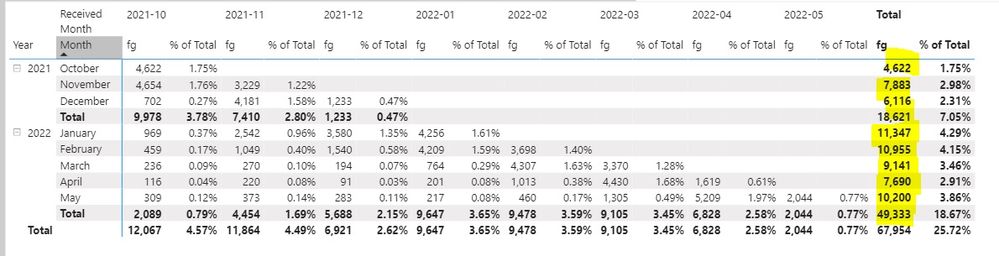
I have a matrix with "fg year and month rows" and "received date" in the column.
the matrix shows the count of fg in each received month. I want to add a % for each value using the fg total row (row level value divided by fg total value.
Example data like below.
Oct 2021 rows and Oct 2021 column the % should be 100%(4622/fg total 6422)
Nov 2021 row and Oct 2021 column the % should be 59.04%(4652/fg total 7883), Nov 2021 column 40.96%(3229/7883)
and so on...
Trying out this code and gives me wrong % value.
DIVIDE(SUM(table[FG count]),CALCULATE(SUM(table[FG Count]),ALLEXCEPT(table,table[DateFG])),0)
Thank you in advance
Solved! Go to Solution.
Trying this code and so far its working.
% of total =
Hi @Anonymous ,
It seems you have solved the issue. Please kindly mark your answer as a solution to help more people find the answer.
If I have misunderstood your meaning, please provide the output you want in the form of a picture.
Best Regards
Community Support Team _ Polly
If this post helps, then please consider Accept it as the solution to help the other members find it more quickly.
Trying this code and so far its working.
% of total =
Check out the April 2026 Power BI update to learn about new features.
Sign up to receive a private message when registration opens and key events begin.
If you have recently started exploring Fabric, we'd love to hear how it's going. Your feedback can help with product improvements.
| User | Count |
|---|---|
| 4 | |
| 3 | |
| 3 | |
| 2 | |
| 2 |
| User | Count |
|---|---|
| 6 | |
| 6 | |
| 6 | |
| 5 | |
| 4 |