Join the #PBI10 DataViz contest
Power BI is turning 10, and we’re marking the occasion with a special community challenge. Use your creativity to tell a story, uncover trends, or highlight something unexpected.
Get started- Power BI forums
- Get Help with Power BI
- Desktop
- Service
- Report Server
- Power Query
- Mobile Apps
- Developer
- DAX Commands and Tips
- Custom Visuals Development Discussion
- Health and Life Sciences
- Power BI Spanish forums
- Translated Spanish Desktop
- Training and Consulting
- Instructor Led Training
- Dashboard in a Day for Women, by Women
- Galleries
- Webinars and Video Gallery
- Data Stories Gallery
- Themes Gallery
- Contests Gallery
- Quick Measures Gallery
- Notebook Gallery
- Translytical Task Flow Gallery
- R Script Showcase
- Ideas
- Custom Visuals Ideas (read-only)
- Issues
- Issues
- Events
- Upcoming Events
Join us for an expert-led overview of the tools and concepts you'll need to become a Certified Power BI Data Analyst and pass exam PL-300. Register now.
- Power BI forums
- Forums
- Get Help with Power BI
- DAX Commands and Tips
- Re: Divide every row with a measure
- Subscribe to RSS Feed
- Mark Topic as New
- Mark Topic as Read
- Float this Topic for Current User
- Bookmark
- Subscribe
- Printer Friendly Page


- Mark as New
- Bookmark
- Subscribe
- Mute
- Subscribe to RSS Feed
- Permalink
- Report Inappropriate Content
Divide every row with a measure
Hi !
I want to divide every row with a measure where the measure is filtered with a category and that category exixts in the same column where I want to execute the division.
My Measure:-
Now,
what I want:-
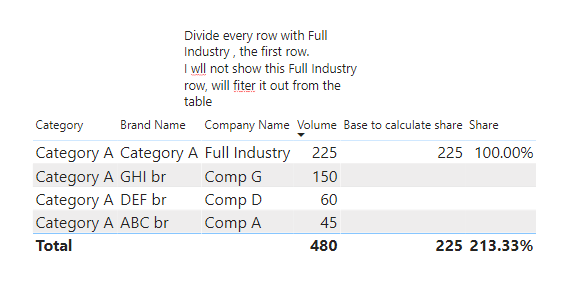
I tried this measure in this dummy example it is working but not in my orginal example !
Thanks in Advance !
Solved! Go to Solution.


- Mark as New
- Bookmark
- Subscribe
- Mute
- Subscribe to RSS Feed
- Permalink
- Report Inappropriate Content
Hi,
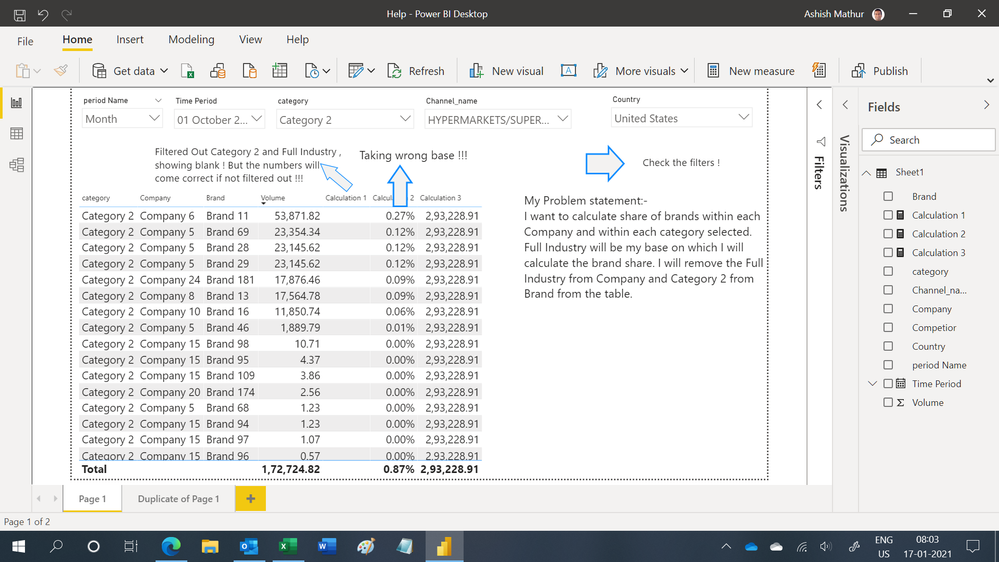
I am still not sure of that you need but this is what i can contribute from my understanding. Let's forget the division for now. Let's just try to get the denominator correct. With the following filters applied (after exporting your data to an Excel file):
- Company = Full Industry
- Time period = 1 October 2020
- Cheannel name = HYPERMARKETS/SUPERMARKETS/DISCOUNTERS
- Country = United States
- Category = Category 2
the total of the volume column is 293228.9051. With your filters remaining intact (as you can see in the image), this measure returns that value
Regards,
Ashish Mathur
http://www.ashishmathur.com
https://www.linkedin.com/in/excelenthusiasts/
- Mark as New
- Bookmark
- Subscribe
- Mute
- Subscribe to RSS Feed
- Permalink
- Report Inappropriate Content
Hi ! @amitchandak
This measure of yours worked !
Category = divide([Volume],CALCULATE([Volume],Filter(allselected(Table),Table[company_nm]="Full Industry")))
But but ....
When I am trying to check out the Full Industry from Company Name column or Category A from brand Name column from the table the measure is vanishing.

- Mark as New
- Bookmark
- Subscribe
- Mute
- Subscribe to RSS Feed
- Permalink
- Report Inappropriate Content
@souvik900766 , becasue allselected need full industry to be one the selected value (Not removed by filter or slicer)
in that case all will do. Check all for both cases
Category = divide([Volume],CALCULATE([Volume],Filter(all(Table),Table[company_nm]="Full Industry")))
- Mark as New
- Bookmark
- Subscribe
- Mute
- Subscribe to RSS Feed
- Permalink
- Report Inappropriate Content
Hi ! @amitchandak
Dont know what is happening !
I used your last measure:_
Category = divide([Volume],CALCULATE([Volume],Filter(all(Table),Table[company_nm]="Full Industry")))
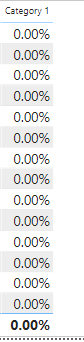
In my Dummy example it is working but in my orginal file it is showing 0.00% !!!
- Mark as New
- Bookmark
- Subscribe
- Mute
- Subscribe to RSS Feed
- Permalink
- Report Inappropriate Content
@souvik900766 , Please the case or the excat value you need in double quotes i.e. Full Industry
I doubt that is creating a blank below. Value is not matching (space, Case etc )
Table[company_nm]="Full Industry"
- Mark as New
- Bookmark
- Subscribe
- Mute
- Subscribe to RSS Feed
- Permalink
- Report Inappropriate Content
Hi @amitchandak
The case is right.I have checked that !
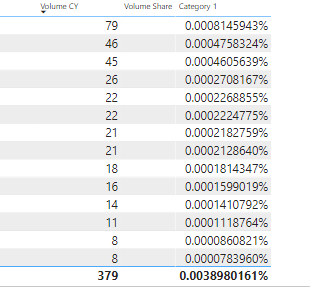
See this...The numbers are coming correspondingly same !
- Mark as New
- Bookmark
- Subscribe
- Mute
- Subscribe to RSS Feed
- Permalink
- Report Inappropriate Content
@souvik900766 , is this value very big for- Table[company_nm]="Full Industry"
Can you share sample data and sample output in table format? Or a sample pbix after removing sensitive data.
- Mark as New
- Bookmark
- Subscribe
- Mute
- Subscribe to RSS Feed
- Permalink
- Report Inappropriate Content
Hi !
Kindly find the sample attached link
https://www.dropbox.com/s/nz0fnx87j6ktdjf/Help.pbix?dl=0
Regards
- Mark as New
- Bookmark
- Subscribe
- Mute
- Subscribe to RSS Feed
- Permalink
- Report Inappropriate Content
Hi,
I am still not sure of that you need but this is what i can contribute from my understanding. Let's forget the division for now. Let's just try to get the denominator correct. With the following filters applied (after exporting your data to an Excel file):
- Company = Full Industry
- Time period = 1 October 2020
- Cheannel name = HYPERMARKETS/SUPERMARKETS/DISCOUNTERS
- Country = United States
- Category = Category 2
the total of the volume column is 293228.9051. With your filters remaining intact (as you can see in the image), this measure returns that value
Regards,
Ashish Mathur
http://www.ashishmathur.com
https://www.linkedin.com/in/excelenthusiasts/
- Mark as New
- Bookmark
- Subscribe
- Mute
- Subscribe to RSS Feed
- Permalink
- Report Inappropriate Content
Hi !
Yes, the base or denominator is coming correct !
Now using the switch statement I made this dynamic !!!
Switch Category 1, CALCULATE(SUM(Sheet1[Volume]),Sheet1[Company]="Full Industry",Sheet1[Brand]="Category 1") !!!!
Category 2, CALCULATE(SUM(Sheet1[Volume]),Sheet1[Company]="Full Industry",Sheet1[Brand]="Category 2")
Thank You so much !!!!
- Mark as New
- Bookmark
- Subscribe
- Mute
- Subscribe to RSS Feed
- Permalink
- Report Inappropriate Content
You are welcome.
Regards,
Ashish Mathur
http://www.ashishmathur.com
https://www.linkedin.com/in/excelenthusiasts/
- Mark as New
- Bookmark
- Subscribe
- Mute
- Subscribe to RSS Feed
- Permalink
- Report Inappropriate Content
@souvik900766 , You have try All or allselcted. Allexcept keep that filter
01 =
DIVIDE (
SUM('Table'[Volume]),
CALCULATE (
SUM('Table'[Volume]),
FILTER (
ALL ( 'Table','Table'[Category] ),
'Table'[Company Name] = "Full Industry"
)
)
)

Helpful resources

Join our Fabric User Panel
This is your chance to engage directly with the engineering team behind Fabric and Power BI. Share your experiences and shape the future.

Power BI Monthly Update - June 2025
Check out the June 2025 Power BI update to learn about new features.

Fabric Community Update - June 2025
Find out what's new and trending in the Fabric community.

| User | Count |
|---|---|
| 14 | |
| 11 | |
| 10 | |
| 10 | |
| 10 |


| User | Count |
|---|---|
| 18 | |
| 13 | |
| 12 | |
| 11 | |
| 8 |


