Hello
I am trying to optimice the following Dax measure:
SUMX (
    FILTER(Complete_DATA,Complete_Data[Version] in VALUES('Scenario 1'[Scenario 1])),
    DIVIDE (
        Totales[Gross Sales],
        SUMX(
            FILTER(
                FILTER(FX,FX[Version]=Forex[Selected Currency]),
                FX[Month]=Complete_DATA[Month]),
                FX[EUR to US]
            )
        )
)
I have 2 slicers, one to select an scenario (From the Complete_DATA table), and another to select the currency.
The idea is that the [Gross Sales] be divided by the corresponding currency (according to the scenario selected) and month independent of the "Date" as I could need 2020 sales in 2019 Exchange Rates.
FX table has the following structure:
| Date | Month | Version | EUR to US |
| 01/01/2020 | January | LC$ | 1 |
| 01/01/2020 | January | USD 2020 | 1.02 |
| 01/01/2019 | January | USD 2019 | 1.05 |
The previous DAX formula works, but is incredibly inefficient as it first goes to each of the Complete_DATA registry, divides the corresponding currency and then summarizes everything. With small data it doesn't matter but right now I have query updates of +3 minutes.
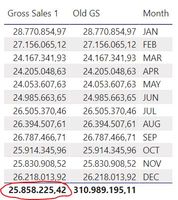
I have tried the following with no success as Exchange is not calculating correctly:
Gross Sales 1 =
var Sales =
    CALCULATE(
    Totales[Gross Sales],
    Complete_Data[Version] in VALUES('Scenario 1'[Scenario 1])
    )

var Exchange =
    CALCULATE(
    [TRM],
    FX[Version] in VALUES(Forex[Currency]),
    FX[Month] = SELECTEDVALUE(Calendario[Month])
    )

return DIVIDE(Sales,Exchange)
Any suggestions?