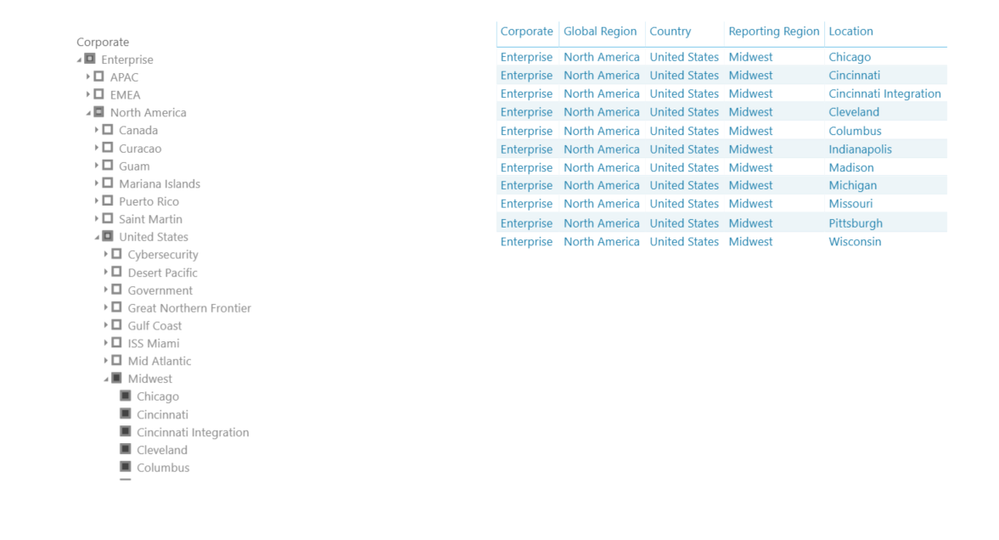
Here is a simple pattern that returns the deepest single selection. It covers both the standard slicer and the Hierarchy Slicer visual. Replace DimGeo with your table name if needed.
Selected node name =
VAR v5 = IF(COUNTROWS(VALUES(DimGeo[Location])) = 1, SELECTEDVALUE(DimGeo[Location]))
VAR v4 = IF(COUNTROWS(VALUES(DimGeo[Reporting Region])) = 1, SELECTEDVALUE(DimGeo[Reporting Region]))
VAR v3 = IF(COUNTROWS(VALUES(DimGeo[Country])) = 1, SELECTEDVALUE(DimGeo[Country]))
VAR v2 = IF(COUNTROWS(VALUES(DimGeo[Global Region])) = 1, SELECTEDVALUE(DimGeo[Global Region]))
VAR v1 = IF(COUNTROWS(VALUES(DimGeo[Corporate])) = 1, SELECTEDVALUE(DimGeo[Corporate]))
RETURN COALESCE(v5, v4, v3, v2, v1, "All")
If you want a friendly label that includes the level name, use this
Selection label =
VAR v5 = IF(COUNTROWS(VALUES(DimGeo[Location])) = 1, SELECTEDVALUE(DimGeo[Location]))
VAR v4 = IF(COUNTROWS(VALUES(DimGeo[Reporting Region])) = 1, SELECTEDVALUE(DimGeo[Reporting Region]))
VAR v3 = IF(COUNTROWS(VALUES(DimGeo[Country])) = 1, SELECTEDVALUE(DimGeo[Country]))
VAR v2 = IF(COUNTROWS(VALUES(DimGeo[Global Region])) = 1, SELECTEDVALUE(DimGeo[Global Region]))
VAR v1 = IF(COUNTROWS(VALUES(DimGeo[Corporate])) = 1, SELECTEDVALUE(DimGeo[Corporate]))
VAR name = COALESCE(v5, v4, v3, v2, v1)
VAR level =
IF(NOT(ISBLANK(v5)), "Location",
IF(NOT(ISBLANK(v4)), "Reporting Region",
IF(NOT(ISBLANK(v3)), "Country",
IF(NOT(ISBLANK(v2)), "Global Region",
IF(NOT(ISBLANK(v1)), "Corporate", BLANK())))))
RETURN IF(ISBLANK(name), "All", level & ": " & name)
If the only thing you care about is Reporting Region, and you want the text to change only when exactly one region is selected, use this lean measure
Selected reporting region =
VAR c = COUNTROWS(VALUES(DimGeo[Reporting Region]))
RETURN IF(c = 1, SELECTEDVALUE(DimGeo[Reporting Region]), "All reporting regions")