Join us at FabCon Atlanta from March 16 - 20, 2026, for the ultimate Fabric, Power BI, AI and SQL community-led event. Save $200 with code FABCOMM.
Register now!The Power BI Data Visualization World Championships is back! Get ahead of the game and start preparing now! Learn more
Hi everyone,
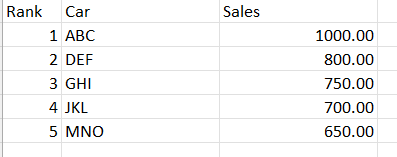
I'm having a problem to display category which rank = 2
Below is the table that I currently have in my report.
For the ranking table, I currently using the measure below:
var a = max(smart_revenue[Year])
return
RANKX( ALLSELECTED(car[car_name]), CALCULATE(SUM(car_sales[sales1]) + SUM(car_sales[sales2]),smart_revenue[Year]=a))Credit to: @Adam_Shelton for helping me out to create this measure.
I want to create a measure which a scorecard can display car DEF only. Any tips?
Solved! Go to Solution.
Well, there are 2 ways you can try:
1. Using filter on this visual: you can create a visual and apply filter rank = 2
2. Create another DAX: calculate Sales with condition rank measure = 2
Well, there are 2 ways you can try:
1. Using filter on this visual: you can create a visual and apply filter rank = 2
2. Create another DAX: calculate Sales with condition rank measure = 2
@reendzz98 , I think the newly released Index function should be a better option
newly released Dax Function Offset, Window, Index: https://youtu.be/KhkCALjHylE
The Power BI Data Visualization World Championships is back! Get ahead of the game and start preparing now!
| User | Count |
|---|---|
| 13 | |
| 5 | |
| 5 | |
| 3 | |
| 3 |
| User | Count |
|---|---|
| 25 | |
| 10 | |
| 10 | |
| 6 | |
| 6 |