cancel
Showing results for 
Search instead for 
Did you mean: 

The Power BI Data Visualization World Championships is back! Get ahead of the game and start preparing now! Learn more

Reply
Khang
Frequent Visitor

Display % in a Matrix visual that has decimal number formatting - within multiple filtered contexts

Hello DAXperts,


I have a matrix visual showing my data from a "MainData" table.
I have been able to display % numbers for selected rows while the rest of the matrix is decimal formatted. But this only works within certain filtered contexts based on the selected slicers.


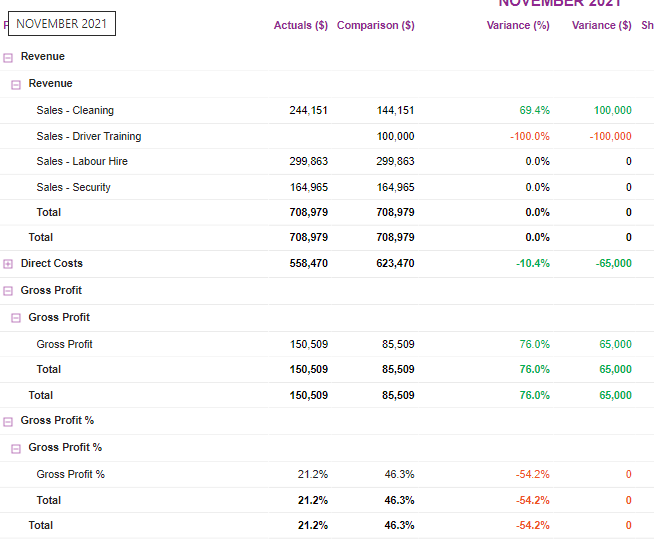
Ultimately, I have a Profit & Loss report, I want this report to show the correct calculated % values for the "Gross Profit %" row.

Currently, the data does contain the correct decimal values for the % equivalent number for "Gross Profit %". But the numbers are correct when only a single Business Unit is selected on the slicer.


Ideally, the GP% can be calculated by use of a measure or something similar (but I have not gone this route):

    GP% = DIVIDE( CALCULATE( [PL], 'MainData'[L1] = "Gross Profit", CALCULATE( [PL], 'MainData'[L1] = "Revenue" ) )


The measure I really need help with is [ActualsPL w %] or [ComparisonPL w %].

See below image and attached PBIX file.
Any suggestions or workarounds is much appreciated!

Capture.PNG


1 ACCEPTED SOLUTION
v-kkf-msft
Community Support
Community Support

Hi @Khang ,


Please modify the measure [ShowPL].


ShowPL = 
IF( SELECTEDVALUE(Tbl_Glb_Show[Show]) = "YTD", 

    IF( SELECTEDVALUE( MainData[L1] ) = "Gross Profit %",
        CALCULATE( [PL YTD], MainData[L1] = "Gross Profit" && MainData[Figures] = "Actuals") / CALCULATE( [PL YTD], MainData[L1] = "Revenue" && MainData[Figures] = "Actuals"),
        CALCULATE( [PL YTD], MainData[Figures] = "Actuals")),

    IF( SELECTEDVALUE( MainData[L1] ) = "Gross Profit %",
        CALCULATE( [PL], MainData[L1] = "Gross Profit" && MainData[Figures] = "Actuals", ALLSELECTED(MainData)) / CALCULATE( [PL], MainData[L1] = "Revenue" && MainData[Figures] = "Actuals", ALLSELECTED(MainData)),
        CALCULATE( [PL], MainData[Figures] = "Actuals"))
        )
 

vkkfmsft_0-1652677454270.png


If the problem is still not resolved, please provide detailed error information or the expected result you expect. Let me know immediately, looking forward to your reply.
Best Regards,
Winniz
If this post helps, then please consider Accept it as the solution to help the other members find it more quickly.

View solution in original post

2 REPLIES 2
v-kkf-msft
Community Support
Community Support

Hi @Khang ,


Please modify the measure [ShowPL].


ShowPL = 
IF( SELECTEDVALUE(Tbl_Glb_Show[Show]) = "YTD", 

    IF( SELECTEDVALUE( MainData[L1] ) = "Gross Profit %",
        CALCULATE( [PL YTD], MainData[L1] = "Gross Profit" && MainData[Figures] = "Actuals") / CALCULATE( [PL YTD], MainData[L1] = "Revenue" && MainData[Figures] = "Actuals"),
        CALCULATE( [PL YTD], MainData[Figures] = "Actuals")),

    IF( SELECTEDVALUE( MainData[L1] ) = "Gross Profit %",
        CALCULATE( [PL], MainData[L1] = "Gross Profit" && MainData[Figures] = "Actuals", ALLSELECTED(MainData)) / CALCULATE( [PL], MainData[L1] = "Revenue" && MainData[Figures] = "Actuals", ALLSELECTED(MainData)),
        CALCULATE( [PL], MainData[Figures] = "Actuals"))
        )


vkkfmsft_0-1652677454270.png


If the problem is still not resolved, please provide detailed error information or the expected result you expect. Let me know immediately, looking forward to your reply.
Best Regards,
Winniz
If this post helps, then please consider Accept it as the solution to help the other members find it more quickly.

Hi Winniz,
This worked perfectly.
Thanks so much!

Helpful resources

Announcements
Power BI DataViz World Championships

Power BI Dataviz World Championships

The Power BI Data Visualization World Championships is back! Get ahead of the game and start preparing now!

December 2025 Power BI Update Carousel

Power BI Monthly Update - December 2025

Check out the December 2025 Power BI Holiday Recap!

FabCon Atlanta 2026 carousel

FabCon Atlanta 2026

Join us at FabCon Atlanta, March 16-20, for the ultimate Fabric, Power BI, AI and SQL community-led event. Save $200 with code FABCOMM.