Join us at FabCon Atlanta from March 16 - 20, 2026, for the ultimate Fabric, Power BI, AI and SQL community-led event. Save $200 with code FABCOMM.
Register now!The Power BI Data Visualization World Championships is back! Get ahead of the game and start preparing now! Learn more
Hi
Can you please help me to find DAX for change%. "Month" is not a date column (its a text value) and CSAT came from another Measure (Average of Score). I need to calulate percentage difference. As there is no date or index column in dataset, so is it possible to calculate the %difference through Earlier or any other simple function.
| Distributor | Month | CSAT | Change% |
| A | Jan | 94.67% | |
| A | Feb | 92.52% | -2.26% |
| A | Mar | 92.84% | 0.34% |
| B | Jan | 96.10% | |
| B | Feb | 96.21% | 0.11% |
| B | Mar | 95.45% | -0.79% |
| C | Jan | 96.84% | |
| C | Feb | 94.02% | -2.91% |
| C | Mar | 95.22% | 1.27% |
Hi, @Hijbul_Bari
Please correct me if I wrongly understood your question.
In my opinion, if you want to achieve this by writing a measure, there have to be some criteria that tell Jan is earlier than Feb, and Feb is earlier than Mar.
I just assumed this and created a sample by myself.
If the below sample (link down below), does not suit your case, please share your sample file's link, then I can try to look into it and come up with a more accurate measure.
The measures that I used are in my sample pbix file.

https://www.dropbox.com/s/3fa608ymcfd9zcq/Hijbul%20Bari.pbix?dl=0
Hi, My name is Jihwan Kim.
If this post helps, then please consider accept it as the solution to help other members find it faster, and give a big thumbs up.
Thanks a lot. Your concept is right. But I don't have any Date table. The Month Name is a nothing but a "Text" like Jan, Feb etc came from Raw data. Is it possible without date/time intelligent fuction, get the same output using any other function like "Earlier"?
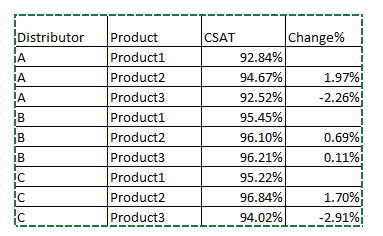
For better understanding if I remove Month and bring product column then output should be the following way. Means it always compare upper two rows and give the Percentage Change.
The Power BI Data Visualization World Championships is back! Get ahead of the game and start preparing now!
| User | Count |
|---|---|
| 14 | |
| 5 | |
| 5 | |
| 3 | |
| 3 |
| User | Count |
|---|---|
| 24 | |
| 10 | |
| 10 | |
| 6 | |
| 6 |