Join us at FabCon Atlanta from March 16 - 20, 2026, for the ultimate Fabric, Power BI, AI and SQL community-led event. Save $200 with code FABCOMM.
Register now!The Power BI Data Visualization World Championships is back! Get ahead of the game and start preparing now! Learn more
Hi ,
How to calculate the difference between the two rows of a same column in Power bi.
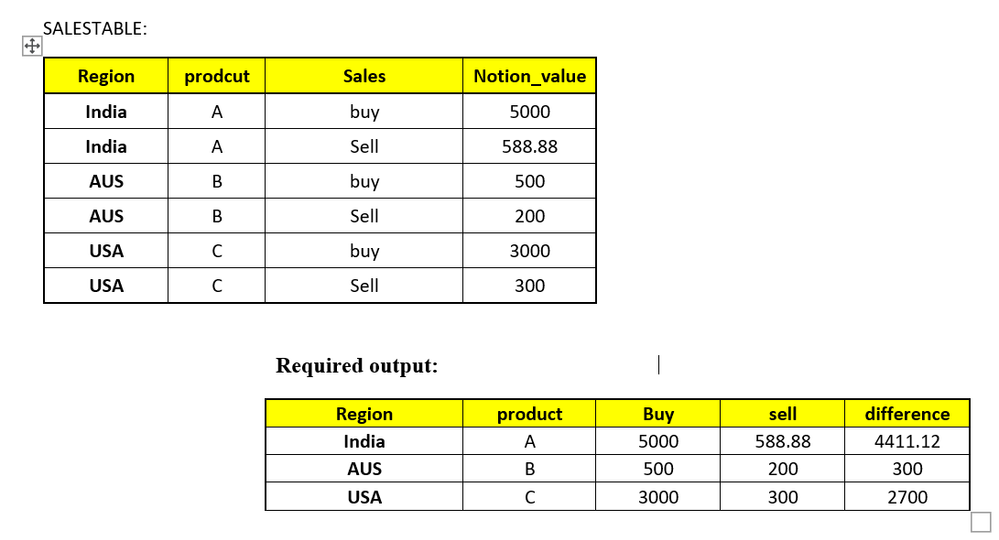
I have SALESTABLE with below data, how to calculate the difference between buy and sell of a sales coulmn based on region.
Sales value(buy,sell) need to displayed in column format .
Example:
Hi,
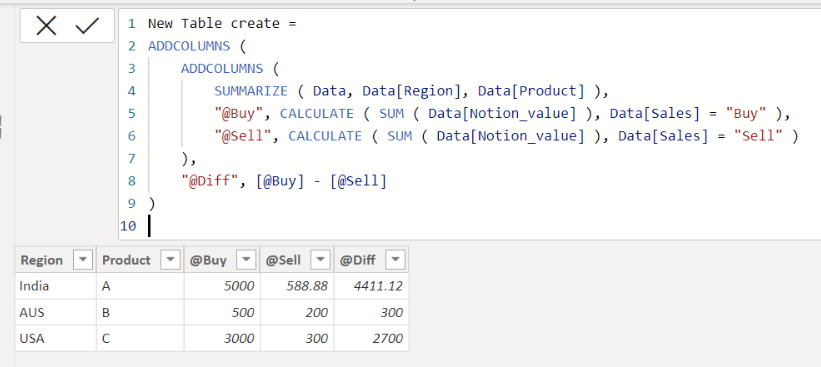
Please check the below picture and the attached pbix file.
It is for creating a new table.
New Table create =
ADDCOLUMNS (
ADDCOLUMNS (
SUMMARIZE ( Data, Data[Region], Data[Product] ),
"@Buy", CALCULATE ( SUM ( Data[Notion_value] ), Data[Sales] = "Buy" ),
"@Sell", CALCULATE ( SUM ( Data[Notion_value] ), Data[Sales] = "Sell" )
),
"@Diff", [@Buy] - [@Sell]
)
Hi @Jihwan_Kim ,
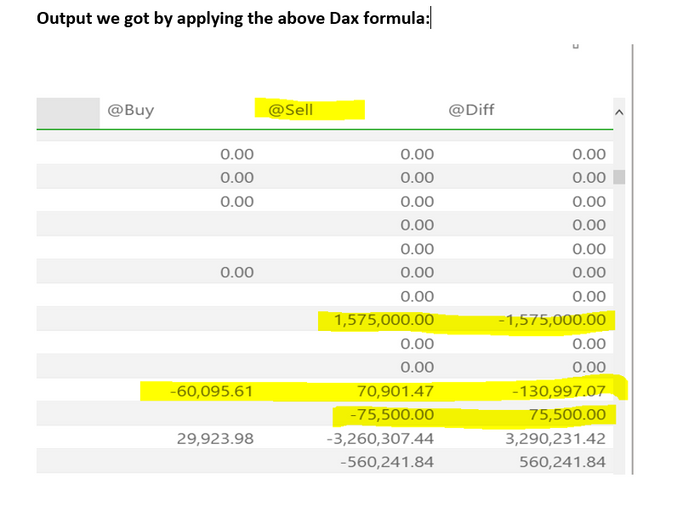
Thanks for the reply,but dax formula is not working for all the values ,
I have few values in negative, in that negative values are getting added and showing positive values.
If we have negative values or positive it need to display as source displayed value.
Expected Output:
The Power BI Data Visualization World Championships is back! Get ahead of the game and start preparing now!
Check out the November 2025 Power BI update to learn about new features.
| User | Count |
|---|---|
| 20 | |
| 11 | |
| 10 | |
| 4 | |
| 4 |
| User | Count |
|---|---|
| 34 | |
| 30 | |
| 19 | |
| 12 | |
| 11 |