Join us at FabCon Atlanta from March 16 - 20, 2026, for the ultimate Fabric, Power BI, AI and SQL community-led event. Save $200 with code FABCOMM.
Register now!The Power BI Data Visualization World Championships is back! Get ahead of the game and start preparing now! Learn more
Hello,
Last time i was asking how to display new employees of the current month compared to the previous month in a datasheet
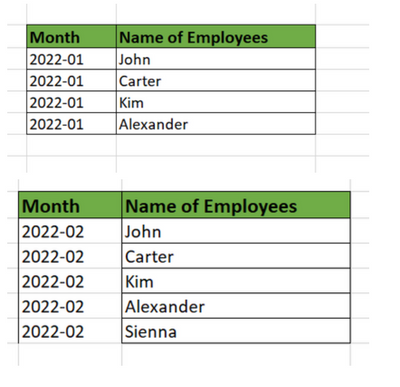
in January we had John, Carter, Kim and Alexander.
In February we have John, Carter, Kim, Alexander and Sienna.
The visual should then show me only Sienna
This is the solution that worked for me :
Flag =
var _preMonth=DATEADD('Table'[Month],-1,MONTH)
var _preEmps= SUMMARIZE(FILTER(ALL('Table'),YEAR([Month])= YEAR(_preMonth) && MONTH([Month])=MONTH(_preMonth)) ,[Name of Employees])
return IF(_preMonth<>BLANK(),IF( MAX('Table'[Name of Employees]) in _preEmps,0,1))
Now i would like to have the list of all the employees who have disappeared (they are no longer in the database)
Example :
The visual should then show me only : Carter and Alexander
Can you please help ?
Best regards,
Rena.
Solved! Go to Solution.
Hi @Anonymous ,
You can just change your expression like so:
Flag 2 =
VAR _curMonth =
DATEADD ( 'Table2'[Month], 1, MONTH )
VAR _curEmps =
SUMMARIZE (
FILTER (
ALL ( 'Table2' ),
YEAR ( [Month] ) = YEAR ( _curMonth )
&& MONTH ( [Month] ) = MONTH ( _curMonth )
),
[Name of Employees]
)
RETURN
IF (
_curMonth <> BLANK (),
IF ( MAX ( 'Table2'[Name of Employees] ) IN _curEmps, 0, 1 )
)
Best Regards,
Icey
If this post helps, then please consider Accept it as the solution to help the other members find it more quickly.
Hi @Anonymous ,
You can just change your expression like so:
Flag 2 =
VAR _curMonth =
DATEADD ( 'Table2'[Month], 1, MONTH )
VAR _curEmps =
SUMMARIZE (
FILTER (
ALL ( 'Table2' ),
YEAR ( [Month] ) = YEAR ( _curMonth )
&& MONTH ( [Month] ) = MONTH ( _curMonth )
),
[Name of Employees]
)
RETURN
IF (
_curMonth <> BLANK (),
IF ( MAX ( 'Table2'[Name of Employees] ) IN _curEmps, 0, 1 )
)
Best Regards,
Icey
If this post helps, then please consider Accept it as the solution to help the other members find it more quickly.
Thank you Icey.
It works for me.
Best regards,
Yanne.
@Anonymous , Create a date using month year. Using common date and employee table follow this customer retention logic
Customer Retention Part 1:
https://community.powerbi.com/t5/Community-Blog/Customer-Retention-Part-1-Month-on-Month-Retention/ba-p/1361529
Hi @Anonymous
I hope "Month" is a date column. Then you can drag this measure into the filter pane and select "Not is blank"
Flag =
VAR NumberOfMonths = 1
VFlag =
VAR NumberOfMonths = 1
VAR CrrentPeriod =
MAX ( 'Table'[Month] )
VAR PreviousPeriod =
DATEADD ( CrrentPeriod, - NumberOfMonths, MONTH )
VAR LastPeriodEmployees =
CALCULATETABLE (
VALUES ( 'Table'[Name of Employees] ),
'Table'[Month] = PreviousPeriod
)
VAR CurrentPeriodEmployees =
CALCULATETABLE (
VALUES ( 'Table'[Name of Employees] ),
'Table'[Month] = CrrentPeriod
)
RETURN
COUNTROWS ( EXCEPT ( LastPeriodEmployees, CurrentPeriodEmployees ) )
Check out the November 2025 Power BI update to learn about new features.
Advance your Data & AI career with 50 days of live learning, contests, hands-on challenges, study groups & certifications and more!
| User | Count |
|---|---|
| 20 | |
| 10 | |
| 9 | |
| 4 | |
| 4 |
| User | Count |
|---|---|
| 33 | |
| 31 | |
| 19 | |
| 12 | |
| 10 |