cancel
Showing results for 
Search instead for 
Did you mean: 

The Power BI Data Visualization World Championships is back! Get ahead of the game and start preparing now! Learn more

Reply
LankaPriya
Frequent Visitor

Dax help for forecast

Hello, 

  I need help with forecast measure using power-bi Dax.  from the below excel, at the end of the report, there is a constanct value 1.4, I need to use that constant value and forecast into future by subracting the last value with 1.4 and next row as previous row - 1.4 and so on until the value reaches 0. 

Any help on how to get this using dax is really helpful


YearMonthDayWEEK ENDING DATEwaiter 
2022April303/04/20223486 
2022April1010/04/20223358 
2022April1717/04/20223371 
2022April2424/04/20223560 
2022May101/05/20223486 
2022May808/05/20223404 
2022May1515/05/20223334 
2022May2222/05/20223250 
2022May2929/05/20223241 
2022June505/06/20223442 
2022June1212/06/20223411 
2022June1919/06/20223357 
2022June2626/06/20223336 
2022July303/07/20223351 
2022July1010/07/20223323 
2022July1717/07/20223339 
2022July2424/07/20223402 
2022July3131/07/20223479 
2022August707/08/20223493 
2022August1414/08/20223504 
2022August2121/08/20223454 
2022August2828/08/20223523 
2022September404/09/20223468 
2022September1111/09/20223517 
2022September1818/09/20223602 
2022September2525/09/202236681.4
    3666.6 
    3665.2 
    3663.8 
    3662.4 
    3661 
    3659.6 


Thanks

Priya

3 REPLIES 3
amitchandak
Super User
Super User

@LankaPriya , Assume you already have a date table with future date , assuming waiter  is measure or create woth sum ot max


M1=  calculate(lastnonblank(Table[Date]), allselected()) 

m2= calculate(lastnonblankvalue(Table[Date], [waiter Measure])  , allselected())  


M3  =

if(Max(Date[Date]) <[M1] , [waiter Measure], [M2] * Power(1.4, quotient(datediff([M1],Max(Date[Date]), Day),7) ))

Share with Power BI Enthusiasts: Full Power BI Video (20 Hours) YouTube
Microsoft Fabric Series 60+ Videos YouTube
Microsoft Fabric Hindi End to End YouTube

Hi Amit,

   Thanks a lot for your immediate response. 

I worked out the measures  as below 


m1 = CALCULATE(LASTNONBLANK(DATES[FULLDATE]), ALLSELECTED()) -- was getting an error at this, suspect it needs one more arugument and adjusted as below
m2 = CALCULATE(LASTNONBLANK(DATES[FULL_DATE], [waiter] ), ALLSELECTED())
m2 = CALCULATE(LASTNONBLANK(DATES[FULL_DATE], [waiter] ), ALLSELECTED()) -- this one appreared as a column in the fact table
 
m3 =
if (MAX(DATES[FULL_DATE]) < [m1], [m2], [waiter]*POWER(1.4,QUOTIENT(DATEDIFF([m1],max(DATES[FULL_DATE]),day),7))) 
 
couldn't get to call [M2] here , if I use [waiter] instead, this is how it looks
 
LankaPriya_0-1679995858808.png


I now want to subract the last value(937) - 1.4 and the resulting value(935.6) from 1.4 and so on and forecast


Thanks

Priya

Hello,

  I further changed the measure as below 


m1 = CALCULATE(LASTNONBLANK(DATES[FULL_DATE], [waiter]), ALLSELECTED())
 
m2 = CALCULATE(LASTNONBLANKVALUE(DATES[FULL_DATE],[waiter]), ALLSELECTED())
 
m3 =
if (MAX(DATES[FULL_DATE]) < [m1],  [waiter],[m2]*POWER(1.4,QUOTIENT(DATEDIFF([m1],max(DATES[FULL_DATE]),day),7)))
 
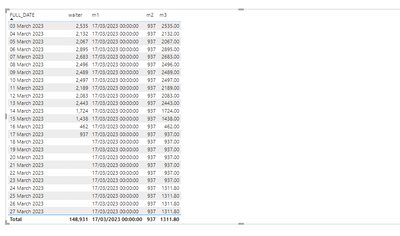
Below is the result I see,
 
LankaPriya_0-1680002994392.png

How can I change m3 to get as below


18-03-2023 = 935.6

19-03-2023 = 934.2

and so on

previous value - 1.4 in each step


Thanks

Priya


Helpful resources

Announcements
Power BI DataViz World Championships

Power BI Dataviz World Championships

The Power BI Data Visualization World Championships is back! Get ahead of the game and start preparing now!

December 2025 Power BI Update Carousel

Power BI Monthly Update - December 2025

Check out the December 2025 Power BI Holiday Recap!

FabCon Atlanta 2026 carousel

FabCon Atlanta 2026

Join us at FabCon Atlanta, March 16-20, for the ultimate Fabric, Power BI, AI and SQL community-led event. Save $200 with code FABCOMM.