Join us at FabCon Atlanta from March 16 - 20, 2026, for the ultimate Fabric, Power BI, AI and SQL community-led event. Save $200 with code FABCOMM.
Register now!The Power BI Data Visualization World Championships is back! Get ahead of the game and start preparing now! Learn more
Hello all,
I need some help creating a custom date slicer. When the user selects a year, I want the visual to show data from the same year, the previous six months, and the coming six months. If I choose 2010 on this slicer, the time frame will last six months, from 2009 through the first six months of 2011.
TIA
Solved! Go to Solution.
Hi @Puja ,
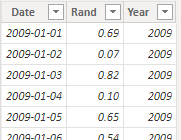
I created some data:
Here are the steps you can follow:
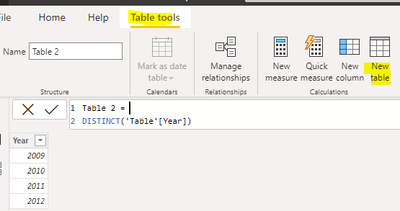
1. Create calculated table.
Table 2 =
DISTINCT('Table'[Year])
2. Create measure.
Flag =
var _select=SELECTEDVALUE('Table 2'[Year])
var _previoussixmonths=EOMONTH(DATE(_select,1,1),-8) //2009 5 .31
var _comingsixmonths=EOMONTH(DATE(_select,12,31),+6)
return
IF(
MAX('Table'[Date]) >_previoussixmonths &&MAX('Table'[Date])<=_comingsixmonths,1,0)
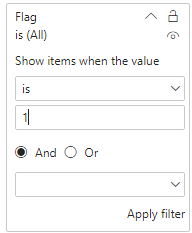
3. Place [Flag]in Filters, set is=1, apply filter.
4. Result:
Best Regards,
Liu Yang
If this post helps, then please consider Accept it as the solution to help the other members find it more quickly
hi @Anonymous
Excellent.
Thank you somuch 🙂
Hi @Puja ,
I created some data:
Here are the steps you can follow:
1. Create calculated table.
Table 2 =
DISTINCT('Table'[Year])
2. Create measure.
Flag =
var _select=SELECTEDVALUE('Table 2'[Year])
var _previoussixmonths=EOMONTH(DATE(_select,1,1),-8) //2009 5 .31
var _comingsixmonths=EOMONTH(DATE(_select,12,31),+6)
return
IF(
MAX('Table'[Date]) >_previoussixmonths &&MAX('Table'[Date])<=_comingsixmonths,1,0)
3. Place [Flag]in Filters, set is=1, apply filter.
4. Result:
Best Regards,
Liu Yang
If this post helps, then please consider Accept it as the solution to help the other members find it more quickly
Check out the November 2025 Power BI update to learn about new features.
Advance your Data & AI career with 50 days of live learning, contests, hands-on challenges, study groups & certifications and more!
| User | Count |
|---|---|
| 19 | |
| 10 | |
| 9 | |
| 4 | |
| 4 |
| User | Count |
|---|---|
| 31 | |
| 31 | |
| 20 | |
| 12 | |
| 12 |