Join us at FabCon Atlanta from March 16 - 20, 2026, for the ultimate Fabric, Power BI, AI and SQL community-led event. Save $200 with code FABCOMM.
Register now!Get Fabric Certified for FREE during Fabric Data Days. Don't miss your chance! Request now
Hi Everyone!
I am quite new to DAX. I made my model really simple in the attached file .xlsx
I would like to compute a DISTINCTCOUNT of the FACT_TABLE[CUSTOMER ID] based on the following criteria:
Total Values for each "Customer ID" in the "1 SEMESTER" = 0 AND Total Values for each "Customer ID" in the 2 SEMESTER > 0
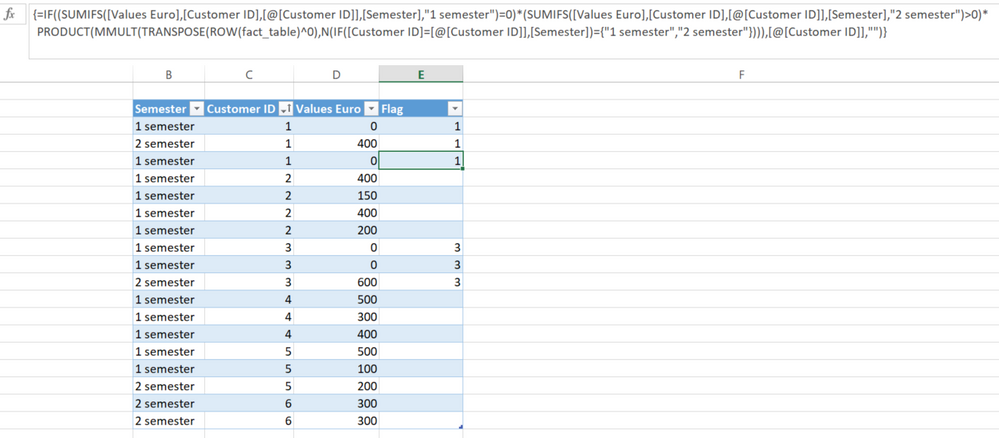
In this example CUSTOMER ID = 1 AND CUSTOMER ID = 3 are ok and they should be counted in the DISTINCTCOUNT because both have 1 semester = 0 and 2 semester > 0
https://filetransfer.io/data-package/47cqvbpL#link
thanks in advance
Solved! Go to Solution.
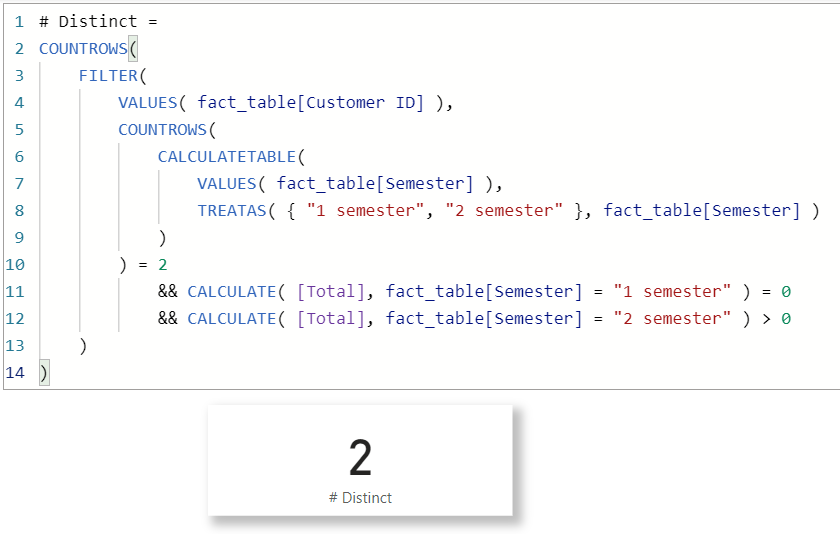
For fun only, a showcase of powerful Excel worksheet formula,
| Thanks to the great efforts by MS engineers to simplify syntax of DAX! Most beginners are SUCCESSFULLY MISLED to think that they could easily master DAX; but it turns out that the intricacy of the most frequently used RANKX() is still way beyond their comprehension! |
DAX is simple, but NOT EASY! |
For fun only, a showcase of powerful Excel worksheet formula,
| Thanks to the great efforts by MS engineers to simplify syntax of DAX! Most beginners are SUCCESSFULLY MISLED to think that they could easily master DAX; but it turns out that the intricacy of the most frequently used RANKX() is still way beyond their comprehension! |
DAX is simple, but NOT EASY! |
Thank you for your answer!! Unofortunately I am using Power Pivot and the TREATAS is not provided....
I think it is really a good idea the Excel flag you did...
DO you think would be possibile to add a calculated column in the model for doing the same thing as you did in the Excel Worksheet?
Thanks a lot!
Num customers =
var semester1 = CALCULATETABLE( VALUES('Table'[Customer ID]),
TREATAS( { ("Semester 1", 0)}, 'Table'[Semester], 'Table'[Values Euro]) )
var semester2 = CALCULATETABLE( VALUES('Table'[Customer ID]), 'Table'[Semester] = "Semester 2" && 'Table'[Values Euro] > 0)
return DISTINCTCOUNT(UNION(semester1, semester2))
Check out the November 2025 Power BI update to learn about new features.
Advance your Data & AI career with 50 days of live learning, contests, hands-on challenges, study groups & certifications and more!
| User | Count |
|---|---|
| 10 | |
| 9 | |
| 8 | |
| 6 | |
| 6 |
| User | Count |
|---|---|
| 24 | |
| 18 | |
| 16 | |
| 15 | |
| 9 |