cancel
Showing results for 
Search instead for 
Did you mean: 

Learn from the best! Meet the four finalists headed to the FINALS of the Power BI Dataviz World Championships! Register now

Reply
Anonymous
Not applicable

DAX query to return CompI have liant or Non Compliant based on the filter

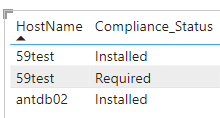
ausafonly_0-1684672982571.png

Based on this data I want to create a calculated column or measure.

If compliance_status is both installed and required result should be Non compliant otherwise compliant in a new column.

I have no idea how to achieve it tried multiple ways but no luck.

Any suggestion how to achieve it.

3 REPLIES 3
Mrxiang
Helper II
Helper II

You can use the DAX language to create a computed column or metric to implement your requirements. Here is a sample DAX formula:

Compliance Status = IF(Table1[Compliance_Status] = "Installed" && Table1[Compliance_Status] = "Required",  "Non compliant", "Compliant")

This formula checks whether the value in the Compliance_Status column contains both "Installed" and "Required". If so, the result is "Non compliant", otherwise it is "Compliant". You can apply this formula to a new computed column or measure to display the results in a table.
Anonymous
Not applicable

Hi @Anonymous,

You can try to use the following measure formula to get the correspond statues count based on current hostname:

formula =
VAR currName =
    SELECTEDVALUE ( Table[HostName] )
VAR summary =
    SUMMARIZE (
        FILTER (
            ALLSELECTED ( Table ),
            [compliance_status] IN { "Installed", "Required" }
        ),
        [HostName],
        [compliance_status]
    )
RETURN
    IF (
        COUNTROWS ( FILTER ( summary, [HostName] = currName ) ) < 2,
        "Compliant",
        "Non compliant"
    )

Regards,

Xiaoxin Sheng

Anonymous
Not applicable

Unfortunately it didn't worked as expected.

However I tried another method and it worked.

I have created a duplicate table and then used group by to achieve the solution.

Helpful resources

Announcements
Join our Fabric User Panel

Join our Fabric User Panel

Share feedback directly with Fabric product managers, participate in targeted research studies and influence the Fabric roadmap.

February Power BI Update Carousel

Power BI Monthly Update - February 2026

Check out the February 2026 Power BI update to learn about new features.

FabCon Atlanta 2026 carousel

FabCon Atlanta 2026

Join us at FabCon Atlanta, March 16-20, for the ultimate Fabric, Power BI, AI and SQL community-led event. Save $200 with code FABCOMM.

Users online (1,386)