This is best Fabric, Power BI, SQL and AI community event. How do we know? The last event sold out! Save €200 with code FABCMTY200.
Register nowA new Data Days event is coming soon! This time we’re going bigger than ever. Fabric, Power BI, SQL, AI and more. Don't miss out.
Hi
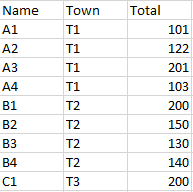
I have a datatable like
in Power BI I have a dax function to find Max of each Town(T1, T2, T3) - it gives (201,200,200). Depending on the slicer selection it shows this value
"A table of multiple values was supplied where a single value was expected."
what should i do in this case
Solved! Go to Solution.
if the lookup value is duplicated, lookupvalue will get a error.
LookupTown=VAR _h=[HighestTotal] RETURN CONCATENATEX(FILTER('tempdumpdata','tempdumpdata'[Total]=_h),'tempdumpdata'[Town],",")
HI @wheelsshark,
Perhaps you can add a new condition to compare with the name field and selection to filter the result.
LookupTown =
VAR _h = [HighestTotal]
VAR selection =
VALUES ( Table[Name] )
RETURN
CONCATENATEX (
FILTER ( 'tempdumpdata', 'tempdumpdata'[Total] = _h && [Name] IN selection ),
'tempdumpdata'[Town],
","
)
Regards,
Xiaoxin Sheng
Thank you Daniel, it works. But I cant understand.
Highest Total is 200 for C1, while var _h is 200
Return concatenatex(filter('tempdumpdata', 'tempdumpdata'[Total] = 200), 'tempdumpdata[Town] - this gives T3 and T2. I need only T3.
bz the slicer selection is C1. Can you help me understand
the function of LOOKUPVALUE do not consider any filters outsider. it always lookup all the table.
HI @wheelsshark,
Perhaps you can add a new condition to compare with the name field and selection to filter the result.
LookupTown =
VAR _h = [HighestTotal]
VAR selection =
VALUES ( Table[Name] )
RETURN
CONCATENATEX (
FILTER ( 'tempdumpdata', 'tempdumpdata'[Total] = _h && [Name] IN selection ),
'tempdumpdata'[Town],
","
)
Regards,
Xiaoxin Sheng
if the lookup value is duplicated, lookupvalue will get a error.
LookupTown=VAR _h=[HighestTotal] RETURN CONCATENATEX(FILTER('tempdumpdata','tempdumpdata'[Total]=_h),'tempdumpdata'[Town],",")
Check out the May 2026 Power BI update to learn about new features.
Sign up to receive a private message when registration opens and key events begin.
If you have recently started exploring Fabric, we'd love to hear how it's going. Your feedback can help with product improvements.
| User | Count |
|---|---|
| 5 | |
| 3 | |
| 3 | |
| 3 | |
| 3 |
| User | Count |
|---|---|
| 9 | |
| 6 | |
| 6 | |
| 6 | |
| 6 |