Join us at FabCon Atlanta from March 16 - 20, 2026, for the ultimate Fabric, Power BI, AI and SQL community-led event. Save $200 with code FABCOMM.
Register now!Get Fabric Certified for FREE during Fabric Data Days. Don't miss your chance! Request now
I have a table with shipment number ,dates and a measure "Backlog". Need to calculate the Total backlog of that shipment and consider the latest date value.
| Date | Shipment | Measure(backlog) | Required Backlog (last date value) |
| 30/10/2022 | AX | 720 | 0 |
| 31/10/2022 | AX | 0 | 0 |
| 30/10/2022 | BX | 840 | 0 |
| 31/10/2022 | BX | 0 | 0 |
| 30/10/2022 | CX | 35 | 0 |
| 31/10/2022 | CX | 12 | 12 |
Solved! Go to Solution.
Hi,
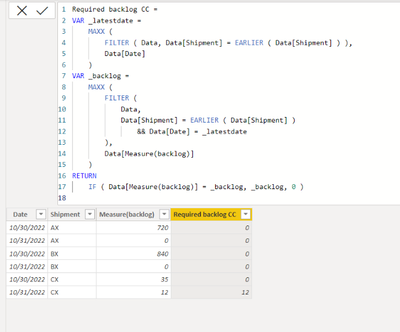
Please check the below picture and the attached pbix file.
It is for creating a new column
Required backlog CC =
VAR _latestdate =
MAXX (
FILTER ( Data, Data[Shipment] = EARLIER ( Data[Shipment] ) ),
Data[Date]
)
VAR _backlog =
MAXX (
FILTER (
Data,
Data[Shipment] = EARLIER ( Data[Shipment] )
&& Data[Date] = _latestdate
),
Data[Measure(backlog)]
)
RETURN
IF ( Data[Measure(backlog)] = _backlog, _backlog, 0 )
Hi,
Please check the below picture and the attached pbix file.
It is for creating a new column
Required backlog CC =
VAR _latestdate =
MAXX (
FILTER ( Data, Data[Shipment] = EARLIER ( Data[Shipment] ) ),
Data[Date]
)
VAR _backlog =
MAXX (
FILTER (
Data,
Data[Shipment] = EARLIER ( Data[Shipment] )
&& Data[Date] = _latestdate
),
Data[Measure(backlog)]
)
RETURN
IF ( Data[Measure(backlog)] = _backlog, _backlog, 0 )
Check out the November 2025 Power BI update to learn about new features.
Advance your Data & AI career with 50 days of live learning, contests, hands-on challenges, study groups & certifications and more!
| User | Count |
|---|---|
| 11 | |
| 9 | |
| 9 | |
| 5 | |
| 4 |
| User | Count |
|---|---|
| 27 | |
| 22 | |
| 20 | |
| 17 | |
| 12 |