cancel
Showing results for 
Search instead for 
Did you mean: 

Get Fabric Certified for FREE during Fabric Data Days. Don't miss your chance! Request now

Reply
milkynight
Helper I
Helper I

DAX for comparison of weekly sales vs benchmark

Hi all,


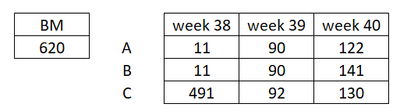
Im trying to write a DAX to calculate % difference with benchmark value. The tricky is I will have weekly data added in, so I want to show the % difference per week basis.


Below input:

milkynight_0-1632987015171.png

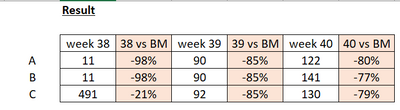
Disired result:

milkynight_1-1632987049649.png


Thank you!


1 REPLY 1
jppv20
Solution Sage
Solution Sage

Hi @milkynight ,


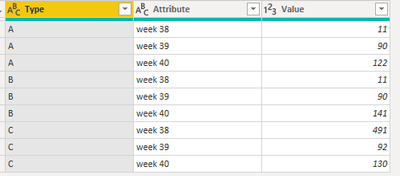
The way to do this is to go to PowerQuery. Select the column with (A, B, C) and choose unpivot other columns. Result:

jppv20_0-1632987888327.png


Then you can create a measure like this:

Week vs BM = DIVIDE(SUM(Sales[Value])-SUM(Benchmark[BM]),SUM(Benchmark[BM]),BLANK())
 
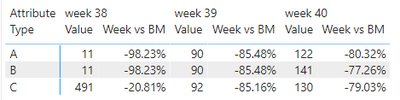
Then put it in a Matrix to get this result:
jppv20_0-1632988761629.png


Jori


If I answered your question, please mark it as a solution to help other members find it more quickly.


Helpful resources

Announcements
November Power BI Update Carousel

Power BI Monthly Update - November 2025

Check out the November 2025 Power BI update to learn about new features.

Fabric Data Days Carousel

Fabric Data Days

Advance your Data & AI career with 50 days of live learning, contests, hands-on challenges, study groups & certifications and more!

FabCon Atlanta 2026 carousel

FabCon Atlanta 2026

Join us at FabCon Atlanta, March 16-20, for the ultimate Fabric, Power BI, AI and SQL community-led event. Save $200 with code FABCOMM.