Join us at FabCon Atlanta from March 16 - 20, 2026, for the ultimate Fabric, Power BI, AI and SQL community-led event. Save $200 with code FABCOMM.
Register now!Get Fabric Certified for FREE during Fabric Data Days. Don't miss your chance! Request now
Hi all,
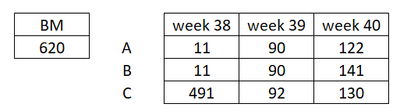
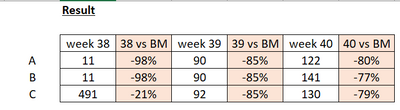
Im trying to write a DAX to calculate % difference with benchmark value. The tricky is I will have weekly data added in, so I want to show the % difference per week basis.
Below input:
Disired result:
Thank you!
Hi @milkynight ,
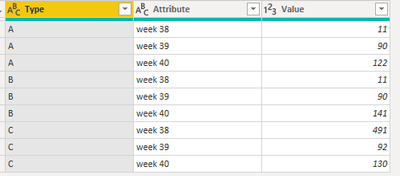
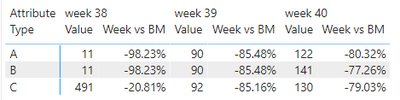
The way to do this is to go to PowerQuery. Select the column with (A, B, C) and choose unpivot other columns. Result:
Then you can create a measure like this:
Jori
If I answered your question, please mark it as a solution to help other members find it more quickly.
Check out the November 2025 Power BI update to learn about new features.
Advance your Data & AI career with 50 days of live learning, contests, hands-on challenges, study groups & certifications and more!
| User | Count |
|---|---|
| 11 | |
| 9 | |
| 9 | |
| 6 | |
| 5 |
| User | Count |
|---|---|
| 27 | |
| 22 | |
| 19 | |
| 17 | |
| 11 |