FabCon is coming to Atlanta
Join us at FabCon Atlanta from March 16 - 20, 2026, for the ultimate Fabric, Power BI, AI and SQL community-led event. Save $200 with code FABCOMM.
Register now!- Power BI forums
- Get Help with Power BI
- Desktop
- Service
- Report Server
- Power Query
- Mobile Apps
- Developer
- DAX Commands and Tips
- Custom Visuals Development Discussion
- Health and Life Sciences
- Power BI Spanish forums
- Translated Spanish Desktop
- Training and Consulting
- Instructor Led Training
- Dashboard in a Day for Women, by Women
- Galleries
- Data Stories Gallery
- Themes Gallery
- Contests Gallery
- Quick Measures Gallery
- Notebook Gallery
- Translytical Task Flow Gallery
- TMDL Gallery
- R Script Showcase
- Webinars and Video Gallery
- Ideas
- Custom Visuals Ideas (read-only)
- Issues
- Issues
- Events
- Upcoming Events
To celebrate FabCon Vienna, we are offering 50% off select exams. Ends October 3rd. Request your discount now.
- Power BI forums
- Forums
- Get Help with Power BI
- DAX Commands and Tips
- Re: DAX expression to filter column for dates only...
- Subscribe to RSS Feed
- Mark Topic as New
- Mark Topic as Read
- Float this Topic for Current User
- Bookmark
- Subscribe
- Printer Friendly Page

- Mark as New
- Bookmark
- Subscribe
- Mute
- Subscribe to RSS Feed
- Permalink
- Report Inappropriate Content
DAX expression to filter column for dates only in last month?
Hey everyone,
I am trying to generate a measure that filters a column with dates for those which are only from the last month or last 30 days.
I would like to use this in a calcuate function to see if the amount of rows which have the date in the last month and which meet antoher critera are greater than 0.
Thanks!
Solved! Go to Solution.

- Mark as New
- Bookmark
- Subscribe
- Mute
- Subscribe to RSS Feed
- Permalink
- Report Inappropriate Content
Hi @jfish29 ,
Here is the DAX to calculate the number of records with a status of closed in the last thirty days:
Count record =

CALCULATE (

    COUNT ( 'Table'[status] ),

    FILTER (

        'Table',

        [status] = "Closed"

            && [report date] <= TODAY ()

            && [report date]

                >= ( TODAY () - 30 )

    )

)
If you just want to know if the result is greater than 0, you can use this DAX
result =

VAR _c =

    CALCULATE (

        COUNT ( 'Table'[status] ),

        FILTER (

            'Table',

            [status] = "Closed"

                && [report date] <= TODAY ()

                && [report date]

                    >= ( TODAY () - 30 )

        )

    )

RETURN

IF ( _c > 0, "Yes", "No" )
Final output:
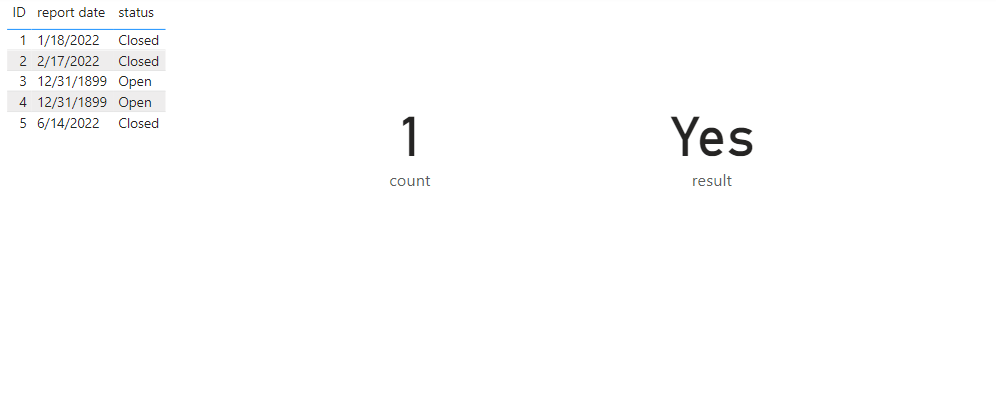
Best Regards,
Jianbo Li
If this post helps, then please consider Accept it as the solution to help the other members find it more quickly.
- Mark as New
- Bookmark
- Subscribe
- Mute
- Subscribe to RSS Feed
- Permalink
- Report Inappropriate Content
Hi @jfish29 ,
Here is the DAX to calculate the number of records with a status of closed in the last thirty days:
Count record =

CALCULATE (

    COUNT ( 'Table'[status] ),

    FILTER (

        'Table',

        [status] = "Closed"

            && [report date] <= TODAY ()

            && [report date]

                >= ( TODAY () - 30 )

    )

)
If you just want to know if the result is greater than 0, you can use this DAX
result =

VAR _c =

    CALCULATE (

        COUNT ( 'Table'[status] ),

        FILTER (

            'Table',

            [status] = "Closed"

                && [report date] <= TODAY ()

                && [report date]

                    >= ( TODAY () - 30 )

        )

    )

RETURN

IF ( _c > 0, "Yes", "No" )
Final output:
Best Regards,
Jianbo Li
If this post helps, then please consider Accept it as the solution to help the other members find it more quickly.
- Mark as New
- Bookmark
- Subscribe
- Mute
- Subscribe to RSS Feed
- Permalink
- Report Inappropriate Content
Hey, thanks for getting back!
I proabably should have offered more context about the column I want to look through. It has dates from when projects are closed, and it may not have a date within it from the last month, so I do not think the MAX function would work here?
So, it has a bunch of dates of projects which are closed, and then a placeholder value (Sunday, December 31, 1899) for all projects which are still open. Again, the goal would be to see if say, "June" is present in any cell in the column for this month.


- Mark as New
- Bookmark
- Subscribe
- Mute
- Subscribe to RSS Feed
- Permalink
- Report Inappropriate Content
Hi @jfish29
this a measure. MAX will only retrieve the current month visible in the filter context. Not sure what are slicing by. A screenshot of your visual will be of a great help to understand better.
- Mark as New
- Bookmark
- Subscribe
- Mute
- Subscribe to RSS Feed
- Permalink
- Report Inappropriate Content
The visual is a picture that gets switched by the SWITCH function depending on if the condition is met. It seems like the DAX function has to do all the calcualtions without leveraging a filter?
- Mark as New
- Bookmark
- Subscribe
- Mute
- Subscribe to RSS Feed
- Permalink
- Report Inappropriate Content
Hi @jfish29
can you join a zoom meeting to explain further. I sent you meeting request on private message
- Mark as New
- Bookmark
- Subscribe
- Mute
- Subscribe to RSS Feed
- Permalink
- Report Inappropriate Content
Here is some sample data:
We have a "report date" column which is the column i want to filter for only those dates in the past month.
Tuesday, January 18, 2022
Thursday, February 17, 2022
Sunday, December 31, 1899
Sunday, December 31, 1899
Tuesday, June 14, 2022
^ Above is the formatt of the dates in this column, the one from 1899 is a placeholder value for unfinished projects.
We have another column to filter by, called "status"
Closed
Open
^ This column holds these values
It seems to me that I need a switch function, which checks if is it is true that, there are > 0 projects within the last month that are closed.
I am using the "Image by Cloudscope" as the visualization which holds my images. It holds their values as text which I had formatted as image urls.
- Mark as New
- Bookmark
- Subscribe
- Mute
- Subscribe to RSS Feed
- Permalink
- Report Inappropriate Content
Hi @jfish29
I have no data to work with but this shall not be very complex
first you need to retrieve the dates in the past month:
VAR CurrentMonth = MAX ( 'Date'[Month] ) --Preferred "year month key" to avoid the previous year problem.
VAR PreviousMonthDates =
CALCULATE LTABLE (
VALUES ( TableName[Date] ),
'Date'[Month] = CurrentMonth - 1,
REMOVEFILTERS ( )
)
then you need to extract the day number of each of the available dates.
VAR T1 =
ADDCOLUMNS (
PreviousMonthDates,
"@DayNum", DAY ( [Date] )
)
then select the day number column
VAR PreviousDays =
SELECTCOLUMNS ( T1, "Day Number", [@DayNum] )
then you can calculate for example you sales amount
CALCULATE (
SUM ( TableName[Sales] ),
FILTER ( 'Date', DAY ( 'Date'[Date] ) IN PreviousDays ),
Other filters and/or calculate modifiers as required
)

Helpful resources

Power BI Monthly Update - September 2025
Check out the September 2025 Power BI update to learn about new features.

Fabric Community Update - August 2025
Find out what's new and trending in the Fabric community.

| User | Count |
|---|---|
| 15 | |
| 9 | |
| 8 | |
| 6 | |
| 5 |


| User | Count |
|---|---|
| 31 | |
| 18 | |
| 15 | |
| 7 | |
| 5 |


