FabCon is coming to Atlanta
Join us at FabCon Atlanta from March 16 - 20, 2026, for the ultimate Fabric, Power BI, AI and SQL community-led event. Save $200 with code FABCOMM.
Register now!- Power BI forums
- Get Help with Power BI
- Desktop
- Service
- Report Server
- Power Query
- Mobile Apps
- Developer
- DAX Commands and Tips
- Custom Visuals Development Discussion
- Health and Life Sciences
- Power BI Spanish forums
- Translated Spanish Desktop
- Training and Consulting
- Instructor Led Training
- Dashboard in a Day for Women, by Women
- Galleries
- Data Stories Gallery
- Themes Gallery
- Contests Gallery
- QuickViz Gallery
- Quick Measures Gallery
- Visual Calculations Gallery
- Notebook Gallery
- Translytical Task Flow Gallery
- TMDL Gallery
- R Script Showcase
- Webinars and Video Gallery
- Ideas
- Custom Visuals Ideas (read-only)
- Issues
- Issues
- Events
- Upcoming Events
The Power BI Data Visualization World Championships is back! Get ahead of the game and start preparing now! Learn more
- Power BI forums
- Forums
- Get Help with Power BI
- DAX Commands and Tips
- Re: DAX equivalent to excel Array
- Subscribe to RSS Feed
- Mark Topic as New
- Mark Topic as Read
- Float this Topic for Current User
- Bookmark
- Subscribe
- Printer Friendly Page

- Mark as New
- Bookmark
- Subscribe
- Mute
- Subscribe to RSS Feed
- Permalink
- Report Inappropriate Content
DAX equivalent to excel Array
Hi,
I have an excel array formula that I need help in writing the DAX eqivalent.
Columns
Station ID
Start Time
End Time
My formula captures the start time of next start per Station ID.
Next Start Time - Excel Array Formula
{=MIN(IF(A3:A$4983=A2,IF(B3:B$4983>C2,B3:B$4983)))}
I would like to have this calculated in DAX, but cannot figure out equivalent.
Any help would be greatly appreciated.
/tks
| Station ID | Start Time | End Time | Usage (kWh) | Peak kW | SiteID | ChgId | Duration | MicroSess | NextStartTime |
| 100001-02 | 2021-09-01 10:37:35 | 2021-09-01 10:59:43 | 27 | 207 | 100001 | 2 | 0:22:08 | 13:46:23 | |
| 100001-02 | 2021-09-01 13:46:23 | 2021-09-01 14:31:08 | 17 | 207 | 100001 | 2 | 0:44:45 | 17:35:09 | |
| 100001-02 | 2021-09-01 17:35:09 | 2021-09-01 18:14:22 | 53 | 207 | 100001 | 2 | 0:39:13 | 15:47:56 | |
| 100001-01 | 2021-09-02 12:04:22 | 2021-09-02 12:21:19 | 4 | 65 | 100001 | 1 | 0:16:57 | 14:52:53 | |
| 100001-02 | 2021-09-02 15:47:56 | 2021-09-02 16:48:24 | 36 | 60 | 100001 | 2 | 1:00:28 | 11:11:17 | |
| 100001-02 | 2021-09-03 11:11:17 | 2021-09-03 11:30:51 | 6 | 60 | 100001 | 2 | 0:19:34 | 16:09:11 | |
| 100001-01 | 2021-09-03 14:52:53 | 2021-09-03 15:08:59 | 4 | 65 | 100001 | 1 | 0:16:06 | 18:16:58 | |
| 100001-04 | 2021-09-04 14:18:24 | 2021-09-04 14:55:28 | 25 | 70.9 | 100001 | 4 | 0:37:04 | 12:01:55 | |
| 100001-02 | 2021-09-04 16:09:11 | 2021-09-04 16:48:47 | 55 | 207 | 100001 | 2 | 0:39:36 | 16:59:52 | |
| 100001-04 | 2021-09-05 12:01:55 | 2021-09-05 12:09:59 | 6 | 51.9 | 100001 | 4 | 0:08:04 | 16:35:09 | |
| 100001-03 | 2021-09-05 16:10:09 | 2021-09-05 17:04:30 | 41 | 153.8 | 100001 | 3 | 0:54:21 | 11:30:26 | |
| 100001-04 | 2021-09-05 16:35:09 | 2021-09-05 17:00:44 | 15 | 55.1 | 100001 | 4 | 0:25:35 | 14:14:16 | |
| 100001-02 | 2021-09-05 16:59:52 | 2021-09-05 17:43:49 | 22 | 70.9 | 100001 | 2 | 0:43:57 | 15:18:53 | |
| 100001-01 | 2021-09-05 18:16:58 | 2021-09-05 18:31:10 | 5 | 65 | 100001 | 1 | 0:14:12 | 20:06:39 | |
| 100001-01 | 2021-09-05 20:06:39 | 2021-09-05 20:27:27 | 8 | 65 | 100001 | 1 | 0:20:48 | 0:12:45 | |
| 100001-01 | 2021-09-06 00:12:45 | 2021-09-06 00:32:07 | 3 | 65 | 100001 | 1 | 0:19:22 | 17:07:49 | |
| 100001-04 | 2021-09-06 14:14:16 | 2021-09-06 15:40:46 | 42 | 60 | 100001 | 4 | 1:26:30 | 20:54:52 | |
| 100001-04 | 2021-09-07 20:54:52 | 2021-09-07 21:39:22 | 34 | 60 | 100001 | 4 | 0:44:30 | 0:00:00 |
Solved! Go to Solution.


- Mark as New
- Bookmark
- Subscribe
- Mute
- Subscribe to RSS Feed
- Permalink
- Report Inappropriate Content
- Mark as New
- Bookmark
- Subscribe
- Mute
- Subscribe to RSS Feed
- Permalink
- Report Inappropriate Content
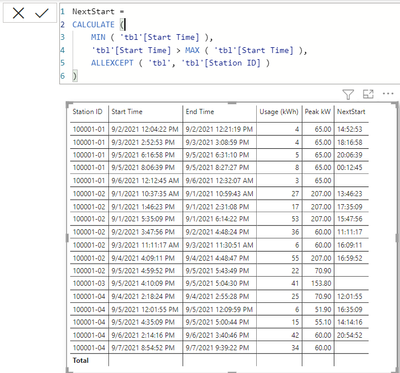
@cfstout you can use a measure like this
NextStart =
CALCULATE (
    MIN ( 'tbl'[Start Time] ),
    'tbl'[Start Time] > MAX ( 'tbl'[Start Time] ),
    ALLEXCEPT ( 'tbl', 'tbl'[Station ID] )
)
- Mark as New
- Bookmark
- Subscribe
- Mute
- Subscribe to RSS Feed
- Permalink
- Report Inappropriate Content
Hi, thanks for the response.
I am unable to get this to work... would you mind attaching the .pbix file so I can see how you created the VAR?
tks/
- Mark as New
- Bookmark
- Subscribe
- Mute
- Subscribe to RSS Feed
- Permalink
- Report Inappropriate Content
- Mark as New
- Bookmark
- Subscribe
- Mute
- Subscribe to RSS Feed
- Permalink
- Report Inappropriate Content
Thanks so much for your help. Works great!

- Mark as New
- Bookmark
- Subscribe
- Mute
- Subscribe to RSS Feed
- Permalink
- Report Inappropriate Content
Hi,
This DAX should do what you want:
End result:
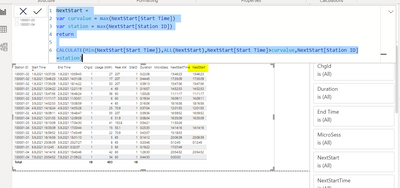
The basic logic is to remove filters with ALL and keep the relevant filters with variables. You might need to add SiteID as an variable.
I hope this post helps to solve your issue and if it does consider accepting it as a solution and giving the post a thumbs up!
Did I answer your question? Mark my post as a solution!
Proud to be a Super User!
- Mark as New
- Bookmark
- Subscribe
- Mute
- Subscribe to RSS Feed
- Permalink
- Report Inappropriate Content
Hi, thanks for the response.
I am unable to get this to work... would you mind attaching the .pbix file so I can see how you created the VAR?
tks/

Helpful resources

Power BI Dataviz World Championships
The Power BI Data Visualization World Championships is back! Get ahead of the game and start preparing now!

Power BI Monthly Update - November 2025
Check out the November 2025 Power BI update to learn about new features.

FabCon Atlanta 2026
Join us at FabCon Atlanta, March 16-20, for the ultimate Fabric, Power BI, AI and SQL community-led event. Save $200 with code FABCOMM.

| User | Count |
|---|---|
| 19 | |
| 10 | |
| 9 | |
| 4 | |
| 4 |


| User | Count |
|---|---|
| 34 | |
| 32 | |
| 20 | |
| 12 | |
| 11 |


