cancel
Showing results for 
Search instead for 
Did you mean: 

The Power BI Data Visualization World Championships is back! It's time to submit your entry. Live now!

Reply
Robyrubyjane
Frequent Visitor

DAX code to Input data

hi guys I need help, so i have data like this..
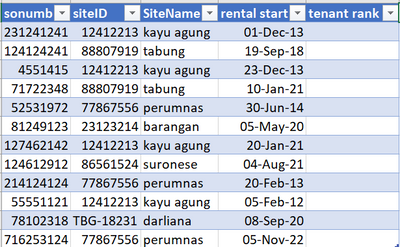
Screenshot_20230208_101743.png

and if we filter in one of data in sitename column, it'll be like this
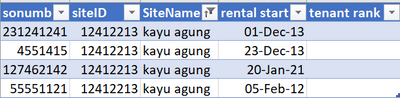
Screenshot_20230208_102026.png

as we can see there is 4 sitename that has same name and SiteID but each them have different sonumb, so in the column tenant rank i want it'll rank based on the oldest date, like this
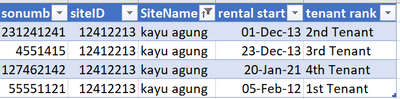
Screenshot_20230208_102635.png

if we clear the filter, it'll be like this
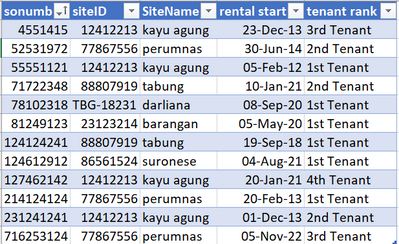
Screenshot_20230208_103233.png

and if we sorted by SiteName, It'll be like this
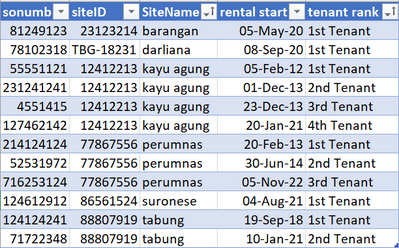
Screenshot_20230208_103519.png

there is 15k data in my masterlist, and it must be take lots of time if I input tenant rank one by one which is that I have to filter each siteID to see is there only 1 siteName or maybe more that actually has different sonumb. I've been looking for answer like a week and still haven't find the answer :'(


TIA

1 ACCEPTED SOLUTION
Jihwan_Kim
Super User
Super User

Hi,

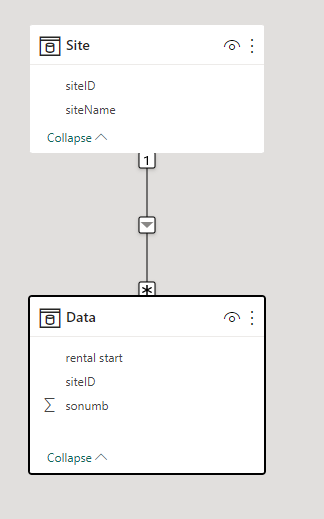
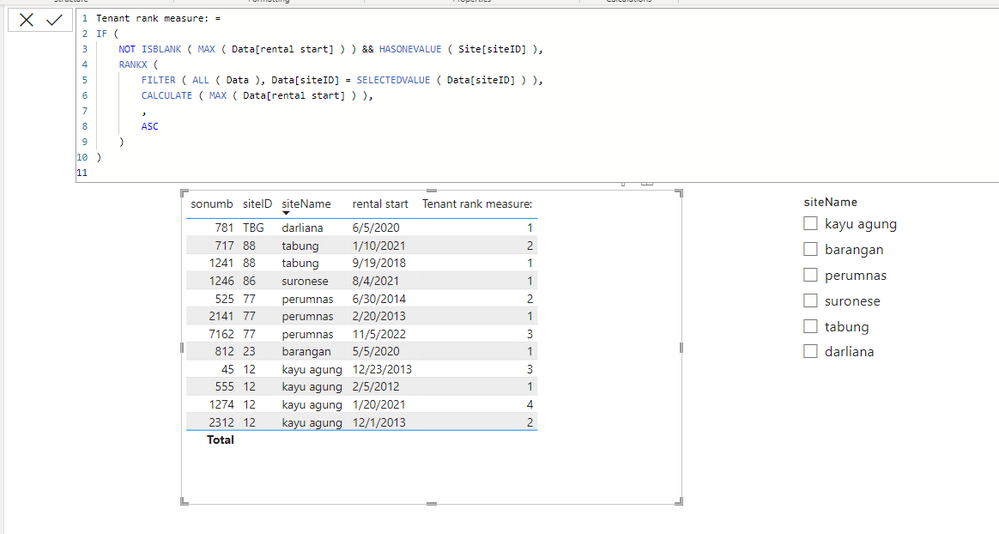
I am not sure if I understood your question correctly, but please check the below picture and the attached pbix file.


Jihwan_Kim_0-1675833291667.png


Jihwan_Kim_1-1675834024532.png


Tenant rank measure: =
IF (
    NOT ISBLANK ( MAX ( Data[rental start] ) ) && HASONEVALUE ( Site[siteID] ),
    RANKX (
        FILTER ( ALL ( Data ), Data[siteID] = SELECTEDVALUE ( Data[siteID] ) ),
        CALCULATE ( MAX ( Data[rental start] ) ),
        ,
        ASC
    )
)


If this post helps, then please consider accepting it as the solution to help other members find it faster, and give a big thumbs up.


Click here to visit my LinkedIn page

View solution in original post

1 REPLY 1
Jihwan_Kim
Super User
Super User

Hi,

I am not sure if I understood your question correctly, but please check the below picture and the attached pbix file.


Jihwan_Kim_0-1675833291667.png


Jihwan_Kim_1-1675834024532.png


Tenant rank measure: =
IF (
    NOT ISBLANK ( MAX ( Data[rental start] ) ) && HASONEVALUE ( Site[siteID] ),
    RANKX (
        FILTER ( ALL ( Data ), Data[siteID] = SELECTEDVALUE ( Data[siteID] ) ),
        CALCULATE ( MAX ( Data[rental start] ) ),
        ,
        ASC
    )
)


If this post helps, then please consider accepting it as the solution to help other members find it faster, and give a big thumbs up.


Click here to visit my LinkedIn page

Helpful resources

Announcements
FabCon Atlanta 2026 carousel

FabCon Atlanta 2026

Join us at FabCon Atlanta, March 16-20, for the ultimate Fabric, Power BI, AI and SQL community-led event. Save $200 with code FABCOMM.