cancel
Showing results for 
Search instead for 
Did you mean: 

The Power BI Data Visualization World Championships is back! Get ahead of the game and start preparing now! Learn more

Reply
deb_power123
Helper V
Helper V

DAX calculation for removal of duplicate rows

Hi,


For the source table below , I have repeated rows one for India and another for Delhi location .


Another for India and Goa location. 


I want to hide all those rows with India(marked in bold in the below table) location and want to only keep the rows with Delhi and Goa location .I have many enteries like this so it should be don via some DAX. Please suggest.


Source Indput:

SchoollocationAveragemarks
ABCIndia90
ABCDelhi90
DEFIndia89
DEFDelhi89
DEJIndia75
DEJGoa75
DEMIndia97
DEMGoa97


Expected Output :

SchoollocationAveragemarks
ABCDelhi90
DEFDelhi89
DEJGoa75
DEMGoa97


Kind regards

Sameer

1 ACCEPTED SOLUTION
Anonymous
Not applicable

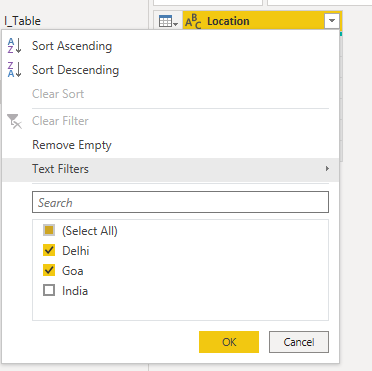
Filter Location Column from the power query.

vairag99_0-1648207806697.png

Then save and close the power Query editor.
2. You Can Use DAX Also

New_Table = FILTER('Table','Table'[Location]<>"India")

View solution in original post

2 REPLIES 2
Anonymous
Not applicable

Filter Location Column from the power query.

vairag99_0-1648207806697.png

Then save and close the power Query editor.
2. You Can Use DAX Also

New_Table = FILTER('Table','Table'[Location]<>"India")

Awesome

Helpful resources

Announcements
November Power BI Update Carousel

Power BI Monthly Update - November 2025

Check out the November 2025 Power BI update to learn about new features.

Fabric Data Days Carousel

Fabric Data Days

Advance your Data & AI career with 50 days of live learning, contests, hands-on challenges, study groups & certifications and more!

FabCon Atlanta 2026 carousel

FabCon Atlanta 2026

Join us at FabCon Atlanta, March 16-20, for the ultimate Fabric, Power BI, AI and SQL community-led event. Save $200 with code FABCOMM.