We've captured the moments from FabCon & SQLCon that everyone is talking about, and we are bringing them to the community, live and on-demand. Starts on April 14th. Register now
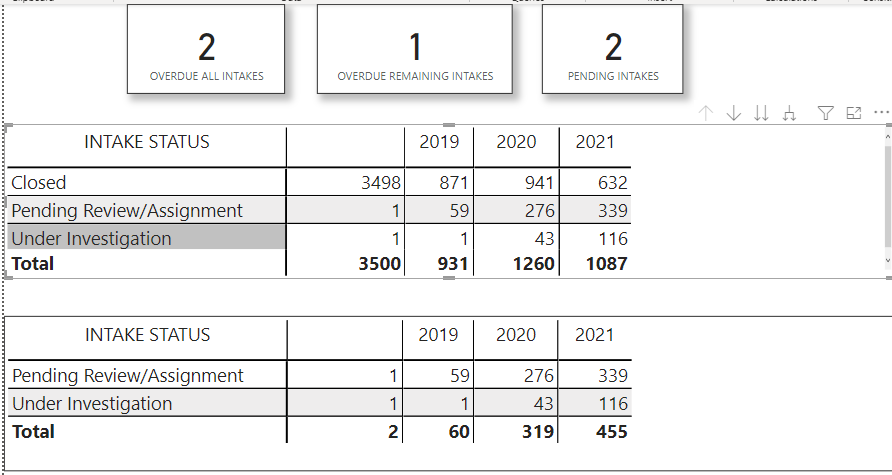
This is my Power BI canvas for a report I'm putting together. Let me try and explain the details of what I'm trying to accomplish and what my issue is.
My DAX statement seem right, at least the syntax is, but obviously my logic is not. Can someone look at my DAX statements and maybe see something I'm not seeing.
Thank you in advance.
Vince
Solved! Go to Solution.
@OR0159236 , is it a format issue ?
Date like
OVERDUE ALL INTAKES =
CALCULATE(
DISTINCTCOUNT(_NFSU_INTAKES_ALG[INTAKE ID]),
ALL(_NFSU_INTAKES_ALG),
FILTER(
_NFSU_INTAKES_ALG, [INTAKE STATUS] in {"Pending Review/Assignment", "Under Investigation"} &&
[INVESTIGATION DUE DATE] <= date(2021,11,30) && [RECEIVED END DATE] >= date(2019,10,01)
)
)
That worked. 🙂 Thank you.
Thank you, @amitchandak . This looks promising, the small change in the formatting gave me a more "likely" set of measures result. At least I don't get zeros (0), ones (1) or twos (2) for my measures. 🙂 Now the hard part is to validate the numbers I get with what is actual for a small sample with different variances in the filter.
@OR0159236 , is it a format issue ?
Date like
OVERDUE ALL INTAKES =
CALCULATE(
DISTINCTCOUNT(_NFSU_INTAKES_ALG[INTAKE ID]),
ALL(_NFSU_INTAKES_ALG),
FILTER(
_NFSU_INTAKES_ALG, [INTAKE STATUS] in {"Pending Review/Assignment", "Under Investigation"} &&
[INVESTIGATION DUE DATE] <= date(2021,11,30) && [RECEIVED END DATE] >= date(2019,10,01)
)
)
If you have recently started exploring Fabric, we'd love to hear how it's going. Your feedback can help with product improvements.
A new Power BI DataViz World Championship is coming this June! Don't miss out on submitting your entry.
Share feedback directly with Fabric product managers, participate in targeted research studies and influence the Fabric roadmap.
| User | Count |
|---|---|
| 16 | |
| 12 | |
| 10 | |
| 6 | |
| 5 |