cancel
Showing results for 
Search instead for 
Did you mean: 

Learn from the best! Meet the four finalists headed to the FINALS of the Power BI Dataviz World Championships! Register now

Reply
SupriyaVarun
Frequent Visitor

DAX Measure for not showing the future months

Hi Everyone,


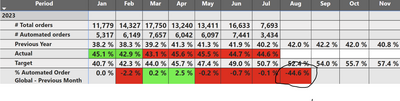
Can you please help me with this, For the below query how to show blank  for

the future months?


Eg : August month showing  -44.6% Now I want it to show a blank Value


SupriyaVarun_0-1689772754325.png


 Measure Below : 


% Automated Order EU - Previous Month =
VAR CurrentAcual = [% Automated order EU]
VAR PreviousActual =
CALCULATE (
[% Automated order EU],
ALLSELECTED ( 'SM Dim Calendar' ),
'SM Dim Calendar'[Fiscal Month Number]
= MAX ( 'SM Dim Calendar'[Fiscal Month Number] ) - 1
)
RETURN
CurrentAcual - COALESCE ( PreviousActual, CurrentAcual )


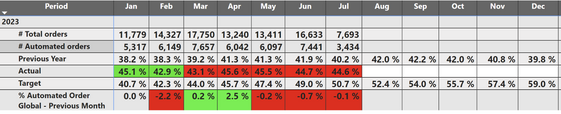
I want the output like this below:

SupriyaVarun_0-1689779682542.png


Thanks in advance

1 ACCEPTED SOLUTION

Hi,


Thanks for the response.

 I am using a Live connection

I just used this measure and its working now 

% Automated Order Global - Previous Month =
VAR CurrentActual = [% Automated order]
VAR PreviousActual =
CALCULATE (
[% Automated order],
ALLSELECTED ( 'SM Dim Calendar' ),
'SM Dim Calendar'[Fiscal Month Number]
= MAX ( 'SM Dim Calendar'[Fiscal Month Number] ) - 1
)
VAR CurrentMonthNumber = MONTH(TODAY()) +1
VAR SelectedMonthNumber = SELECTEDVALUE('SM Dim Calendar'[Fiscal Month Number])

RETURN
IF (
SelectedMonthNumber >= CurrentMonthNumber,
BLANK(),
CurrentActual - COALESCE ( PreviousActual, CurrentActual )
)

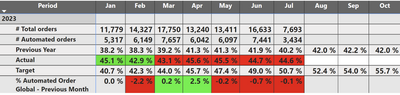
I got the result 🙂


SupriyaVarun_0-1689784310111.png


View solution in original post

3 REPLIES 3
rubayatyasmin
Community Champion
Community Champion

Hi, @SupriyaVarun 


To ensure that future months show as blank, you can add a condition that checks whether the month is in the future, and if it is, returns BLANK(). You can use the TODAY() function to get the current date and use it for the comparison.


try this


% Automated Order EU - Previous Month =
VAR CurrentDate = TODAY()
VAR CurrentMonth = MONTH(CurrentDate)
VAR CurrentYear = YEAR(CurrentDate)
VAR CurrentFiscalMonthNumber =
LOOKUPVALUE(
'SM Dim Calendar'[Fiscal Month Number],
'SM Dim Calendar'[Calendar Year], CurrentYear,
'SM Dim Calendar'[Calendar Month], CurrentMonth)

VAR CurrentAcual = [% Automated order EU]
VAR PreviousActual =
CALCULATE (
[% Automated order EU],
ALLSELECTED ( 'SM Dim Calendar' ),
'SM Dim Calendar'[Fiscal Month Number]
= MAX ( 'SM Dim Calendar'[Fiscal Month Number] ) - 1
)

RETURN
IF (
MAX('SM Dim Calendar'[Fiscal Month Number]) > CurrentFiscalMonthNumber,
BLANK(),
CurrentAcual - COALESCE ( PreviousActual, CurrentAcual )
)


note: Please note that you should adjust this based on your fiscal year start month if it does not start in January.

 

rubayatyasmin_0-1689517080227.png


Did I answer your question? Mark my post as a solution!super-user-logo

Proud to be a Super User!


Hi,


Thanks for the response.

 I am using a Live connection

I just used this measure and its working now 

% Automated Order Global - Previous Month =
VAR CurrentActual = [% Automated order]
VAR PreviousActual =
CALCULATE (
[% Automated order],
ALLSELECTED ( 'SM Dim Calendar' ),
'SM Dim Calendar'[Fiscal Month Number]
= MAX ( 'SM Dim Calendar'[Fiscal Month Number] ) - 1
)
VAR CurrentMonthNumber = MONTH(TODAY()) +1
VAR SelectedMonthNumber = SELECTEDVALUE('SM Dim Calendar'[Fiscal Month Number])

RETURN
IF (
SelectedMonthNumber >= CurrentMonthNumber,
BLANK(),
CurrentActual - COALESCE ( PreviousActual, CurrentActual )
)

I got the result 🙂


SupriyaVarun_0-1689784310111.png


how about SelectedMonthNumber > CurrentMonthNumber, instead of SelectedMonthNumber >= CurrentMonthNumber?


rubayatyasmin_0-1689517080227.png


Did I answer your question? Mark my post as a solution!super-user-logo

Proud to be a Super User!


Helpful resources

Announcements
Join our Fabric User Panel

Join our Fabric User Panel

Share feedback directly with Fabric product managers, participate in targeted research studies and influence the Fabric roadmap.

February Power BI Update Carousel

Power BI Monthly Update - February 2026

Check out the February 2026 Power BI update to learn about new features.

FabCon Atlanta 2026 carousel

FabCon Atlanta 2026

Join us at FabCon Atlanta, March 16-20, for the ultimate Fabric, Power BI, AI and SQL community-led event. Save $200 with code FABCOMM.