cancel
Showing results for 
Search instead for 
Did you mean: 

The Power BI Data Visualization World Championships is back! Get ahead of the game and start preparing now! Learn more

Reply
Anonymous
Not applicable

DAX Measure For Employees Regional Average

Hello,

Please I have this issue I have been trying to fix for some days now.

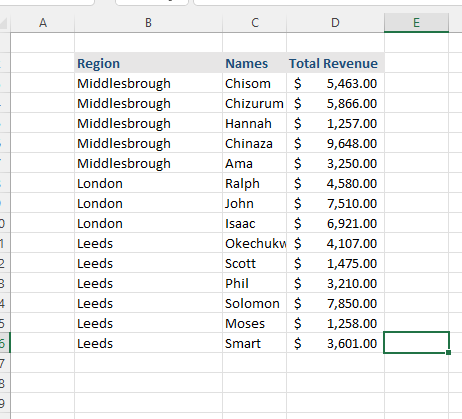
Regional Employees Revenue.png


Say I have a table as above, the columns are Regions, Names and Total Revenue,

I want to get each employees average revenue based on their regional performance only


I need a DAX formular to get this.

Please help 


The table below shows the dataset.


RegionNamesTotal Revenue
MiddlesbroughChisom $          5,463.00
MiddlesbroughChizurum $          5,866.00
MiddlesbroughHannah $          1,257.00
MiddlesbroughChinaza $          9,648.00
MiddlesbroughAma $          3,250.00
LondonRalph $          4,580.00
LondonJohn $          7,510.00
LondonIsaac $          6,921.00
LeedsOkechukwu $          4,107.00
LeedsScott $          1,475.00
LeedsPhil $          3,210.00
LeedsSolomon $          7,850.00
LeedsMoses $          1,258.00
LeedsSmart $          3,601.00


1 ACCEPTED SOLUTION

Hi,

So percentage of revenue compared to regional AVG?

In that case this should do:

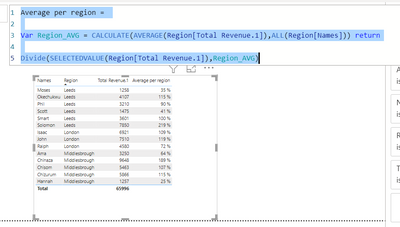
Average per region =

Var Region_AVG = CALCULATE(AVERAGE(Region[Total Revenue.1]),ALL(Region[Names])) return

Divide(SELECTEDVALUE(Region[Total Revenue.1]),Region_AVG)


End result:

ValtteriN_0-1641722418142.png


Did I answer your question? Mark my post as a solution!

Proud to be a Super User!


View solution in original post

3 REPLIES 3
Anonymous
Not applicable

Thank you for the responds.

I think I missed it up. I am apparently looking for percentage performance of each employee based on regional total or regional average.


Please a DAX function for it will help clarify things for me.


Thank you

Hi,

So percentage of revenue compared to regional AVG?

In that case this should do:

Average per region =

Var Region_AVG = CALCULATE(AVERAGE(Region[Total Revenue.1]),ALL(Region[Names])) return

Divide(SELECTEDVALUE(Region[Total Revenue.1]),Region_AVG)


End result:

ValtteriN_0-1641722418142.png


Did I answer your question? Mark my post as a solution!

Proud to be a Super User!


ValtteriN
Super User
Super User

Hi,

I am not completely sure what you are trying to achieve based on your problem description. Could you provide more details what is the desired end result? For now, I understood your issue so that you want to have average per region. That can be achieved by using this kind of dax:

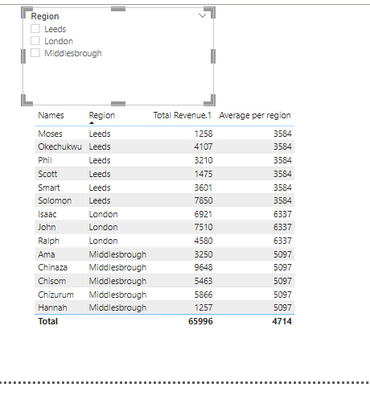
Average per region = CALCULATE(AVERAGE(Region[Total Revenue.1]),ALL(Region[Names]))
End result:
ValtteriN_0-1641686894782.png


Did I answer your question? Mark my post as a solution!

Proud to be a Super User!


Helpful resources

Announcements
November Power BI Update Carousel

Power BI Monthly Update - November 2025

Check out the November 2025 Power BI update to learn about new features.

Fabric Data Days Carousel

Fabric Data Days

Advance your Data & AI career with 50 days of live learning, contests, hands-on challenges, study groups & certifications and more!

FabCon Atlanta 2026 carousel

FabCon Atlanta 2026

Join us at FabCon Atlanta, March 16-20, for the ultimate Fabric, Power BI, AI and SQL community-led event. Save $200 with code FABCOMM.