FabCon is coming to Atlanta
Join us at FabCon Atlanta from March 16 - 20, 2026, for the ultimate Fabric, Power BI, AI and SQL community-led event. Save $200 with code FABCOMM.
Register now!- Power BI forums
- Get Help with Power BI
- Desktop
- Service
- Report Server
- Power Query
- Mobile Apps
- Developer
- DAX Commands and Tips
- Custom Visuals Development Discussion
- Health and Life Sciences
- Power BI Spanish forums
- Translated Spanish Desktop
- Training and Consulting
- Instructor Led Training
- Dashboard in a Day for Women, by Women
- Galleries
- Data Stories Gallery
- Themes Gallery
- Contests Gallery
- QuickViz Gallery
- Quick Measures Gallery
- Visual Calculations Gallery
- Notebook Gallery
- Translytical Task Flow Gallery
- TMDL Gallery
- R Script Showcase
- Webinars and Video Gallery
- Ideas
- Custom Visuals Ideas (read-only)
- Issues
- Issues
- Events
- Upcoming Events
The Power BI Data Visualization World Championships is back! Get ahead of the game and start preparing now! Learn more
- Power BI forums
- Forums
- Get Help with Power BI
- DAX Commands and Tips
- Re: DAX | How to iterate consecutive text modifica...
- Subscribe to RSS Feed
- Mark Topic as New
- Mark Topic as Read
- Float this Topic for Current User
- Bookmark
- Subscribe
- Printer Friendly Page

- Mark as New
- Bookmark
- Subscribe
- Mute
- Subscribe to RSS Feed
- Permalink
- Report Inappropriate Content
DAX | How to iterate consecutive text modifications in a measure
Hi,
I'm struggling to find the right syntax for a measure that needs to produce a series of operations through a calculated column.
I have column "Audio Degradation Average" that contains a STRING in this format: 015: [0.01 - 0.02), where:
- 015 represents the average
- The values in the brakets represent the tier
I need to:
- Extract the first three characters representing the value (015 in the example) -> LEFT
- Transform 015 into a DOUBLE (ex: 0.15) -> CONVERT
- Calculate the total average of the column. -> AVERAGE
I started to create variables in my measure for each passage, but I cannot find the right aggregators or iterators to perform these operations row by row. I cannot use calculated columns as the dataset is already huge.
Can anybody help?
Solved! Go to Solution.


- Mark as New
- Bookmark
- Subscribe
- Mute
- Subscribe to RSS Feed
- Permalink
- Report Inappropriate Content
@Anonymous
Looks like you have only one way out: you have to either write DAX in such a way that the engine is able to translate it into the language of the underlying source system (SQL, I guess), or you have to write the M code in exactly the same way. You just have to experiment and I would start with M as it has more functions.
- Mark as New
- Bookmark
- Subscribe
- Mute
- Subscribe to RSS Feed
- Permalink
- Report Inappropriate Content
Thanks, I guess it will be a learning curve...
- Mark as New
- Bookmark
- Subscribe
- Mute
- Subscribe to RSS Feed
- Permalink
- Report Inappropriate Content
@Anonymous
Looks like you have only one way out: you have to either write DAX in such a way that the engine is able to translate it into the language of the underlying source system (SQL, I guess), or you have to write the M code in exactly the same way. You just have to experiment and I would start with M as it has more functions.


- Mark as New
- Bookmark
- Subscribe
- Mute
- Subscribe to RSS Feed
- Permalink
- Report Inappropriate Content
@Anonymous
perhaps you can add that column we had earlier directly in the source? Or in the query editor?
Please mark the question solved when done and consider giving a thumbs up if posts are helpful.
Contact me privately for support with any larger-scale BI needs, tutoring, etc.
Cheers

- Mark as New
- Bookmark
- Subscribe
- Mute
- Subscribe to RSS Feed
- Permalink
- Report Inappropriate Content
Nope...

I also tried to add a calculated column = Audio Degradation Avg, with the intent of manipulating it later, but that's just not possible:

I don't have access to the data source... the only way is through the connector.
Alienvolm
- Mark as New
- Bookmark
- Subscribe
- Mute
- Subscribe to RSS Feed
- Permalink
- Report Inappropriate Content
@Anonymous
So we'll do it all within the measure then:
AVG measure  =
AVERAGEX (
    Table1,
    CONVERT ( LEFT ( Table1[Audio Degradation Average], 3 ), DOUBLE ) / 100
)
Please mark the question solved when done and consider giving a thumbs up if posts are helpful.
Contact me privately for support with any larger-scale BI needs, tutoring, etc.
Cheers
- Mark as New
- Bookmark
- Subscribe
- Mute
- Subscribe to RSS Feed
- Permalink
- Report Inappropriate Content
Thanks!
I was really hoping it would work:
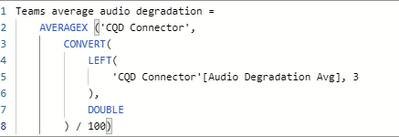
But this is what I get in the visuals:
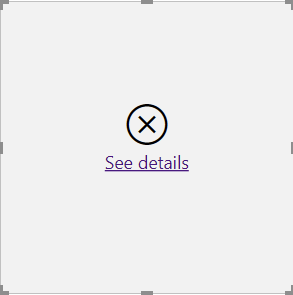

This seems to happen whenever I use SUMX or AVERAGEX in an expression, with or without CALCULATE. And I cannot work in Import mode as the dataset is too large.
Thanks anyway, you definitely clarified the syntax for me!
Alienvolm
- Mark as New
- Bookmark
- Subscribe
- Mute
- Subscribe to RSS Feed
- Permalink
- Report Inappropriate Content
Hi @Anonymous
How about you first create a calculated column in your table to get the number:
NewColumn =
CONVERT ( LEFT ( Table1[Audio Degradation Average], 3 ), DOUBLE ) / 100
and the create a measure that will calculate the average.
AVG Measure =
AVERAGE ( Table1[NewColumn] )
Place the measure in a card visual
Please mark the question solved when done and consider giving a thumbs up if posts are helpful.
Contact me privately for support with any larger-scale BI needs, tutoring, etc.
Cheers
- Mark as New
- Bookmark
- Subscribe
- Mute
- Subscribe to RSS Feed
- Permalink
- Report Inappropriate Content
Hi @AlB ,
That's my problem... I cannot create calculated columns.
I'm working with the CQD connector in Direct Query, and calculated columns will not work:

Thanks!
Alienvolm
Helpful resources

Power BI Dataviz World Championships
The Power BI Data Visualization World Championships is back! Get ahead of the game and start preparing now!

Power BI Monthly Update - December 2025
Check out the December 2025 Power BI Holiday Recap!

FabCon Atlanta 2026
Join us at FabCon Atlanta, March 16-20, for the ultimate Fabric, Power BI, AI and SQL community-led event. Save $200 with code FABCOMM.

| User | Count |
|---|---|
| 19 | |
| 13 | |
| 10 | |
| 4 | |
| 4 |


| User | Count |
|---|---|
| 31 | |
| 28 | |
| 19 | |
| 11 | |
| 10 |


