Join us at FabCon Atlanta from March 16 - 20, 2026, for the ultimate Fabric, Power BI, AI and SQL community-led event. Save $200 with code FABCOMM.
Register now!Get Fabric Certified for FREE during Fabric Data Days. Don't miss your chance! Request now
Solved! Go to Solution.
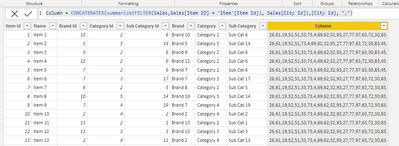
@Anonymous , Assuming this is a new column, I tried the same on my data, a new column. without all
Column = CONCATENATEX(summarize(FILTER(Sales,Sales[Item ID] = 'Item'[Item Id]), Sales[City Id]),[City Id], ",")
@Anonymous provide sample data and expected output to accelerate response
@amitchandak Hi there, thanks for commenting. I tried but the output that I've obtained is "," and ", ,"
Seems like only commas are being concatenated here...
@Anonymous , Assuming this is a new column, I tried the same on my data, a new column. without all
Column = CONCATENATEX(summarize(FILTER(Sales,Sales[Item ID] = 'Item'[Item Id]), Sales[City Id]),[City Id], ",")
I am using this same formula and it is working great. Is there a way to update this to exclude where the City Id has blank values?
@amitchandak This works great, thanks. Think in the first comment you provided, there was a missing Table2[Column2] as part of the CONCATENATEX formula, hence the error.
Check out the November 2025 Power BI update to learn about new features.
Advance your Data & AI career with 50 days of live learning, contests, hands-on challenges, study groups & certifications and more!
| User | Count |
|---|---|
| 10 | |
| 10 | |
| 8 | |
| 6 | |
| 6 |
| User | Count |
|---|---|
| 24 | |
| 19 | |
| 18 | |
| 15 | |
| 9 |