cancel
Showing results for 
Search instead for 
Did you mean: 

Level up your Power BI skills this month - build one visual each week and tell better stories with data! Get started

Reply
Anonymous
Not applicable

DAX Beginner - How to get last date & no.of days

Hello, I am a beginner in DAX, need help with the below problem:


Goal is to achieve the last date & no.of field columns. Last date is nothing but the attendance date of that store employee that he worked and how many days has it been from today to his/her last date.


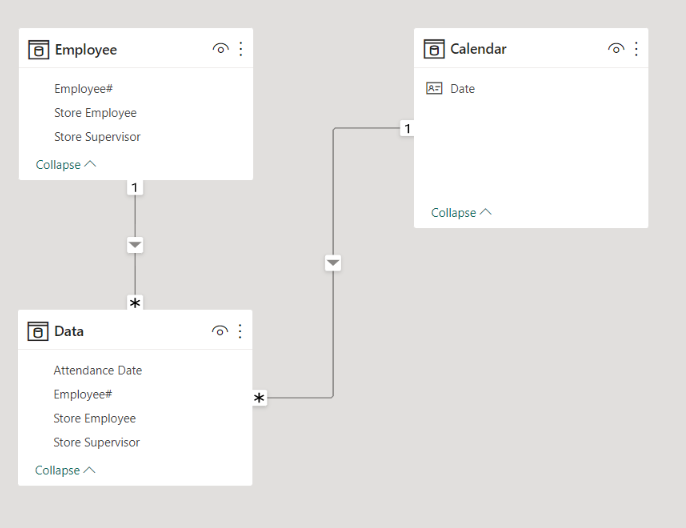
Remember: Store supervisor, store employee# are in one dimension and date is coming from another calendar dimension table.

In which table is it best to create dax for this ??


 Expected results should be like this:

Last Date        No.of days
10-Jun-2020     926 days
15-Jun-2020     921 days


Below is the sample data:

Store SupervisorStore EmployeeEmployee#Attendance DateLast dateno.of days= last date to today
BradenBrad342516-Jan-20  
BradenBrad342519-Jan-20  
BradenBrad342510-Jun-2010-Jun-2020        926 days
JessicaMessi987924-Feb-20  
JessicaMessi987916-May-20  
JessicaMessi987915-Jun-2015-Jun-2020         921 days
1 ACCEPTED SOLUTION
Jihwan_Kim
Super User
Super User

Hi,

I do not know how your datamodel looks like, but I tried to create a sample pbix file like below.

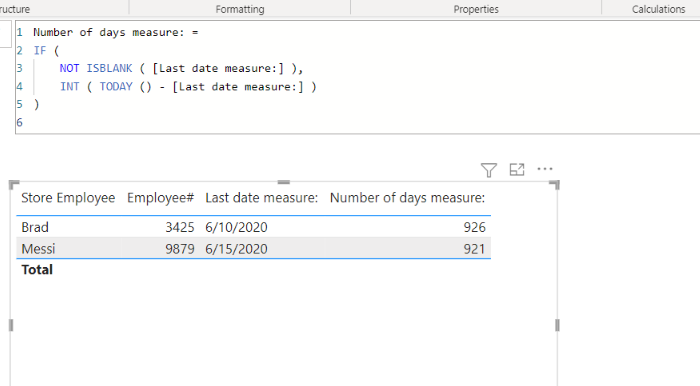
Please check the below picture and the attached pbix file.

I hope the below can provide some ideas on how to create a solution for your datamodel.


Jihwan_Kim_0-1671775408240.png


Jihwan_Kim_1-1671775611491.png


Last date measure: = 
IF (
    HASONEVALUE ( Employee[Store Employee] ),
    MAXX ( RELATEDTABLE ( Data ), Data[Attendance Date] )
)


Number of days measure: =
IF (
    NOT ISBLANK ( [Last date measure:] ),
    INT ( TODAY () - [Last date measure:] )
)


If this post helps, then please consider accepting it as the solution to help other members find it faster, and give a big thumbs up.


Click here to visit my LinkedIn page

View solution in original post

2 REPLIES 2
Mahesh0016
Super User
Super User

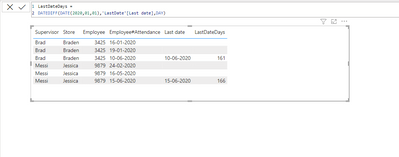
Mahesh0016_0-1671777348094.png

@Anonymous 
Note : You can use

datediff(FirstDate(table[Date]),'LastDate'[Last date],DAY)
 
If this post helps, please consider accept as solution to help other members find it more quickly.
Jihwan_Kim
Super User
Super User

Hi,

I do not know how your datamodel looks like, but I tried to create a sample pbix file like below.

Please check the below picture and the attached pbix file.

I hope the below can provide some ideas on how to create a solution for your datamodel.


Jihwan_Kim_0-1671775408240.png


Jihwan_Kim_1-1671775611491.png


Last date measure: = 
IF (
    HASONEVALUE ( Employee[Store Employee] ),
    MAXX ( RELATEDTABLE ( Data ), Data[Attendance Date] )
)


Number of days measure: =
IF (
    NOT ISBLANK ( [Last date measure:] ),
    INT ( TODAY () - [Last date measure:] )
)


If this post helps, then please consider accepting it as the solution to help other members find it faster, and give a big thumbs up.


Click here to visit my LinkedIn page

Helpful resources

Announcements
April Power BI Update Carousel

Power BI Monthly Update - April 2026

Check out the April 2026 Power BI update to learn about new features.

Fabric SQL PBI Data Days

Data Days 2026 coming soon!

Sign up to receive a private message when registration opens and key events begin.

New to Fabric survey Carousel

New to Fabric Survey

If you have recently started exploring Fabric, we'd love to hear how it's going. Your feedback can help with product improvements.

Power BI DataViz World Championships carousel

Power BI DataViz World Championships - June 2026

A new Power BI DataViz World Championship is coming this June! Don't miss out on submitting your entry.