cancel
Showing results for 
Search instead for 
Did you mean: 

The Power BI Data Visualization World Championships is back! Get ahead of the game and start preparing now! Learn more

Reply
navenn08
New Member

DAX ALLSELECTED DISPLAYING BLANKS

Hi All,

I'm trying to create an Average for a count distinct on a time series data, using the below formula i managed to create an Average line


AVG_RECEIPTS =
CALCULATE(
    AVERAGEX(Values('DATE'[Date]), CALCULATE( DISTINCTCOUNT(CO_DLY_sample[CLM_NUMBER]))), ALLSELECTED())
 
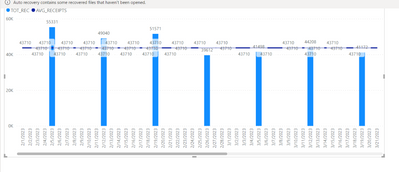
but how can i avoid displaying those dates with blank values
 

navenn08_0-1682531411001.png

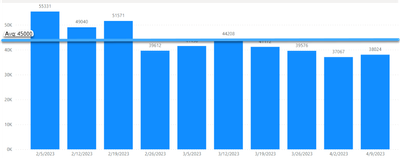
I'm expecting the end result to look like this 

navenn08_1-1682531728864.png


Thanks,

Naveen

1 ACCEPTED SOLUTION
tamerj1
Super User
Super User

Hi @navenn08 
Please try

AVG_RECEIPTS =
IF (
    [TOT_REC] <> BLANK (),
    CALCULATE (
        AVERAGEX (
            VALUES ( 'DATE'[Date] ),
            CALCULATE ( DISTINCTCOUNT ( CO_DLY_sample[CLM_NUMBER] ) )
        ),
        ALLSELECTED ()
    )
)

View solution in original post

2 REPLIES 2
navenn08
New Member

@tamerj1  It worked now. Thanks

tamerj1
Super User
Super User

Hi @navenn08 
Please try

AVG_RECEIPTS =
IF (
    [TOT_REC] <> BLANK (),
    CALCULATE (
        AVERAGEX (
            VALUES ( 'DATE'[Date] ),
            CALCULATE ( DISTINCTCOUNT ( CO_DLY_sample[CLM_NUMBER] ) )
        ),
        ALLSELECTED ()
    )
)

Helpful resources

Announcements
Power BI DataViz World Championships

Power BI Dataviz World Championships

The Power BI Data Visualization World Championships is back! Get ahead of the game and start preparing now!

December 2025 Power BI Update Carousel

Power BI Monthly Update - December 2025

Check out the December 2025 Power BI Holiday Recap!

FabCon Atlanta 2026 carousel

FabCon Atlanta 2026

Join us at FabCon Atlanta, March 16-20, for the ultimate Fabric, Power BI, AI and SQL community-led event. Save $200 with code FABCOMM.