This time we’re going bigger than ever. Fabric, Power BI, SQL, AI and more. We're covering it all. You won't want to miss it.
Learn moreLevel up your Power BI skills this month - build one visual each week and tell better stories with data! Get started
Fiscal YTD Net Sales =
CALCULATE(SUM(sales[NET_SALES]), DATESYTD(periodsfulldata[Date]))
Solved! Go to Solution.
Hi, @andreas789
Yes, use TOTALYTD fuction.
Hope this helps.
Best Regards,
Community Support Team _ Zeon Zheng
If this post helps, then please consider Accept it as the solution to help the other members find it more quickly.
Hi, @andreas789
Yes, use TOTALYTD fuction.
Hope this helps.
Best Regards,
Community Support Team _ Zeon Zheng
If this post helps, then please consider Accept it as the solution to help the other members find it more quickly.
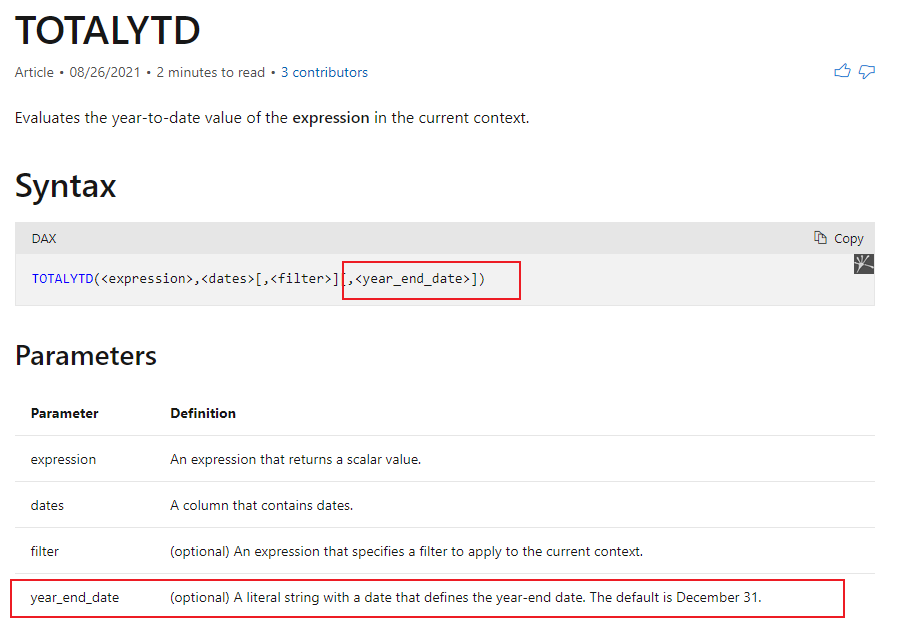
Thanks @v-angzheng-msft but since our end date is not standard each year, is it possible to get the first Sunday of May from a powerbi function?
Hi, @andreas789
Yes, try this:
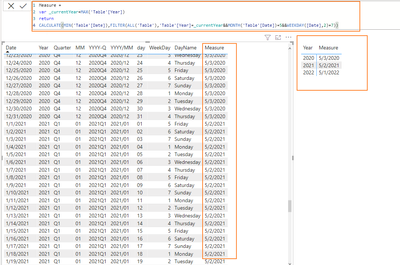
Measure =
var _currentYear=MAX('Table'[Year])
return
CALCULATE(MIN('Table'[Date]),FILTER(ALL('Table'),'Table'[Year]=_currentYear&&MONTH('Table'[Date])=5&&WEEKDAY([Date],2)=7))
Result:
Please refer to the attachment below for details.
Hope this helps.
Best Regards,
Community Support Team _ Zeon Zheng
If this post helps, then please consider Accept it as the solution to help the other members find it more quickly.
Hi @v-angzheng-msft ,
Is it possible to use that measure on DATESYTD, or TOTALYTD functions?
I tried that but it seems that it only accepts constant text values.
use (endofyear) function to createyear end date
Check out the April 2026 Power BI update to learn about new features.
Sign up to receive a private message when registration opens and key events begin.
If you have recently started exploring Fabric, we'd love to hear how it's going. Your feedback can help with product improvements.
| User | Count |
|---|---|
| 5 | |
| 4 | |
| 3 | |
| 3 | |
| 3 |
| User | Count |
|---|---|
| 10 | |
| 8 | |
| 8 | |
| 6 | |
| 6 |