Don't miss your chance to take the Fabric Data Engineer (DP-600) exam for FREE! Find out how by attending the DP-600 session on April 23rd (pacific time), live or on-demand.
Learn moreNext up in the FabCon + SQLCon recap series: The roadmap for Microsoft SQL and Maximizing Developer experiences in Fabric. All sessions are available on-demand after the live show. Register now
Hi!
Have been struggling with this for a long time now. 😞
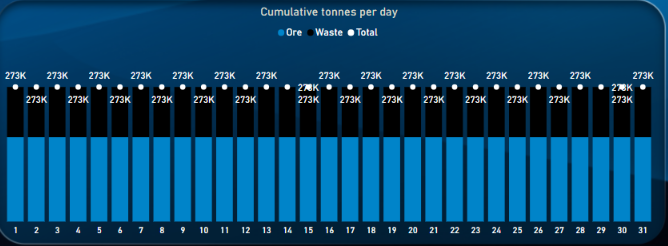
I have current week, current month, previous week and previous month as a custom slicer in a disconnected table and one measure
to return results for each of the chosen periods. Everything works except for Previous month.
The part of the entire code which corresponds to Previous month below.
This link contains the sample file with all info needed, Sample file
SELECTEDVALUE ( 'Period slicer'[Period] ) = "Previous month",
VAR MaxDate =
EOMONTH ( MAX ( Period[Date] ), -1 ) //Returns the last day of previous month, 2021-12-31
VAR LastMonth =
EOMONTH ( MaxDate, -1 ) + 1 //Returns the first day of previous month, making the period 2021-12-01 to 2021-12-31. The variables return the correct timeframe, but do not work in the visual.
RETURN
CALCULATE (
[Number of loaded tonnes],
ALL ( Period[Date] ),
Period[Date] <= MaxDate,
Period[Date] >= LastMonth
)
Solved! Go to Solution.
@KrisD , for previous month cumulative use only datesmtd with date add
CALCULATE (
[Number of loaded tonnes],
DATESMTD (
DATEADD ( Period[Date], -1, MONTH )
)
)
Endofmonth will give complete month on all dates
@KrisD , You can use date table and time intelligence
refer example
MTD Sales = CALCULATE(SUM(Sales[Sales Amount]),DATESMTD('Date'[Date]))
last MTD Sales = CALCULATE(SUM(Sales[Sales Amount]),DATESMTD(dateadd('Date'[Date],-1,MONTH)))
last month Sales = CALCULATE(SUM(Sales[Sales Amount]),previousmonth('Date'[Date]))
next month Sales = CALCULATE(SUM(Sales[Sales Amount]),nextmonth('Date'[Date]))
this month = CALCULATE(SUM(Sales[Sales Amount]),DATESMTD(ENDOFMONTH('Date'[Date])))
last MTD (complete) Sales = CALCULATE(SUM(Sales[Sales Amount]),DATESMTD(ENDOFMONTH(dateadd('Date'[Date],-1,MONTH))))
previous month value = CALCULATE(sum('Table'[total hours value]),previousmonth('Date'[Date]))
Power BI — Year on Year with or Without Time Intelligence
https://medium.com/@amitchandak.1978/power-bi-ytd-questions-time-intelligence-1-5-e3174b39f38a
https://www.youtube.com/watch?v=km41KfM_0uA
Power BI — Qtr on Qtr with or Without Time Intelligence
https://medium.com/@amitchandak.1978/power-bi-qtd-questions-time-intelligence-2-5-d842063da839
https://www.youtube.com/watch?v=8-TlVx7P0A0
Power BI — Month on Month with or Without Time Intelligence
https://medium.com/@amitchandak.1978/power-bi-mtd-questions-time-intelligence-3-5-64b0b4a4090e
https://www.youtube.com/watch?v=6LUBbvcxtKA
Power BI — Week on Week and WTD
https://medium.com/@amitchandak.1978/power-bi-wtd-questions-time-intelligence-4-5-98c30fab69d3
https://community.powerbi.com/t5/Community-Blog/Week-Is-Not-So-Weak-WTD-Last-WTD-and-This-Week-vs-La...
https://www.youtube.com/watch?v=pnAesWxYgJ8
Why Time Intelligence Fails - Powerbi 5 Savior Steps for TI :https://youtu.be/OBf0rjpp5Hw
Hi, thanks for your quick reply!
However I do not get the desired results from the code.
CALCULATE (
[Number of loaded tonnes],
DATESMTD (
ENDOFMONTH (
DATEADD ( Period[Date], -1, MONTH )
)
)
)
@KrisD , for previous month cumulative use only datesmtd with date add
CALCULATE (
[Number of loaded tonnes],
DATESMTD (
DATEADD ( Period[Date], -1, MONTH )
)
)
Endofmonth will give complete month on all dates
Thank you so much, looks like it works !!
Will definitely save your code examples, have obviously been overthinking the way I calculate these kind of measures.
As a side note, are you able to explain to me why my code with the EOMONTH variables do not work the way I thought they would?
If you have recently started exploring Fabric, we'd love to hear how it's going. Your feedback can help with product improvements.
A new Power BI DataViz World Championship is coming this June! Don't miss out on submitting your entry.
Share feedback directly with Fabric product managers, participate in targeted research studies and influence the Fabric roadmap.
| User | Count |
|---|---|
| 9 | |
| 6 | |
| 3 | |
| 2 | |
| 2 |
| User | Count |
|---|---|
| 21 | |
| 14 | |
| 10 | |
| 5 | |
| 5 |