cancel
Showing results for 
Search instead for 
Did you mean: 

The Power BI Data Visualization World Championships is back! Get ahead of the game and start preparing now! Learn more

Reply
cdawidow
Helper III
Helper III

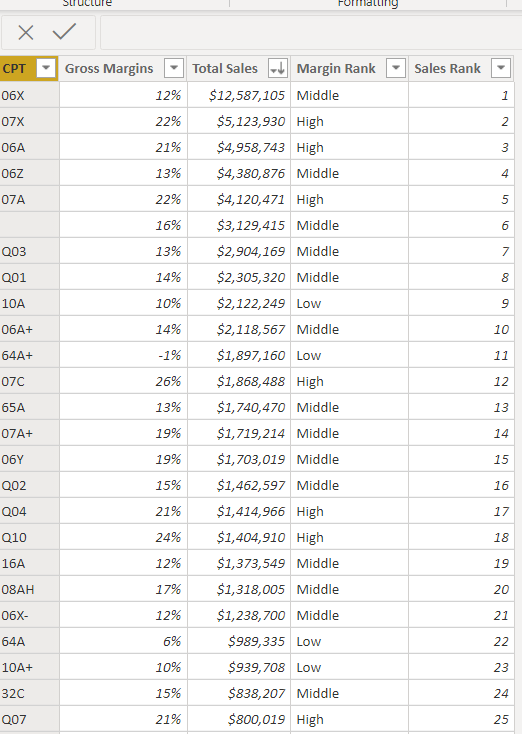
Cumulative sales total within a table using rank?

rank.PNG

 Can anybody refer to me what formula I need to use to calculate the cumulative sales total within this table? I am having trouble doing so 

2 ACCEPTED SOLUTIONS
Fowmy
Super User
Super User

@cdawidow 

You need to have a column like dates or any category that is related to each line where you can do the accumulation?

This would be that formula and needs to be adjusted. You share some table with dummy data. 

CALCULATE (
        SUM ( TableName[Sales Amount] ),        FILTER (
            ALL( TableName),
            TableName[Date] <= EARLIER ( TableName[DATE] )
        )
    ),


________________________

Did I answer your question? Mark this post as a solution, this will help others!.

Click on the Thumbs-Up icon on the right if you like this reply 🙂

YouTube, LinkedIn

Did I answer your question? Mark my post as a solution! and hit thumbs up


Subscribe and learn Power BI from these videos

Website LinkedIn PBI User Group

View solution in original post

Anonymous
Not applicable

@cdawidow Not very clear.


Do you want to obtain cumulative sales based on sales rank?

i.e. 1, 1+2, 1+2+3 .... 

View solution in original post

3 REPLIES 3
Anonymous
Not applicable

@cdawidow Not very clear.


Do you want to obtain cumulative sales based on sales rank?

i.e. 1, 1+2, 1+2+3 .... 

Fowmy
Super User
Super User

@cdawidow 

You need to have a column like dates or any category that is related to each line where you can do the accumulation?

This would be that formula and needs to be adjusted. You share some table with dummy data. 

CALCULATE (
        SUM ( TableName[Sales Amount] ),        FILTER (
            ALL( TableName),
            TableName[Date] <= EARLIER ( TableName[DATE] )
        )
    ),


________________________

Did I answer your question? Mark this post as a solution, this will help others!.

Click on the Thumbs-Up icon on the right if you like this reply 🙂

YouTube, LinkedIn

Did I answer your question? Mark my post as a solution! and hit thumbs up


Subscribe and learn Power BI from these videos

Website LinkedIn PBI User Group

Hi @cdawidow ,


Not very clear but you can try this.


You can try this measure


RRT =
VAR _rankval =
    MAX ( 'Table'[SalesRank] )
RETURN
    CALCULATE (
        SUM ( 'Table'[Total Sales] ),
        'Table'[SalesRank] <= _rankval
    )


Incase this does not work share the sample data in text format and required output.


Regards,

Harsh Nathani

Helpful resources

Announcements
November Power BI Update Carousel

Power BI Monthly Update - November 2025

Check out the November 2025 Power BI update to learn about new features.

Fabric Data Days Carousel

Fabric Data Days

Advance your Data & AI career with 50 days of live learning, contests, hands-on challenges, study groups & certifications and more!

FabCon Atlanta 2026 carousel

FabCon Atlanta 2026

Join us at FabCon Atlanta, March 16-20, for the ultimate Fabric, Power BI, AI and SQL community-led event. Save $200 with code FABCOMM.