FabCon is coming to Atlanta
Join us at FabCon Atlanta from March 16 - 20, 2026, for the ultimate Fabric, Power BI, AI and SQL community-led event. Save $200 with code FABCOMM.
Register now!- Power BI forums
- Get Help with Power BI
- Desktop
- Service
- Report Server
- Power Query
- Mobile Apps
- Developer
- DAX Commands and Tips
- Custom Visuals Development Discussion
- Health and Life Sciences
- Power BI Spanish forums
- Translated Spanish Desktop
- Training and Consulting
- Instructor Led Training
- Dashboard in a Day for Women, by Women
- Galleries
- Data Stories Gallery
- Themes Gallery
- Contests Gallery
- Quick Measures Gallery
- Notebook Gallery
- Translytical Task Flow Gallery
- TMDL Gallery
- R Script Showcase
- Webinars and Video Gallery
- Ideas
- Custom Visuals Ideas (read-only)
- Issues
- Issues
- Events
- Upcoming Events
Calling all Data Engineers! Fabric Data Engineer (Exam DP-700) live sessions are back! Starting October 16th. Sign up.
- Power BI forums
- Forums
- Get Help with Power BI
- DAX Commands and Tips
- Re: Cumulative Total with Dates Sliced by Separate...
- Subscribe to RSS Feed
- Mark Topic as New
- Mark Topic as Read
- Float this Topic for Current User
- Bookmark
- Subscribe
- Printer Friendly Page


- Mark as New
- Bookmark
- Subscribe
- Mute
- Subscribe to RSS Feed
- Permalink
- Report Inappropriate Content
Cumulative Total with Dates Sliced by Separate Table
Hi All,
I'm trying to build a dynamic cumulative totals measure, where the date dimension is able to be sliced by the data ranges from an iterations dimension. The measure the I'm working off of is the following, which lets me slice the dates to get the correct results:
CALCULATE (
    SUM ( FactTimeRegistrations[Hours] ),
    FILTER ( ALLSELECTED ( DimDate[Date] ) , DimDate[Date] <= MAX ( DimDate[Date] ) )
)
However, I want to add an additional filter to be able to slice the date based off of the date range from a given iteration, but I have been unsuccessful so far.
The three tables that the meassure would be using are these:
Any help would be greatly appreciated!
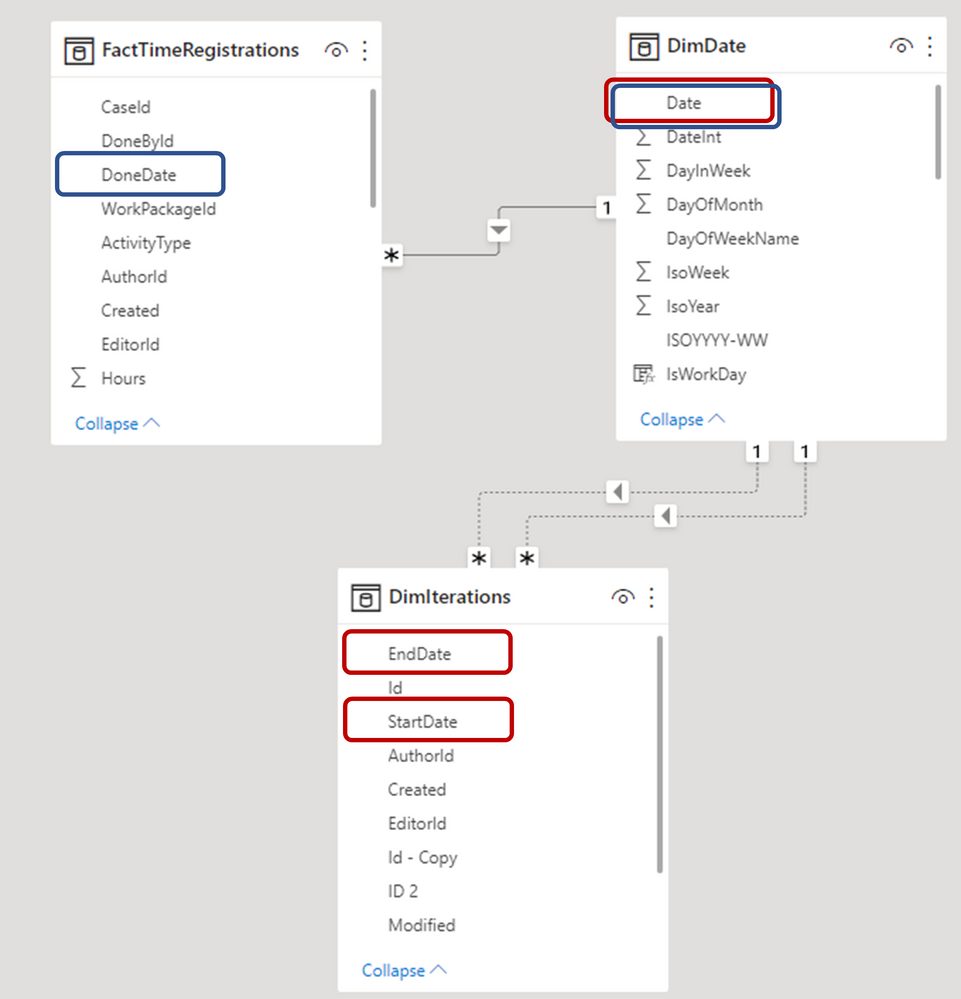
Solved! Go to Solution.


- Mark as New
- Bookmark
- Subscribe
- Mute
- Subscribe to RSS Feed
- Permalink
- Report Inappropriate Content
HI @MAVIE
Please try
Hours RT =
VAR T1 =
    FILTER ( ALLSELECTED ( DimDate[Date] ), DimDate[Date] <= MAX ( DimDate[Date] ) )
VAR StartDate =
    MAXX ( FactTimeRegistrations, RELATED ( DimIterations[StartDate] ) )
VAR EndDate =
    MAXX ( FactTimeRegistrations, RELATED ( DimIterations[EndDate] ) )
VAR T2 =
    CALENDAR ( StartDate, EndDate )
RETURN
CALCULATE ( SUM ( FactTimeRegistrations[Hours] ), INTERSECT ( T1, T2 ) )- Mark as New
- Bookmark
- Subscribe
- Mute
- Subscribe to RSS Feed
- Permalink
- Report Inappropriate Content
@MAVIE
First create realtionship as follows
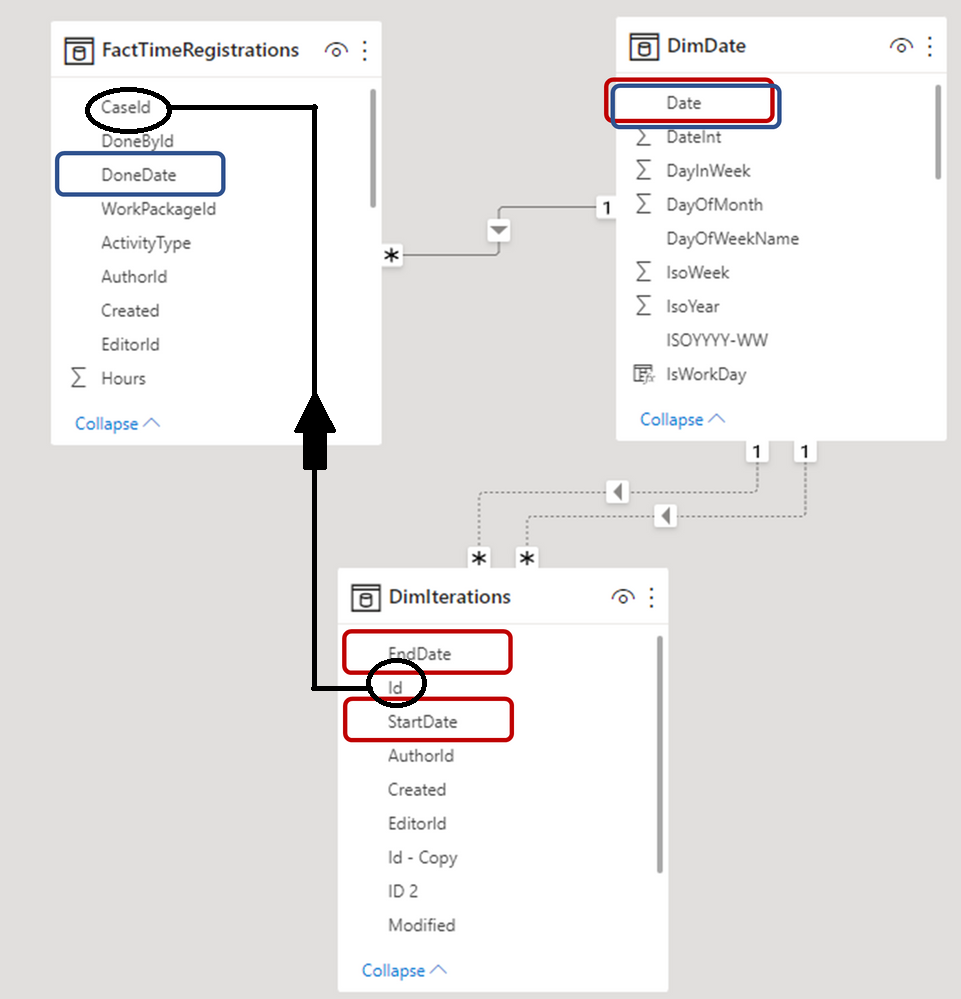
Then use
Hours RT =
VAR T1 =
    FILTER ( ALLSELECTED ( DimDate[Date] ), DimDate[Date] <= MAX ( DimDate[Date] ) )
VAR T2 =
    CALENDAR (
        RELATED ( DimIterations[StartDate] ),
        RELATED ( DimIterations[EndDate] )
    )
RETURN
CALCULATE ( SUM ( FactTimeRegistrations[Hours] ), INTERSECT ( T1, T2 ) )- Mark as New
- Bookmark
- Subscribe
- Mute
- Subscribe to RSS Feed
- Permalink
- Report Inappropriate Content
Hi @tamerj1
I should have clarified the relationship. Iterations if connected to TimeRegistrations in this manner:
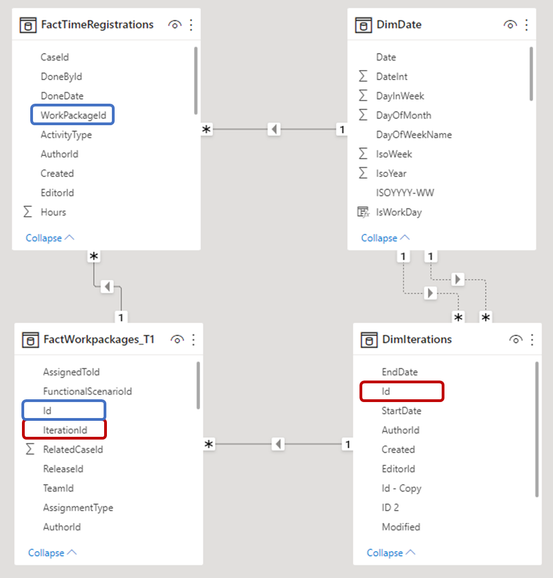
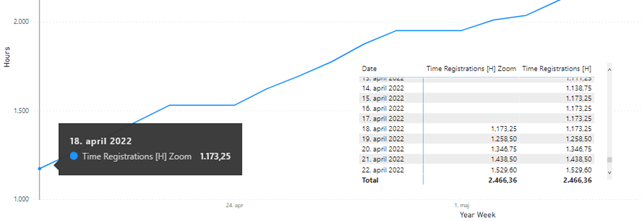
Also the chart that I'm creating looks as such, which has been sliced on the desired iteration. The issue then is that that have data point from before the iteration which should not be included in the calculation.
- Mark as New
- Bookmark
- Subscribe
- Mute
- Subscribe to RSS Feed
- Permalink
- Report Inappropriate Content
Hi @MAVIE
The same code above shall remain applicable. Please check and let me know which results you get. Thank you
- Mark as New
- Bookmark
- Subscribe
- Mute
- Subscribe to RSS Feed
- Permalink
- Report Inappropriate Content
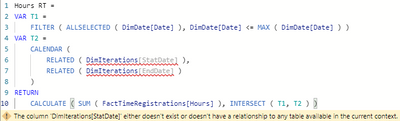
Using that measure I get the following error
- Mark as New
- Bookmark
- Subscribe
- Mute
- Subscribe to RSS Feed
- Permalink
- Report Inappropriate Content
HI @MAVIE
Please try
Hours RT =
VAR T1 =
    FILTER ( ALLSELECTED ( DimDate[Date] ), DimDate[Date] <= MAX ( DimDate[Date] ) )
VAR StartDate =
    MAXX ( FactTimeRegistrations, RELATED ( DimIterations[StartDate] ) )
VAR EndDate =
    MAXX ( FactTimeRegistrations, RELATED ( DimIterations[EndDate] ) )
VAR T2 =
    CALENDAR ( StartDate, EndDate )
RETURN
CALCULATE ( SUM ( FactTimeRegistrations[Hours] ), INTERSECT ( T1, T2 ) )- Mark as New
- Bookmark
- Subscribe
- Mute
- Subscribe to RSS Feed
- Permalink
- Report Inappropriate Content
Hi @tamerj1
This measure seems to work as intended. If anything else goes wrong, I'll try to share some test data with you.
Thank you very much for your help!
- Mark as New
- Bookmark
- Subscribe
- Mute
- Subscribe to RSS Feed
- Permalink
- Report Inappropriate Content
- Mark as New
- Bookmark
- Subscribe
- Mute
- Subscribe to RSS Feed
- Permalink
- Report Inappropriate Content

Helpful resources

FabCon Global Hackathon
Join the Fabric FabCon Global Hackathon—running virtually through Nov 3. Open to all skill levels. $10,000 in prizes!

Power BI Monthly Update - September 2025
Check out the September 2025 Power BI update to learn about new features.

FabCon Atlanta 2026
Join us at FabCon Atlanta, March 16-20, for the ultimate Fabric, Power BI, AI and SQL community-led event. Save $200 with code FABCOMM.


| User | Count |
|---|---|
| 14 | |
| 13 | |
| 11 | |
| 10 | |
| 10 |


