cancel
Showing results for 
Search instead for 
Did you mean: 

The Power BI Data Visualization World Championships is back! Get ahead of the game and start preparing now! Learn more

Reply
peterknowlton
Frequent Visitor

Creating a new column with only a portion of another

For example, one column has

01r01

02r10

05r1

07r9

and I want to create a column that contains only the numbers after the r. So for example,

01

10

1

9

2 ACCEPTED SOLUTIONS

Hi,

Thank you for your feedback.

Please try the below for creating a calculated column for what you need. 

Simply put +1 at the very end of the DAX formula.


Expected column CC = 
VAR _length =
    LEN ( Data[ColumnA] )
VAR _locationofR =
    SEARCH ( "r", Data[ColumnA], 1 )
RETURN
    RIGHT ( Data[ColumnA], _length - _locationofR +1 )


If this post helps, then please consider accepting it as the solution to help other members find it faster, and give a big thumbs up.


Click here to visit my LinkedIn page

Click here to schedule a short Teams meeting to discuss your question.

View solution in original post

Thank you, this is perfect!

View solution in original post

5 REPLIES 5
Jihwan_Kim
Super User
Super User

Hi,

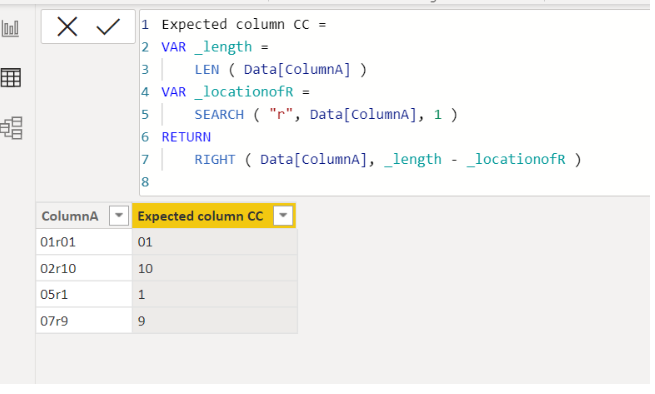
Please check the below picture and the attached pbix file.

It is for creating a calculated column.


Untitled.png


Expected column CC =
VAR _length =
    LEN ( Data[ColumnA] )
VAR _locationofR =
    SEARCH ( "r", Data[ColumnA], 1 )
RETURN
    RIGHT ( Data[ColumnA], _length - _locationofR )

If this post helps, then please consider accepting it as the solution to help other members find it faster, and give a big thumbs up.


Click here to visit my LinkedIn page

Click here to schedule a short Teams meeting to discuss your question.

This is perfect, thank you! One last thing, if I want to include the "r" each time how do I do that?

So 

r01

r10

r1

r9

Hi,

Thank you for your feedback.

Please try the below for creating a calculated column for what you need. 

Simply put +1 at the very end of the DAX formula.


Expected column CC = 
VAR _length =
    LEN ( Data[ColumnA] )
VAR _locationofR =
    SEARCH ( "r", Data[ColumnA], 1 )
RETURN
    RIGHT ( Data[ColumnA], _length - _locationofR +1 )


If this post helps, then please consider accepting it as the solution to help other members find it faster, and give a big thumbs up.


Click here to visit my LinkedIn page

Click here to schedule a short Teams meeting to discuss your question.

Thank you, this is perfect!

tamerj1
Super User
Super User

Hi @peterknowlton 

please try

MID ( tablename[Column], 4, LEN ( tablename[Column] ) - 3 )

unless it is more complex than the examples. 

Helpful resources

Announcements
Power BI DataViz World Championships

Power BI Dataviz World Championships

The Power BI Data Visualization World Championships is back! Get ahead of the game and start preparing now!

November Power BI Update Carousel

Power BI Monthly Update - November 2025

Check out the November 2025 Power BI update to learn about new features.

FabCon Atlanta 2026 carousel

FabCon Atlanta 2026

Join us at FabCon Atlanta, March 16-20, for the ultimate Fabric, Power BI, AI and SQL community-led event. Save $200 with code FABCOMM.