Join us at FabCon Atlanta from March 16 - 20, 2026, for the ultimate Fabric, Power BI, AI and SQL community-led event. Save $200 with code FABCOMM.
Register now!The Power BI Data Visualization World Championships is back! Get ahead of the game and start preparing now! Learn more
Hi PowerBI experts,
I'm new to Power BI so seeking help from you guys.
I have two tables
- Table A with companies' monthly target for multiple products, so you could imagine each company has multiple rows to products, and each product has multuple rows to each month.
- Table B with companies' monthly sales, format is the same as above but only differences is actual sales value.
Many thanks!
Kind regards,
CT.MAH
I'd like to combine these into a matrix visualization, which shows at companies level (row) , each month (column) , target VS actual sales VS % of actual/sales.
How do i add a custom column to the matrix with formula that sum-up the monthly target & sales?
then for each target & sales row there will be % of actual/sales ?
So for each row, repetative of target, sales & % for each month.
Solved! Go to Solution.
@ctmah , based on the month format you can create a date and join them with date table and do analysis. Or you can create common month and other dimension tables and do analysis
date = date([Year],[Month],1) //if you have year and month column
date = date(left([month-year],4),right([month-year],2),1) // in 202002 format
date = "01-" & [Month-year] //format Jan-2020
refer :https://youtu.be/yPQ9UV37LOU
Create date month or common dimension table using two table
https://www.seerinteractive.com/blog/join-many-many-power-bi/
To get the best of the time intelligence function. Make sure you have a date calendar and it has been marked as the date in model view. Also, join it with the date column of your fact/s. Refer :
https://radacad.com/creating-calendar-table-in-power-bi-using-dax-functions
https://www.archerpoint.com/blog/Posts/creating-date-table-power-bi
https://www.sqlbi.com/articles/creating-a-simple-date-table-in-dax/
See if my webinar on Time Intelligence can help: https://community.powerbi.com/t5/Webinars-and-Video-Gallery/PowerBI-Time-Intelligence-Calendar-WTD-Y...
Appreciate your Kudos.
@ctmah , based on the month format you can create a date and join them with date table and do analysis. Or you can create common month and other dimension tables and do analysis
date = date([Year],[Month],1) //if you have year and month column
date = date(left([month-year],4),right([month-year],2),1) // in 202002 format
date = "01-" & [Month-year] //format Jan-2020
refer :https://youtu.be/yPQ9UV37LOU
Create date month or common dimension table using two table
https://www.seerinteractive.com/blog/join-many-many-power-bi/
To get the best of the time intelligence function. Make sure you have a date calendar and it has been marked as the date in model view. Also, join it with the date column of your fact/s. Refer :
https://radacad.com/creating-calendar-table-in-power-bi-using-dax-functions
https://www.archerpoint.com/blog/Posts/creating-date-table-power-bi
https://www.sqlbi.com/articles/creating-a-simple-date-table-in-dax/
See if my webinar on Time Intelligence can help: https://community.powerbi.com/t5/Webinars-and-Video-Gallery/PowerBI-Time-Intelligence-Calendar-WTD-Y...
Appreciate your Kudos.
Hi,
Thanks a lot for your sharing. I managed to create Date table based on the videos you've shared. the YTD, MTD..etc will be explored later😊
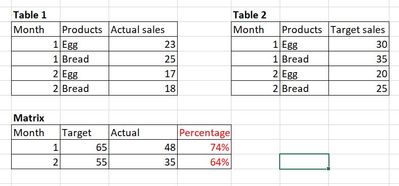
If i simply has the 2 tables below, i wish to create a measure to calculate the percentage as in red, what's they syntax i can use?
Thanks again!
The Power BI Data Visualization World Championships is back! Get ahead of the game and start preparing now!
Check out the November 2025 Power BI update to learn about new features.
| User | Count |
|---|---|
| 19 | |
| 10 | |
| 9 | |
| 4 | |
| 4 |
| User | Count |
|---|---|
| 34 | |
| 32 | |
| 20 | |
| 12 | |
| 11 |