Join us at FabCon Atlanta from March 16 - 20, 2026, for the ultimate Fabric, Power BI, AI and SQL community-led event. Save $200 with code FABCOMM.
Register now!The Power BI Data Visualization World Championships is back! Get ahead of the game and start preparing now! Learn more
Hi All,
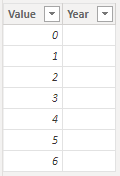
I have created a new table that takes two years and generates a series of values of as many years. Here is the first column:
Years =
VAR MinDate = MIN(Projects[ProjectStartDate])
VAR MaxDate = MAX(Projects[ProjectFinishDate])
VAR ProjectTotalYears = DATEDIFF(MinDate, MaxDate,YEAR)
RETURN
GENERATESERIES(0, ProjectTotalYears, 1)
This results in the first columen "Value"
In the Year column, I would like to populate the years between MinDate and MaxDate. If the earliest date is in 2020 and the latest date is 2026, I would like to create the year column to populate with [2020, 2021, 2022, 2023, 2024, 2025, 2026], based on dates given. I was able to figure it out how to do it with months, but not years.
Any help would be great, thanks! 🙂
Minerva
Solved! Go to Solution.
Hi @minervag
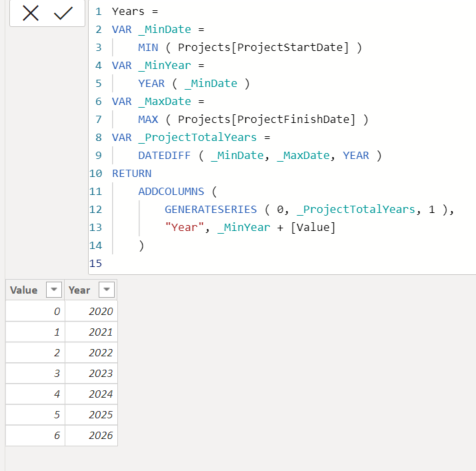
Trt this code:
Years =
VAR _MinDate =
MIN ( Projects[ProjectStartDate] )
VAR _MinYear =
YEAR ( _MinDate )
VAR _MaxDate =
MAX ( Projects[ProjectFinishDate] )
VAR _ProjectTotalYears =
DATEDIFF ( _MinDate, _MaxDate, YEAR )
RETURN
ADDCOLUMNS (
GENERATESERIES ( 0, _ProjectTotalYears, 1 ),
"Year", _MinYear + [Value]
)
Output:
If this post helps, please consider accepting it as the solution to help the other members find it more quickly.
Appreciate your Kudos!!
LinkedIn: www.linkedin.com/in/vahid-dm/
Hi @minervag
Trt this code:
Years =
VAR _MinDate =
MIN ( Projects[ProjectStartDate] )
VAR _MinYear =
YEAR ( _MinDate )
VAR _MaxDate =
MAX ( Projects[ProjectFinishDate] )
VAR _ProjectTotalYears =
DATEDIFF ( _MinDate, _MaxDate, YEAR )
RETURN
ADDCOLUMNS (
GENERATESERIES ( 0, _ProjectTotalYears, 1 ),
"Year", _MinYear + [Value]
)
Output:
If this post helps, please consider accepting it as the solution to help the other members find it more quickly.
Appreciate your Kudos!!
LinkedIn: www.linkedin.com/in/vahid-dm/
Hi VahidDM,
Thank you for responding! 🙂
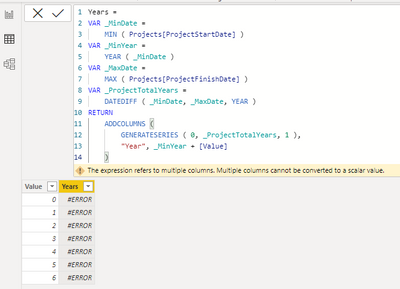
I tried this solution and it gave me an error saying, "A table of multiple values was supplied where a single value was expected". I tried changing ADDCOLUMNS to SELECTCOLUMNS like @AlexisOlson suggested, but I got the same error.
Here is the error:
Minerva
It seems you used that code to add a new column, you need to use that code to add a new TABLE.
If this post helps, please consider accepting it as the solution to help the other members find it more quickly.
Appreciate your Kudos!!
LinkedIn: www.linkedin.com/in/vahid-dm/
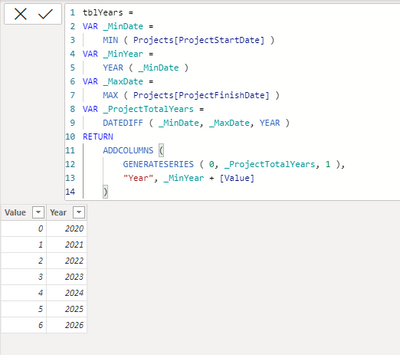
@VahidDM - Never mind! I misunderstood and tried to add it as a seperate column. Once I replied to you, I thought it through and realized that I should try this code as a new table... and it worked!
Thank you, thank you! I appreciate it. 🙂
Success:
The Power BI Data Visualization World Championships is back! Get ahead of the game and start preparing now!
Check out the November 2025 Power BI update to learn about new features.
| User | Count |
|---|---|
| 19 | |
| 10 | |
| 9 | |
| 4 | |
| 4 |
| User | Count |
|---|---|
| 34 | |
| 32 | |
| 20 | |
| 12 | |
| 11 |