Join us at FabCon Atlanta from March 16 - 20, 2026, for the ultimate Fabric, Power BI, AI and SQL community-led event. Save $200 with code FABCOMM.
Register now!The Power BI Data Visualization World Championships is back! Get ahead of the game and start preparing now! Learn more
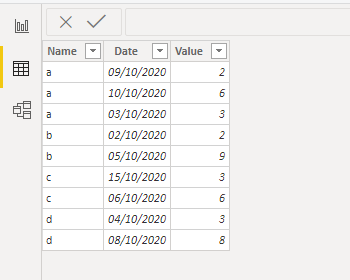
Hi! I created this example for the problem, i have this table:
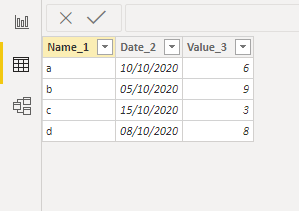
and i would like to create a new calculated table with unique "Name" values where "Date" displays the last date and te corresponding value of the column "value", something like this behind: (this is just a example that i made in excel)
i tried SUMMARIZE, but doesn't seems to work, I'm missing something.
Thank you all for your help!!
Solved! Go to Solution.
Hi @Anonymous
NewTable =
FILTER (
Table1,
Table1[Date] = CALCULATE ( MAX ( Table1[Date] ), ALLEXCEPT ( Table1, Table1[Name] ) )
)
Please mark the question solved when done and consider giving kudos if posts are helpful.
Contact me privately for support with any larger-scale BI needs, tutoring, etc.
Cheers
Hi @Anonymous
NewTable =
FILTER (
Table1,
Table1[Date] = CALCULATE ( MAX ( Table1[Date] ), ALLEXCEPT ( Table1, Table1[Name] ) )
)
Please mark the question solved when done and consider giving kudos if posts are helpful.
Contact me privately for support with any larger-scale BI needs, tutoring, etc.
Cheers
Check out the November 2025 Power BI update to learn about new features.
Advance your Data & AI career with 50 days of live learning, contests, hands-on challenges, study groups & certifications and more!
| User | Count |
|---|---|
| 20 | |
| 10 | |
| 9 | |
| 4 | |
| 4 |
| User | Count |
|---|---|
| 33 | |
| 31 | |
| 19 | |
| 12 | |
| 10 |