
cancel
Showing results for 
Search instead for 
Did you mean: 

The Power BI Data Visualization World Championships is back! Get ahead of the game and start preparing now! Learn more

Reply
Anonymous
Not applicable

Create a filter based on a measure

I have a dataset with a lot of tickets.

A tickets has an id, an open date, a start date and a close date.


The end user has to possibility to select a single date and this will change the status of the tickets.


For example:


ID, Open Date, Start Date, Close Date

1, 01/01/2019, 10/02/2019, 12/03/2019

2, 01/02/2019, 10/01/2019, 12/01/2019


If the date selected is between Open Date and Start Date a ticket is open, if is between Start Date and Close Date the ticket is started, if is after Close Date the ticket is Closed.


I'd like to have a filter that on the context of the data selected, will give only the open, or the started, or the closed tickets.


I can't do it with a measure because I can't set a measure as a filter and I can't do it with a calculated column because is not dynamic.


Any suggestion if it is possible and how?

1 ACCEPTED SOLUTION
lc_finance
Solution Sage
Solution Sage

Hi @Anonymous ,


Yes, it's possible. You can download my solution proposal from here.


Here are the steps to obtain that:

1) Create a calculated Date table (Modeling -> New Table). You can create it with the following DAX formula:

Date = CALENDARAUTO()

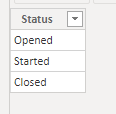
2) Create a non-calculated Status Table (Home -> Enter Data).

Status Table.png


3) Create a calculated measure to obtain the current status. The status will depend on:

- the date selected (the status will be different based on the data)

- the status selected ('opened' tickets will be shown only if there is an 'opened' filter in Status or no filter in Status)

Here is the DAX formula:

Current Status = 
VAR selectedDate = MAX('Date'[Date])

VAR openDate = SELECTEDVALUE('Tickets'[Open Date])
VAR startDate = SELECTEDVALUE('Tickets'[Start Date])
VAR closeDate = SELECTEDVALUE('Tickets'[Close Date])

VAR ticketStatus = IF(selectedDate<openDate, BLANK(), IF(selectedDate<startDate,"Opened",IF(selectedDate<closeDate,"Started","Closed")))

VAR isStatusFiltered = ISFILTERED('Status'[Status])

RETURN IF(isStatusFiltered, IF(ticketStatus=SELECTEDVALUE('Status'[Status]),ticketStatus,BLANK()), ticketStatus)

Below is a screenshot of what it looks like:

Filter tickets.png 


Hope this helps you. 


LC

Interested in Power BI and DAX templates? Check out my blog at www.finance-bi.com


View solution in original post

4 REPLIES 4
lc_finance
Solution Sage
Solution Sage

Hi @Anonymous ,


Yes, it's possible. You can download my solution proposal from here.


Here are the steps to obtain that:

1) Create a calculated Date table (Modeling -> New Table). You can create it with the following DAX formula:

Date = CALENDARAUTO()

2) Create a non-calculated Status Table (Home -> Enter Data).

Status Table.png


3) Create a calculated measure to obtain the current status. The status will depend on:

- the date selected (the status will be different based on the data)

- the status selected ('opened' tickets will be shown only if there is an 'opened' filter in Status or no filter in Status)

Here is the DAX formula:

Current Status = 
VAR selectedDate = MAX('Date'[Date])

VAR openDate = SELECTEDVALUE('Tickets'[Open Date])
VAR startDate = SELECTEDVALUE('Tickets'[Start Date])
VAR closeDate = SELECTEDVALUE('Tickets'[Close Date])

VAR ticketStatus = IF(selectedDate<openDate, BLANK(), IF(selectedDate<startDate,"Opened",IF(selectedDate<closeDate,"Started","Closed")))

VAR isStatusFiltered = ISFILTERED('Status'[Status])

RETURN IF(isStatusFiltered, IF(ticketStatus=SELECTEDVALUE('Status'[Status]),ticketStatus,BLANK()), ticketStatus)

Below is a screenshot of what it looks like:

Filter tickets.png 


Hope this helps you. 


LC

Interested in Power BI and DAX templates? Check out my blog at www.finance-bi.com


Anonymous
Not applicable

Your solution works like a charm!


Nice idea to use a non calculated status table using it for the filter and matching it with the measure.


Many thanks

HI @Anonymous ,


glad this helped you!


Do not hesitate if you have further questions,


LC

Anonymous
Not applicable

Hi @lc_finance ,

I have a problem with your solution.

If, for example, I'd like to count the number of ticket with a simple card, the status filter will not work on it.


To replicate it, just add a card, select the Tickets[ID] and use the count function on it.

It will always show 2.


Helpful resources

Announcements
Power BI DataViz World Championships

Power BI Dataviz World Championships

The Power BI Data Visualization World Championships is back! Get ahead of the game and start preparing now!

December 2025 Power BI Update Carousel

Power BI Monthly Update - December 2025

Check out the December 2025 Power BI Holiday Recap!

FabCon Atlanta 2026 carousel

FabCon Atlanta 2026

Join us at FabCon Atlanta, March 16-20, for the ultimate Fabric, Power BI, AI and SQL community-led event. Save $200 with code FABCOMM.