Join us at FabCon Atlanta from March 16 - 20, 2026, for the ultimate Fabric, Power BI, AI and SQL community-led event. Save $200 with code FABCOMM.
Register now!The Power BI Data Visualization World Championships is back! Get ahead of the game and start preparing now! Learn more
I have a table currently that I want to create a unique row for an ID for with the columns where values are not null, have that date. See table below (current table) and then see what I am trying to create (future table).
| REF_ID | IA Date | SDO Date |
| 72548 | 1/23/2023 | null |
| 72548 | null | 1/24/2023 |
| 71657 | 2/1/2023 | null |
| 71657 | null | 2/5/2023 |
| 76546 | 12/23/2022 | null |
| 76546 | null | 1/8/2023 |
| 75432 | 2/4/2023 | null |
| 75432 | null | 2/4/2023 |
FUTURE TABLE:
| REF_ID | IA Date | SDO Date |
| 72548 | 1/23/2023 | 1/24/2023 |
| 71657 | 2/1/2023 | 2/5/2023 |
| 76546 | 12/23/2022 | 1/8/2023 |
| 75432 | 2/4/2023 | 2/4/2023 |
hi @LaurenTSloa
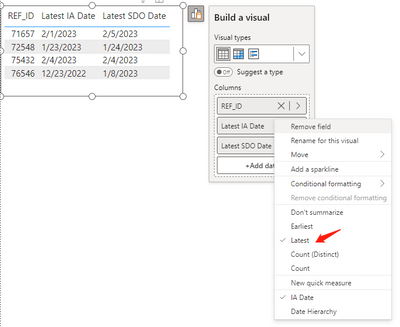
you can plot a table visual with the mentioned three columns directly and choose latest for both data columns, like:
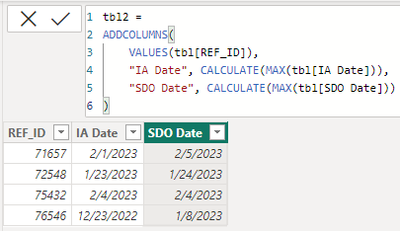
or you create a calculated table with:
tbl2 =
ADDCOLUMNS(
VALUES(tbl[REF_ID]),
"IA Date", CALCULATE(MAX(tbl[IA Date])),
"SDO Date", CALCULATE(MAX(tbl[SDO Date]))
)it worked like:
Create a summary table...
SummaryTable = SUMMARIZE(TableName,REF_IDIA,"Date",MAX([Date]),"SDO Date",MAX([SDO Date]))
The Power BI Data Visualization World Championships is back! Get ahead of the game and start preparing now!
| User | Count |
|---|---|
| 19 | |
| 13 | |
| 10 | |
| 4 | |
| 4 |
| User | Count |
|---|---|
| 31 | |
| 28 | |
| 19 | |
| 11 | |
| 10 |