Join us at FabCon Atlanta from March 16 - 20, 2026, for the ultimate Fabric, Power BI, AI and SQL community-led event. Save $200 with code FABCOMM.
Register now!The Power BI Data Visualization World Championships is back! Get ahead of the game and start preparing now! Learn more
Hello-
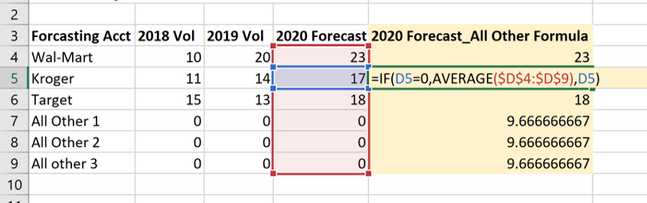
I am looking to re-create the below excel formula using DAX in Power BI.
When I do it in Power BI, I get column results:
23
17
18
0
0
0
The end column result should be the yellow column (like the screenshot above):
23
17
18
9.666
9.666
9.666
I tried DAX Formula -->
But it doesn't work 😞
Solved! Go to Solution.
Hi @Anonymous
try column
Column = if([2020 Forecast_]=0;average(Table1[2020 Forecast_]);[2020 Forecast_])if you do not need a row context
and column
Column = if([2020 Forecast_]=0;calculate(average(Table1[2020 Forecast_]);ALL(Table1));[2020 Forecast_])if you do need
do not hesitate to give a kudo to useful posts and mark solutions as solution
Hi @Anonymous
try column
Column = if([2020 Forecast_]=0;average(Table1[2020 Forecast_]);[2020 Forecast_])if you do not need a row context
and column
Column = if([2020 Forecast_]=0;calculate(average(Table1[2020 Forecast_]);ALL(Table1));[2020 Forecast_])if you do need
do not hesitate to give a kudo to useful posts and mark solutions as solution
Thanks @az38. I had to change the ; to a , but other than that, it worked well. Thank you!
The Power BI Data Visualization World Championships is back! Get ahead of the game and start preparing now!
| User | Count |
|---|---|
| 19 | |
| 13 | |
| 9 | |
| 4 | |
| 4 |
| User | Count |
|---|---|
| 30 | |
| 26 | |
| 17 | |
| 11 | |
| 10 |