FabCon is coming to Atlanta
Join us at FabCon Atlanta from March 16 - 20, 2026, for the ultimate Fabric, Power BI, AI and SQL community-led event. Save $200 with code FABCOMM.
Register now!- Power BI forums
- Get Help with Power BI
- Desktop
- Service
- Report Server
- Power Query
- Mobile Apps
- Developer
- DAX Commands and Tips
- Custom Visuals Development Discussion
- Health and Life Sciences
- Power BI Spanish forums
- Translated Spanish Desktop
- Training and Consulting
- Instructor Led Training
- Dashboard in a Day for Women, by Women
- Galleries
- Data Stories Gallery
- Themes Gallery
- Contests Gallery
- Quick Measures Gallery
- Notebook Gallery
- Translytical Task Flow Gallery
- TMDL Gallery
- R Script Showcase
- Webinars and Video Gallery
- Ideas
- Custom Visuals Ideas (read-only)
- Issues
- Issues
- Events
- Upcoming Events
To celebrate FabCon Vienna, we are offering 50% off select exams. Ends October 3rd. Request your discount now.
- Power BI forums
- Forums
- Get Help with Power BI
- DAX Commands and Tips
- Re: Count working days of running month [Friday is...
- Subscribe to RSS Feed
- Mark Topic as New
- Mark Topic as Read
- Float this Topic for Current User
- Bookmark
- Subscribe
- Printer Friendly Page

- Mark as New
- Bookmark
- Subscribe
- Mute
- Subscribe to RSS Feed
- Permalink
- Report Inappropriate Content
Count working days of running month [Friday is weekend only] & Days elapsed
Hi Experts,
Please help me out!
Struggling to create a measure which will return total working days of current month dynamically [please note, Friday is only weekend in my organization]. I would also want to exclude holidays. I have a calendar table [see scrrenshot], now I want to calculate two measures
1. Total working days of current month
2. Days Elapsed = First Date of current month - Today () -1 [Excluding weekends and holidays]
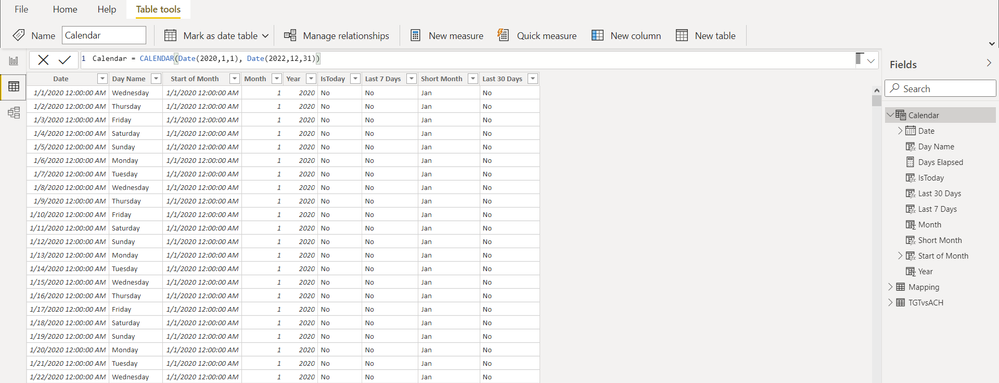
Thans in advance
Mamun
Solved! Go to Solution.


- Mark as New
- Bookmark
- Subscribe
- Mute
- Subscribe to RSS Feed
- Permalink
- Report Inappropriate Content
Hey @mamunabdullah ,
I think I could solve your issue.
In your Calendar table add a new calculated column with the following formula:
Is working day =
VAR vIsRegularWorkingDay =
    IF(
        WEEKDAY( 'Calendar'[Date], 2 )
            IN { 1, 2, 3, 4 },
        1,
        0
    )
VAR vIsHoliday =
    IF(
        RELATED( Holidays2021[Date] ) <> BLANK(),
        "Holiday",
        "No Holiday"
    )
RETURN
    IF(
        vIsRegularWorkingDay = 1 && vIsHoliday = "No Holiday",
        1,
        0
    )
You can also split that into 3 columns (Is regular Working Day, Is Holiday and Is Working Day.
Like this you will have all working days and also subtracted by the holidays.
Then for the elapsed days in current month I would split it in 3 measures:
1. The working days in the current month:
Working Days in current Month =
CALCULATE(
    SUM( 'Calendar'[Is working day] ),
    'Calendar'[Year] = YEAR( TODAY() ) && 'Calendar'[Month] = MONTH( TODAY() )
)
2. The elapsed days in current month:
Days Elapsed in current Month =
CALCULATE(
    SUM( 'Calendar'[Is working day] ),
    'Calendar'[Date] <= TODAY(),
    'Calendar'[Year] = YEAR( TODAY() ) && 'Calendar'[Month] = MONTH( TODAY() )
)
3. The measure that returns the percentage in the current month:
Days Elapsed percent =
DIVIDE(
    [Days Elapsed in current Month],
    [Working Days in current Month]
)
I think like this you should be able to solve all of your issues.

- Mark as New
- Bookmark
- Subscribe
- Mute
- Subscribe to RSS Feed
- Permalink
- Report Inappropriate Content
Hi,
I also have a similar requirement in my Power BI report. I want to know, in case of getting the Elapsed percentages for previous months using a slicer/filter how can we change these measures to caluculate the % dynamically?
When I tried this measure for my requirement it only gives the correct value for the current month not an elapsed percentage of 100% for the previous month/s.
- Mark as New
- Bookmark
- Subscribe
- Mute
- Subscribe to RSS Feed
- Permalink
- Report Inappropriate Content
Hi @user_dil
you can use variables so your slicer can get you prefered data.
Here's my dax which doesnt return days elapsed of previous months. This is FYI
- Mark as New
- Bookmark
- Subscribe
- Mute
- Subscribe to RSS Feed
- Permalink
- Report Inappropriate Content
Hey @mamunabdullah ,
to get the working days the following measure should help you:
Amount working day =
CALCULATE(
    COUNTROWS( Calendar ),
    Calendar[Day Name]
        IN {
        "Monday",
        "Tuesday",
        "Wednesday",
        "Thursday"
    }
)
- Mark as New
- Bookmark
- Subscribe
- Mute
- Subscribe to RSS Feed
- Permalink
- Report Inappropriate Content
Hi @selimovd
Thanks for your time, the measure you suggested retuns total days from entire date range. What I was looking for is total number of working days of current month. E.g 27 is total working days in August if you exclude Fridays. Plus 15th August is the local national holiday, so I would like to exclude this too.
- Mark as New
- Bookmark
- Subscribe
- Mute
- Subscribe to RSS Feed
- Permalink
- Report Inappropriate Content
Hey @mamunabdullah ,
sure, you have to put the month name in the matrix/table and then add the measure I provided. Then it will show by month name.
Where do you have the information that 15th of August is a holiday in the data?
Best regards
Denis
- Mark as New
- Bookmark
- Subscribe
- Mute
- Subscribe to RSS Feed
- Permalink
- Report Inappropriate Content
Hi @selimovd,
Sorry to bother you again, let me tell you what I really need here. I want to see days elapsed percentage [=Days Elapsed/Total Working Days in current month] to compare with my sales achievement. Also with Days Elapsed measure, I would be able to calculate daily average orders till date.
Answering to your question: I have created a separate table as Holidays2021
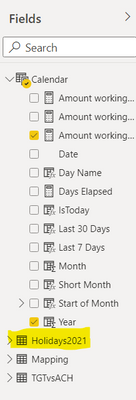
Thanks
Mamun
- Mark as New
- Bookmark
- Subscribe
- Mute
- Subscribe to RSS Feed
- Permalink
- Report Inappropriate Content
Hey @mamunabdullah ,
then you have to integrate that to the calendar table. Maybe add that to the calculated column. If you give more information I can help you.
Your calculation should not be the problem later, that is kind of easy.
Best regards
Denis
- Mark as New
- Bookmark
- Subscribe
- Mute
- Subscribe to RSS Feed
- Permalink
- Report Inappropriate Content
Hey @mamunabdullah ,
I think I could solve your issue.
In your Calendar table add a new calculated column with the following formula:
Is working day =
VAR vIsRegularWorkingDay =
    IF(
        WEEKDAY( 'Calendar'[Date], 2 )
            IN { 1, 2, 3, 4 },
        1,
        0
    )
VAR vIsHoliday =
    IF(
        RELATED( Holidays2021[Date] ) <> BLANK(),
        "Holiday",
        "No Holiday"
    )
RETURN
    IF(
        vIsRegularWorkingDay = 1 && vIsHoliday = "No Holiday",
        1,
        0
    )
You can also split that into 3 columns (Is regular Working Day, Is Holiday and Is Working Day.
Like this you will have all working days and also subtracted by the holidays.
Then for the elapsed days in current month I would split it in 3 measures:
1. The working days in the current month:
Working Days in current Month =
CALCULATE(
    SUM( 'Calendar'[Is working day] ),
    'Calendar'[Year] = YEAR( TODAY() ) && 'Calendar'[Month] = MONTH( TODAY() )
)
2. The elapsed days in current month:
Days Elapsed in current Month =
CALCULATE(
    SUM( 'Calendar'[Is working day] ),
    'Calendar'[Date] <= TODAY(),
    'Calendar'[Year] = YEAR( TODAY() ) && 'Calendar'[Month] = MONTH( TODAY() )
)
3. The measure that returns the percentage in the current month:
Days Elapsed percent =
DIVIDE(
    [Days Elapsed in current Month],
    [Working Days in current Month]
)
I think like this you should be able to solve all of your issues.

Helpful resources

Power BI Monthly Update - September 2025
Check out the September 2025 Power BI update to learn about new features.

Fabric Community Update - August 2025
Find out what's new and trending in the Fabric community.

| User | Count |
|---|---|
| 15 | |
| 9 | |
| 8 | |
| 6 | |
| 5 |


| User | Count |
|---|---|
| 31 | |
| 18 | |
| 15 | |
| 7 | |
| 5 |


