Join us at FabCon Atlanta from March 16 - 20, 2026, for the ultimate Fabric, Power BI, AI and SQL community-led event. Save $200 with code FABCOMM.
Register now!The Power BI Data Visualization World Championships is back! Get ahead of the game and start preparing now! Learn more
Hi ,
I am not able to figure this out.
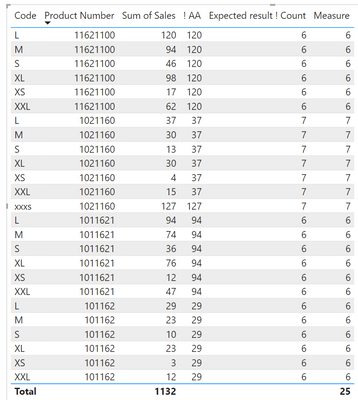
I need to get total number of rows by each Product number. The product number , Sales and Code are from 3 different tables.
I need to get the result like in the last column Expected result count. Thanks a lot.
| Product Number | Sales | Code | ! AA | Expected result ! Count |
| 101162 | 29 | L | 29 | 6 |
| 101162 | 23 | M | 29 | 6 |
| 101162 | 10 | S | 29 | 6 |
| 101162 | 23 | XL | 29 | 6 |
| 101162 | 3 | XS | 29 | 6 |
| 101162 | 12 | XXL | 29 | 6 |
| 1011621 | 94 | L | 94 | 6 |
| 1011621 | 74 | M | 94 | 6 |
| 1011621 | 36 | S | 94 | 6 |
| 1011621 | 76 | XL | 94 | 6 |
| 1011621 | 12 | XS | 94 | 6 |
| 1011621 | 47 | XXL | 94 | 6 |
| 11621100 | 120 | L | 120 | 6 |
| 11621100 | 94 | M | 120 | 6 |
| 11621100 | 46 | S | 120 | 6 |
| 11621100 | 98 | XL | 120 | 6 |
| 11621100 | 17 | XS | 120 | 6 |
| 11621100 | 62 | XXL | 120 | 6 |
| 1021160 | 37 | L | 37 | 7 |
| 1021160 | 30 | M | 37 | 7 |
| 1021160 | 13 | S | 37 | 7 |
| 1021160 | 30 | XL | 37 | 7 |
| 1021160 | 4 | XS | 37 | 7 |
| 1021160 | 15 | XXL | 37 | 7 |
| 1021160 | 127 | xxxs | 127 | 7 |
Solved! Go to Solution.
Hi @Puja
Can you check if the following measure works fine or not and let me know regarding the same.
TestMeasure =
VAR x =
SELECTEDVALUE ( 'Table'[Product Number] )
RETURN
SWITCH (
TRUE (),
x <> x, 98989,
CALCULATE (
COUNTROWS ( FILTER ( 'Table', 'Table'[Product Number] = x ) ),
ALL ( 'Table'[! AA] , 'Table'[Code], 'Table'[Sales])
)
)
Thank you.
If my answer helps you, please mark it as solution.
Hi,
some questions: I think to give a good answer we need the data model. Can you please post the related tables for your matrix. Are you sure, that you want to count everytime the total number in every group of
| Product Number | Sales | Code | ! AA |
By interpreting this data it seems that "! AA" are not change the count: 7x times 1021160 but two different "! AA" numbers.
| 1021160 | 37 | L | 37 | 7 |
| 1021160 | 30 | M | 37 | 7 |
| 1021160 | 13 | S | 37 | 7 |
| 1021160 | 30 | XL | 37 | 7 |
| 1021160 | 4 | XS | 37 | 7 |
| 1021160 | 15 | XXL | 37 | 7 |
| 1021160 | 127 | xxxs | 127 | 7 |
So you have to make it more clear. The best thing are some example data.'
In general a simlar problem is discribed here:
https://community.powerbi.com/t5/DAX-Commands-and-Tips/Measure-for-counting-ignoring-context-filters...
In your case this can work:
Measure = CALCULATE(COUNT('Table'[Product Number]),ALLEXCEPT('Table','Table'[Product Number]))
But you have to change it to your data model / name.
The result (data from one table in this example)
Proud to be a Super User!
Hi,
some questions: I think to give a good answer we need the data model. Can you please post the related tables for your matrix. Are you sure, that you want to count everytime the total number in every group of
| Product Number | Sales | Code | ! AA |
By interpreting this data it seems that "! AA" are not change the count: 7x times 1021160 but two different "! AA" numbers.
| 1021160 | 37 | L | 37 | 7 |
| 1021160 | 30 | M | 37 | 7 |
| 1021160 | 13 | S | 37 | 7 |
| 1021160 | 30 | XL | 37 | 7 |
| 1021160 | 4 | XS | 37 | 7 |
| 1021160 | 15 | XXL | 37 | 7 |
| 1021160 | 127 | xxxs | 127 | 7 |
So you have to make it more clear. The best thing are some example data.'
In general a simlar problem is discribed here:
https://community.powerbi.com/t5/DAX-Commands-and-Tips/Measure-for-counting-ignoring-context-filters...
In your case this can work:
Measure = CALCULATE(COUNT('Table'[Product Number]),ALLEXCEPT('Table','Table'[Product Number]))
But you have to change it to your data model / name.
The result (data from one table in this example)
Proud to be a Super User!
Hi @Puja
Can you check if the following measure works fine or not and let me know regarding the same.
TestMeasure =
VAR x =
SELECTEDVALUE ( 'Table'[Product Number] )
RETURN
SWITCH (
TRUE (),
x <> x, 98989,
CALCULATE (
COUNTROWS ( FILTER ( 'Table', 'Table'[Product Number] = x ) ),
ALL ( 'Table'[! AA] , 'Table'[Code], 'Table'[Sales])
)
)
Thank you.
If my answer helps you, please mark it as solution.
Check out the November 2025 Power BI update to learn about new features.
Advance your Data & AI career with 50 days of live learning, contests, hands-on challenges, study groups & certifications and more!
| User | Count |
|---|---|
| 21 | |
| 10 | |
| 9 | |
| 4 | |
| 4 |
| User | Count |
|---|---|
| 34 | |
| 31 | |
| 20 | |
| 13 | |
| 11 |