FabCon is coming to Atlanta
Join us at FabCon Atlanta from March 16 - 20, 2026, for the ultimate Fabric, Power BI, AI and SQL community-led event. Save $200 with code FABCOMM.
Register now!- Power BI forums
- Get Help with Power BI
- Desktop
- Service
- Report Server
- Power Query
- Mobile Apps
- Developer
- DAX Commands and Tips
- Custom Visuals Development Discussion
- Health and Life Sciences
- Power BI Spanish forums
- Translated Spanish Desktop
- Training and Consulting
- Instructor Led Training
- Dashboard in a Day for Women, by Women
- Galleries
- Data Stories Gallery
- Themes Gallery
- Contests Gallery
- QuickViz Gallery
- Quick Measures Gallery
- Visual Calculations Gallery
- Notebook Gallery
- Translytical Task Flow Gallery
- TMDL Gallery
- R Script Showcase
- Webinars and Video Gallery
- Ideas
- Custom Visuals Ideas (read-only)
- Issues
- Issues
- Events
- Upcoming Events
The Power BI Data Visualization World Championships is back! Get ahead of the game and start preparing now! Learn more
- Power BI forums
- Forums
- Get Help with Power BI
- DAX Commands and Tips
- Re: Count repeated values in a row
- Subscribe to RSS Feed
- Mark Topic as New
- Mark Topic as Read
- Float this Topic for Current User
- Bookmark
- Subscribe
- Printer Friendly Page

- Mark as New
- Bookmark
- Subscribe
- Mute
- Subscribe to RSS Feed
- Permalink
- Report Inappropriate Content
Count repeated values in a row
Hi All,
I have column in data where values are repeating. Can you please suggest me DAX measure or column by which I can Calculate the the number of times a value is repeating in a row.
Customer ID | Product Path | Expected Result
1 A,A,B,B,B,B,B,C,C,C 2-A, 5-B, 3-C
2 G,H,A,B,B 1-G, 1-H, 1-A, 2-B
Thank you so much for any given help.
Chs.
Solved! Go to Solution.


- Mark as New
- Bookmark
- Subscribe
- Mute
- Subscribe to RSS Feed
- Permalink
- Report Inappropriate Content
Hi @Anonymous
Here is a sample file with the solution https://www.dropbox.com/t/tbRUhGvyoNDAZ5xL
I believe a fount a solution for your problem. It is a long code but it works just fine for upto 15 products per row. It can be expanded further if needed.
Please check and let me know if it works with you.
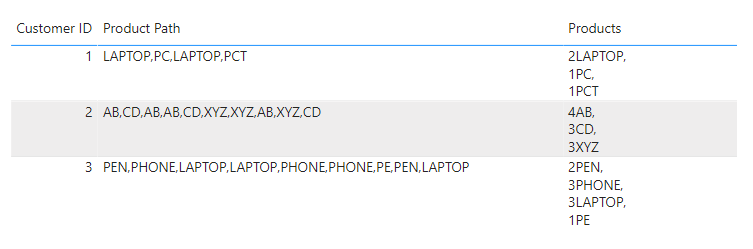
Here is how the table and report look like
And here is the code of the calculated column

Products =
VAR Table1 =
    SELECTCOLUMNS ( { ( [Customer ID], [Product Path] ) }, "Customer ID", [Customer ID], "Product Path", [Product Path] )
VAR Table2 =
    GENERATE (
        Table1,
        VAR Length = LEN ( Store[Product Path] )
        VAR Loc1 = IFERROR ( FIND ( ",", Store[Product Path], 1 ), 0 )
        VAR Loc2 = IFERROR ( FIND ( ",", Store[Product Path], 1 + Loc1 ), 0 )
        VAR Loc3 = IFERROR ( FIND ( ",", Store[Product Path], 1 + Loc2 ), 0 )
        VAR Loc4 = IFERROR ( FIND ( ",", Store[Product Path], 1 + Loc3 ), 0 )
        VAR Loc5 = IFERROR ( FIND ( ",", Store[Product Path], 1 + Loc4 ), 0 )
        VAR Loc6 = IFERROR ( FIND ( ",", Store[Product Path], 1 + Loc5 ), 0 )
        VAR Loc7 = IFERROR ( FIND ( ",", Store[Product Path], 1 + Loc6 ), 0 )
        VAR Loc8 = IFERROR ( FIND ( ",", Store[Product Path], 1 + Loc7 ), 0 )
        VAR Loc9 = IFERROR ( FIND ( ",", Store[Product Path], 1 + Loc8 ), 0 )
        VAR Loc10 = IFERROR ( FIND ( ",", Store[Product Path], 1 + Loc9 ), 0 )
        VAR Loc11 = IFERROR ( FIND ( ",", Store[Product Path], 1 + Loc10 ), 0 )
        VAR Loc12 = IFERROR ( FIND ( ",", Store[Product Path], 1 + Loc11 ), 0 )
        VAR Loc13 = IFERROR ( FIND ( ",", Store[Product Path], 1 + Loc12 ), 0 )
        VAR Loc14 = IFERROR ( FIND ( ",", Store[Product Path], 1 + Loc13 ), 0 )
        VAR Loc15 = IFERROR ( FIND ( ",", Store[Product Path], 1 + Loc14 ), 0 )
        VAR P1 = IF ( Loc1 = 0, Store[Product Path], MID ( Store[Product Path], 1 , Loc1 - 1 ) )
        VAR P2 = IF ( Loc2 = 0, IF ( Loc1 <> 0, MID ( Store[Product Path], 1 + Loc1, Length - Loc1 ) ), MID ( Store[Product Path], 1 + Loc1, Loc2 - Loc1 - 1 ) )
        VAR P3 = IF ( Loc3 = 0, IF ( Loc2 <> 0, MID ( Store[Product Path], 1 + Loc2, Length - Loc2 ) ), MID ( Store[Product Path], 1 + Loc2, Loc3 - Loc2 - 1 ) )
        VAR P4 = IF ( Loc4 = 0, IF ( Loc3 <> 0, MID ( Store[Product Path], 1 + Loc3, Length - Loc3 ) ), MID ( Store[Product Path], 1 + Loc3, Loc4 - Loc3 - 1 ) )
        VAR P5 = IF ( Loc5 = 0, IF ( Loc4 <> 0, MID ( Store[Product Path], 1 + Loc4, Length - Loc4 ) ), MID ( Store[Product Path], 1 + Loc4, Loc5 - Loc4 - 1 ) )
        VAR P6 = IF ( Loc6 = 0, IF ( Loc5 <> 0, MID ( Store[Product Path], 1 + Loc5, Length - Loc5 ) ), MID ( Store[Product Path], 1 + Loc5, Loc6 - Loc5 - 1 ) )
        VAR P7 = IF ( Loc7 = 0, IF ( Loc6 <> 0, MID ( Store[Product Path], 1 + Loc6, Length - Loc6 ) ), MID ( Store[Product Path], 1 + Loc6, Loc7 - Loc6 - 1 ) )
        VAR P8 = IF ( Loc8 = 0, IF ( Loc7 <> 0, MID ( Store[Product Path], 1 + Loc7, Length - Loc7 ) ), MID ( Store[Product Path], 1 + Loc7, Loc8 - Loc7 - 1 ) )
        VAR P9 = IF ( Loc9 = 0, IF ( Loc8 <> 0, MID ( Store[Product Path], 1 + Loc8, Length - Loc8 ) ), MID ( Store[Product Path], 1 + Loc8, Loc9 - Loc8 - 1 ) )
        VAR P10 = IF ( Loc10 = 0, IF ( Loc9 <> 0, MID ( Store[Product Path], 1 + Loc9, Length - Loc9 ) ), MID ( Store[Product Path], 1 + Loc9, Loc10 - Loc9 - 1 ) )
        VAR P11 = IF ( Loc11 = 0, IF ( Loc10 <> 0, MID ( Store[Product Path], 1 + Loc10, Length - Loc10 ) ), MID ( Store[Product Path], 1 + Loc10, Loc11 - Loc10 - 1 ) )
        VAR P12 = IF ( Loc12 = 0, IF ( Loc11 <> 0, MID ( Store[Product Path], 1 + Loc11, Length - Loc11 ) ), MID ( Store[Product Path], 1 + Loc11, Loc12 - Loc11 - 1 ) )
        VAR P13 = IF ( Loc13 = 0, IF ( Loc12 <> 0, MID ( Store[Product Path], 1 + Loc12, Length - Loc12 ) ), MID ( Store[Product Path], 1 + Loc12, Loc13 - Loc12 - 1 ) )
        VAR P14 = IF ( Loc14 = 0, IF ( Loc13 <> 0, MID ( Store[Product Path], 1 + Loc13, Length - Loc13 ) ), MID ( Store[Product Path], 1 + Loc13, Loc14 - Loc13 - 1 ) )
        VAR P15 = IF ( Loc15 = 0, IF ( Loc14 <> 0, MID ( Store[Product Path], 1 + Loc14, Length - Loc14 ) ), MID ( Store[Product Path], 1 + Loc14, Loc15 - Loc14 - 1 ) )
        --VAR P3 = IF ( Loc3 <> 0, MID ( Store[Product Path], 1 + Loc2, Loc3 - Loc2 - 1 ), IF ( Loc2 <> 0, MID ( Store[Product Path], 1 + Loc2, Length - Loc2 ) ) )
        --VAR P4 = IF ( Loc4 <> 0, MID ( Store[Product Path], 1 + Loc3, Loc4 - Loc3 - 1), IF ( Loc3 <> 0, MID ( Store[Product Path], 1 + Loc3, Length - Loc3 ) ) )
        --VAR P5 = IF ( Loc4 <> 0, MID ( Store[Product Path], 1 + Loc4, Loc5 - Loc4 - 1), IF ( Loc4 <> 0, MID ( Store[Product Path], 1 + Loc4, Length - Loc4 ) ) )
        --VAR P6 = IF ( Loc4 <> 0, MID ( Store[Product Path], 1 + Loc5, Loc6 - Loc5 - 1), IF ( Loc5 <> 0, MID ( Store[Product Path], 1 + Loc5, Length - Loc5 ) ) )
       -- VAR P7 = IF ( Loc4 <> 0, MID ( Store[Product Path], 1 + Loc6, Loc7 - Loc6 - 1), IF ( Loc6 <> 0, MID ( Store[Product Path], 1 + Loc6, Length - Loc6 ) ) )
        --VAR P8 = IF ( Loc4 <> 0, MID ( Store[Product Path], 1 + Loc7, Loc8 - Loc7 - 1), IF ( Loc7 <> 0, MID ( Store[Product Path], 1 + Loc7, Length - Loc7 ) ) )
        --VAR P9 = IF ( Loc4 <> 0, MID ( Store[Product Path], 1 + Loc8, Loc9 - Loc8 - 1), IF ( Loc8 <> 0, MID ( Store[Product Path], 1 + Loc8, Length - Loc8 ) ) )
        --VAR P10 = IF ( Loc4 <> 0, MID ( Store[Product Path], 1 + Loc9, Loc10 - Loc9 - 1), IF ( Loc9 <> 0, MID ( Store[Product Path], 1 + Loc9, Length - Loc9 ) ) )
        --VAR P11 = IF ( Loc4 <> 0, MID ( Store[Product Path], 1 + Loc10, Loc11 - Loc10 - 1), IF ( Loc10 <> 0, MID ( Store[Product Path], 1 + Loc10, Length - Loc10 ) ) )
        --VAR P12 = IF ( Loc4 <> 0, MID ( Store[Product Path], 1 + Loc11, Loc12 - Loc11 - 1), IF ( Loc11 <> 0, MID ( Store[Product Path], 1 + Loc11, Length - Loc11 ) ) )
        --VAR P13 = IF ( Loc4 <> 0, MID ( Store[Product Path], 1 + Loc12, Loc13 - Loc12 - 1), IF ( Loc12 <> 0, MID ( Store[Product Path], 1 + Loc12, Length - Loc12 ) ) )
        --VAR P14 = IF ( Loc4 <> 0, MID ( Store[Product Path], 1 + Loc13, Loc14 - Loc13 - 1), IF ( Loc13 <> 0, MID ( Store[Product Path], 1 + Loc13, Length - Loc13 ) ) )
        --VAR P15 = IF ( Loc4 <> 0, MID ( Store[Product Path], 1 + Loc14, Loc15 - Loc14 - 1), IF ( Loc14 <> 0, MID ( Store[Product Path], 1 + Loc13, Length - Loc14 ) ) )
        RETURN
            {  (Loc1, P1), (Loc2, P2), (Loc3, P3), (Loc4, P4), (Loc5, P5), (Loc6, P6), (Loc7, P7), (Loc8, P8), (Loc9, P9), (Loc10, P10), (Loc11, P11), (Loc12, P12), (Loc13, P13), (Loc14, P14), (Loc15, P15) }
    )
VAR Table3 =
    DISTINCT (
        SELECTCOLUMNS (
            Table2,
            "Value1", [Value1],
            "Value2", [Value2]
        )
    )
VAR Table4 =
    ADDCOLUMNS (
        Table3,
        "@Repeated",
        VAR CurrentProduct = [Value2]
        RETURN
        COUNTROWS (
            FILTER (
                Table3,
                    [Value2] = CurrentProduct
                        && NOT ISBLANK ( [Value2] )
            )
        )
    )
VAR Table5 =
    SELECTCOLUMNS (
        ADDCOLUMNS (
            Table4,
            "@Result", [@Repeated] & [Value2]
        ),
        "Result", [@Result]
    )
VAR Result =
    CONCATENATEX ( DISTINCT ( Table5 ), [Result], "," & UNICHAR ( 10 ) )
RETURN
    Result
- Mark as New
- Bookmark
- Subscribe
- Mute
- Subscribe to RSS Feed
- Permalink
- Report Inappropriate Content
@Anonymous
ChannaCol =
VAR CurrentPath = Channa[Product Path]
VAR CurrentPathCount =
    LEN ( CurrentPath )
VAR RemoveComma =
    SUBSTITUTE ( CurrentPath, ",", "" )
VAR DelimeterCount =
    1 + CurrentPathCount
        - LEN ( RemoveComma )
VAR CurrentPathLengthSeries =
    SELECTCOLUMNS ( GENERATESERIES ( 1, DelimeterCount, 1 ), "Index", [Value] )
VAR AttachCurrentPathToSeries =
    ADDCOLUMNS (
        CurrentPathLengthSeries,
        "@CurrentAlphabet", MID ( RemoveComma, [Index], 1 )
    )
VAR AlphabetGroups =
    GROUPBY (
        AttachCurrentPathToSeries,
        [@CurrentAlphabet],
        "@Count", COUNTX ( CURRENTGROUP (), [@CurrentAlphabet] )
    )
VAR Result =
    CONCATENATEX ( AlphabetGroups, [@Count] & "-" & [@CurrentAlphabet], ", " )
RETURN
    Result
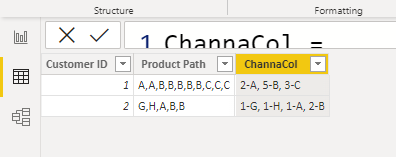
For a measure just change first line to
VAR CurrentPath = SELECTEDVALUE ( Channa[Product Path] )
- Mark as New
- Bookmark
- Subscribe
- Mute
- Subscribe to RSS Feed
- Permalink
- Report Inappropriate Content
When you "values" are you referring to a single character string or it could br multiple characters. And if multiple, is it a fixed size value or values can vary in their size (number of characters)?
- Mark as New
- Bookmark
- Subscribe
- Mute
- Subscribe to RSS Feed
- Permalink
- Report Inappropriate Content
@tamerj1 I am looking for repeated values. Like if a customer had 3 A and 2 B so I need them in a one string separated by ','.
- Mark as New
- Bookmark
- Subscribe
- Mute
- Subscribe to RSS Feed
- Permalink
- Report Inappropriate Content
I understand. But the "A" and the "B" are they always single characters? or they can be a string or characters like HI,HI,HELLO,CAR,CAR ... ?
- Mark as New
- Bookmark
- Subscribe
- Mute
- Subscribe to RSS Feed
- Permalink
- Report Inappropriate Content
@tamerj1 yes their are several product names in data. like webinars , website, tools...
- Mark as New
- Bookmark
- Subscribe
- Mute
- Subscribe to RSS Feed
- Permalink
- Report Inappropriate Content
Even if possible in DAX it would be extremely complicated. The only option is to split into columns. I know this will perhaps double the size of your table but I don't see any other way around.
- Mark as New
- Bookmark
- Subscribe
- Mute
- Subscribe to RSS Feed
- Permalink
- Report Inappropriate Content
@Anonymous
What is the maximum number of characters in the whole string?
- Mark as New
- Bookmark
- Subscribe
- Mute
- Subscribe to RSS Feed
- Permalink
- Report Inappropriate Content
Hi @Anonymous
Here is a sample file with the solution https://www.dropbox.com/t/tbRUhGvyoNDAZ5xL
I believe a fount a solution for your problem. It is a long code but it works just fine for upto 15 products per row. It can be expanded further if needed.
Please check and let me know if it works with you.
Here is how the table and report look like
And here is the code of the calculated column
Products =
VAR Table1 =
    SELECTCOLUMNS ( { ( [Customer ID], [Product Path] ) }, "Customer ID", [Customer ID], "Product Path", [Product Path] )
VAR Table2 =
    GENERATE (
        Table1,
        VAR Length = LEN ( Store[Product Path] )
        VAR Loc1 = IFERROR ( FIND ( ",", Store[Product Path], 1 ), 0 )
        VAR Loc2 = IFERROR ( FIND ( ",", Store[Product Path], 1 + Loc1 ), 0 )
        VAR Loc3 = IFERROR ( FIND ( ",", Store[Product Path], 1 + Loc2 ), 0 )
        VAR Loc4 = IFERROR ( FIND ( ",", Store[Product Path], 1 + Loc3 ), 0 )
        VAR Loc5 = IFERROR ( FIND ( ",", Store[Product Path], 1 + Loc4 ), 0 )
        VAR Loc6 = IFERROR ( FIND ( ",", Store[Product Path], 1 + Loc5 ), 0 )
        VAR Loc7 = IFERROR ( FIND ( ",", Store[Product Path], 1 + Loc6 ), 0 )
        VAR Loc8 = IFERROR ( FIND ( ",", Store[Product Path], 1 + Loc7 ), 0 )
        VAR Loc9 = IFERROR ( FIND ( ",", Store[Product Path], 1 + Loc8 ), 0 )
        VAR Loc10 = IFERROR ( FIND ( ",", Store[Product Path], 1 + Loc9 ), 0 )
        VAR Loc11 = IFERROR ( FIND ( ",", Store[Product Path], 1 + Loc10 ), 0 )
        VAR Loc12 = IFERROR ( FIND ( ",", Store[Product Path], 1 + Loc11 ), 0 )
        VAR Loc13 = IFERROR ( FIND ( ",", Store[Product Path], 1 + Loc12 ), 0 )
        VAR Loc14 = IFERROR ( FIND ( ",", Store[Product Path], 1 + Loc13 ), 0 )
        VAR Loc15 = IFERROR ( FIND ( ",", Store[Product Path], 1 + Loc14 ), 0 )
        VAR P1 = IF ( Loc1 = 0, Store[Product Path], MID ( Store[Product Path], 1 , Loc1 - 1 ) )
        VAR P2 = IF ( Loc2 = 0, IF ( Loc1 <> 0, MID ( Store[Product Path], 1 + Loc1, Length - Loc1 ) ), MID ( Store[Product Path], 1 + Loc1, Loc2 - Loc1 - 1 ) )
        VAR P3 = IF ( Loc3 = 0, IF ( Loc2 <> 0, MID ( Store[Product Path], 1 + Loc2, Length - Loc2 ) ), MID ( Store[Product Path], 1 + Loc2, Loc3 - Loc2 - 1 ) )
        VAR P4 = IF ( Loc4 = 0, IF ( Loc3 <> 0, MID ( Store[Product Path], 1 + Loc3, Length - Loc3 ) ), MID ( Store[Product Path], 1 + Loc3, Loc4 - Loc3 - 1 ) )
        VAR P5 = IF ( Loc5 = 0, IF ( Loc4 <> 0, MID ( Store[Product Path], 1 + Loc4, Length - Loc4 ) ), MID ( Store[Product Path], 1 + Loc4, Loc5 - Loc4 - 1 ) )
        VAR P6 = IF ( Loc6 = 0, IF ( Loc5 <> 0, MID ( Store[Product Path], 1 + Loc5, Length - Loc5 ) ), MID ( Store[Product Path], 1 + Loc5, Loc6 - Loc5 - 1 ) )
        VAR P7 = IF ( Loc7 = 0, IF ( Loc6 <> 0, MID ( Store[Product Path], 1 + Loc6, Length - Loc6 ) ), MID ( Store[Product Path], 1 + Loc6, Loc7 - Loc6 - 1 ) )
        VAR P8 = IF ( Loc8 = 0, IF ( Loc7 <> 0, MID ( Store[Product Path], 1 + Loc7, Length - Loc7 ) ), MID ( Store[Product Path], 1 + Loc7, Loc8 - Loc7 - 1 ) )
        VAR P9 = IF ( Loc9 = 0, IF ( Loc8 <> 0, MID ( Store[Product Path], 1 + Loc8, Length - Loc8 ) ), MID ( Store[Product Path], 1 + Loc8, Loc9 - Loc8 - 1 ) )
        VAR P10 = IF ( Loc10 = 0, IF ( Loc9 <> 0, MID ( Store[Product Path], 1 + Loc9, Length - Loc9 ) ), MID ( Store[Product Path], 1 + Loc9, Loc10 - Loc9 - 1 ) )
        VAR P11 = IF ( Loc11 = 0, IF ( Loc10 <> 0, MID ( Store[Product Path], 1 + Loc10, Length - Loc10 ) ), MID ( Store[Product Path], 1 + Loc10, Loc11 - Loc10 - 1 ) )
        VAR P12 = IF ( Loc12 = 0, IF ( Loc11 <> 0, MID ( Store[Product Path], 1 + Loc11, Length - Loc11 ) ), MID ( Store[Product Path], 1 + Loc11, Loc12 - Loc11 - 1 ) )
        VAR P13 = IF ( Loc13 = 0, IF ( Loc12 <> 0, MID ( Store[Product Path], 1 + Loc12, Length - Loc12 ) ), MID ( Store[Product Path], 1 + Loc12, Loc13 - Loc12 - 1 ) )
        VAR P14 = IF ( Loc14 = 0, IF ( Loc13 <> 0, MID ( Store[Product Path], 1 + Loc13, Length - Loc13 ) ), MID ( Store[Product Path], 1 + Loc13, Loc14 - Loc13 - 1 ) )
        VAR P15 = IF ( Loc15 = 0, IF ( Loc14 <> 0, MID ( Store[Product Path], 1 + Loc14, Length - Loc14 ) ), MID ( Store[Product Path], 1 + Loc14, Loc15 - Loc14 - 1 ) )
        --VAR P3 = IF ( Loc3 <> 0, MID ( Store[Product Path], 1 + Loc2, Loc3 - Loc2 - 1 ), IF ( Loc2 <> 0, MID ( Store[Product Path], 1 + Loc2, Length - Loc2 ) ) )
        --VAR P4 = IF ( Loc4 <> 0, MID ( Store[Product Path], 1 + Loc3, Loc4 - Loc3 - 1), IF ( Loc3 <> 0, MID ( Store[Product Path], 1 + Loc3, Length - Loc3 ) ) )
        --VAR P5 = IF ( Loc4 <> 0, MID ( Store[Product Path], 1 + Loc4, Loc5 - Loc4 - 1), IF ( Loc4 <> 0, MID ( Store[Product Path], 1 + Loc4, Length - Loc4 ) ) )
        --VAR P6 = IF ( Loc4 <> 0, MID ( Store[Product Path], 1 + Loc5, Loc6 - Loc5 - 1), IF ( Loc5 <> 0, MID ( Store[Product Path], 1 + Loc5, Length - Loc5 ) ) )
       -- VAR P7 = IF ( Loc4 <> 0, MID ( Store[Product Path], 1 + Loc6, Loc7 - Loc6 - 1), IF ( Loc6 <> 0, MID ( Store[Product Path], 1 + Loc6, Length - Loc6 ) ) )
        --VAR P8 = IF ( Loc4 <> 0, MID ( Store[Product Path], 1 + Loc7, Loc8 - Loc7 - 1), IF ( Loc7 <> 0, MID ( Store[Product Path], 1 + Loc7, Length - Loc7 ) ) )
        --VAR P9 = IF ( Loc4 <> 0, MID ( Store[Product Path], 1 + Loc8, Loc9 - Loc8 - 1), IF ( Loc8 <> 0, MID ( Store[Product Path], 1 + Loc8, Length - Loc8 ) ) )
        --VAR P10 = IF ( Loc4 <> 0, MID ( Store[Product Path], 1 + Loc9, Loc10 - Loc9 - 1), IF ( Loc9 <> 0, MID ( Store[Product Path], 1 + Loc9, Length - Loc9 ) ) )
        --VAR P11 = IF ( Loc4 <> 0, MID ( Store[Product Path], 1 + Loc10, Loc11 - Loc10 - 1), IF ( Loc10 <> 0, MID ( Store[Product Path], 1 + Loc10, Length - Loc10 ) ) )
        --VAR P12 = IF ( Loc4 <> 0, MID ( Store[Product Path], 1 + Loc11, Loc12 - Loc11 - 1), IF ( Loc11 <> 0, MID ( Store[Product Path], 1 + Loc11, Length - Loc11 ) ) )
        --VAR P13 = IF ( Loc4 <> 0, MID ( Store[Product Path], 1 + Loc12, Loc13 - Loc12 - 1), IF ( Loc12 <> 0, MID ( Store[Product Path], 1 + Loc12, Length - Loc12 ) ) )
        --VAR P14 = IF ( Loc4 <> 0, MID ( Store[Product Path], 1 + Loc13, Loc14 - Loc13 - 1), IF ( Loc13 <> 0, MID ( Store[Product Path], 1 + Loc13, Length - Loc13 ) ) )
        --VAR P15 = IF ( Loc4 <> 0, MID ( Store[Product Path], 1 + Loc14, Loc15 - Loc14 - 1), IF ( Loc14 <> 0, MID ( Store[Product Path], 1 + Loc13, Length - Loc14 ) ) )
        RETURN
            {  (Loc1, P1), (Loc2, P2), (Loc3, P3), (Loc4, P4), (Loc5, P5), (Loc6, P6), (Loc7, P7), (Loc8, P8), (Loc9, P9), (Loc10, P10), (Loc11, P11), (Loc12, P12), (Loc13, P13), (Loc14, P14), (Loc15, P15) }
    )
VAR Table3 =
    DISTINCT (
        SELECTCOLUMNS (
            Table2,
            "Value1", [Value1],
            "Value2", [Value2]
        )
    )
VAR Table4 =
    ADDCOLUMNS (
        Table3,
        "@Repeated",
        VAR CurrentProduct = [Value2]
        RETURN
        COUNTROWS (
            FILTER (
                Table3,
                    [Value2] = CurrentProduct
                        && NOT ISBLANK ( [Value2] )
            )
        )
    )
VAR Table5 =
    SELECTCOLUMNS (
        ADDCOLUMNS (
            Table4,
            "@Result", [@Repeated] & [Value2]
        ),
        "Result", [@Result]
    )
VAR Result =
    CONCATENATEX ( DISTINCT ( Table5 ), [Result], "," & UNICHAR ( 10 ) )
RETURN
    Result
- Mark as New
- Bookmark
- Subscribe
- Mute
- Subscribe to RSS Feed
- Permalink
- Report Inappropriate Content
I think this would be easier to do in Power Query if you can. I'd create a custom function which uses Text.Split, then you could turn the resulting list into a table, perform a group by aggregation to count the rows for each value, append each value-count pair together then combine the whole lot back into a string which you can return


- Mark as New
- Bookmark
- Subscribe
- Mute
- Subscribe to RSS Feed
- Permalink
- Report Inappropriate Content
Hello:
You can try
Result -
var _path = 'Table Name'[Product Path]
return
COUNTROWS(
FILTER(ALL(
'Table Name'),
'Table Name'[Path] = _Path)
)
- Mark as New
- Bookmark
- Subscribe
- Mute
- Subscribe to RSS Feed
- Permalink
- Report Inappropriate Content
@Whitewater100 Thanks for the reply. I need count of each value repated in a string along with values. ( Like in expected result column ).
Customer ID | Product Path | Expected Result
1 A,A,B,B,B,B,B,C,C,C 2-A, 5-B, 3-C
2 G,H,A,B,B 1-G, 1-H, 1-A, 2-B
- Mark as New
- Bookmark
- Subscribe
- Mute
- Subscribe to RSS Feed
- Permalink
- Report Inappropriate Content
Hi Channa:
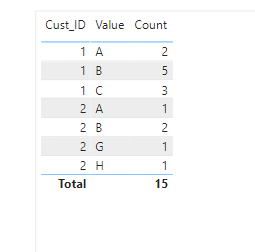
I see. I'll attach the file for you, link at the bottom. There is a few things you can do in the Query Editor to get the data in shape. My source file looked like this:
| Cust_ID | Prod_Path |
| 1 | A,A,B,B,B,B,B,C,C,C |
| 2 | G,H,A,B,B |
https://drive.google.com/file/d/1Zf5PMybceFyUmqKI04ufzavEQnvLkV6b/view?usp=sharing
Helpful resources

Power BI Dataviz World Championships
The Power BI Data Visualization World Championships is back! Get ahead of the game and start preparing now!

Power BI Monthly Update - December 2025
Check out the December 2025 Power BI Holiday Recap!

FabCon Atlanta 2026
Join us at FabCon Atlanta, March 16-20, for the ultimate Fabric, Power BI, AI and SQL community-led event. Save $200 with code FABCOMM.

| User | Count |
|---|---|
| 19 | |
| 13 | |
| 8 | |
| 4 | |
| 4 |


| User | Count |
|---|---|
| 29 | |
| 24 | |
| 17 | |
| 11 | |
| 10 |


