Join us at FabCon Atlanta from March 16 - 20, 2026, for the ultimate Fabric, Power BI, AI and SQL community-led event. Save $200 with code FABCOMM.
Register now!The Power BI Data Visualization World Championships is back! Get ahead of the game and start preparing now! Learn more
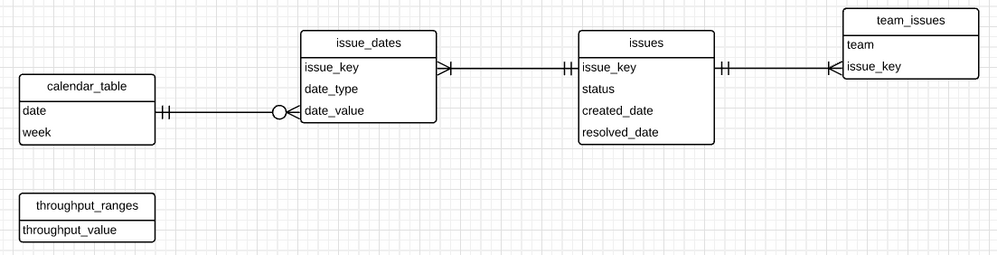
Problem background:
What I’m trying to do:
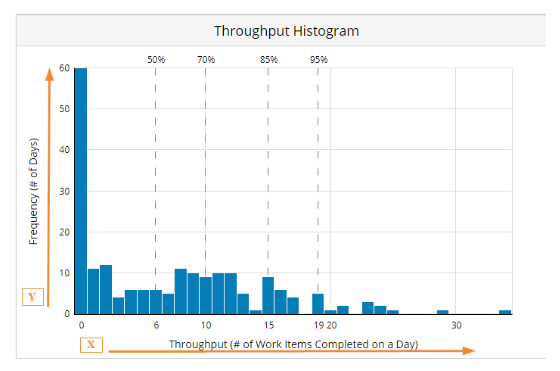
I want to create a histogram of weekly throughput. In other words:
conceptually, this is the desired output...
What I’ve tried so far:
I have this measure that calculates resolved issues dynamically
resolved_count =
CALCULATE(
DISTINCTCOUNT(issues[issue_key]),
issues[status]="Done",
issue_dates[date_type]="Resolved"
)
Then I started trying to dynamically identify the count of weeks, BUT I can’t figure out how to filter this by if the resolved_count is = throughput_value. Maybe I need to go in a completely different direction.
throughput_weeks_count =
COUNTROWS(
ADDCOLUMNS(
VALUES(issue_dates_calendar[Calendar Week End Date]),
"throughput",[resolved_count]
)
)
Normally I would use a filter function (logically, something like below), but I can’t figure out how to use that when I’m not referencing a real table.
FILTER(
“throughput_weeks_count”,
“throughput” = throughput_ranges[throughput_value]
)
Any help is appreciated!
Solved! Go to Solution.
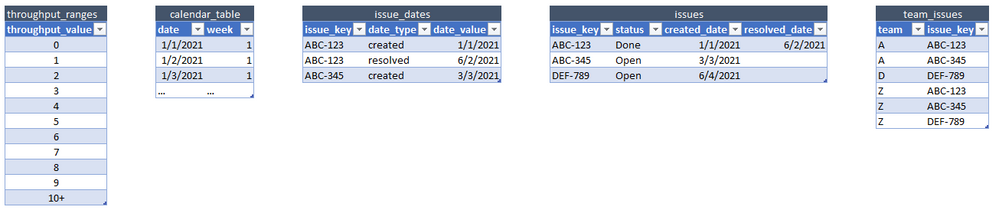
I was able to resolve this by adding a "last day of week" calendar table to my data model then using this measure to calculate the count of weeks. Also added a min/max boundary to the throughput_range table.
VAR weeks =
COUNTROWS(
FILTER(
issue_dates_calendar_weeks,
AND(
[resolved_count] >= MIN (throughput_ranges[value_min]),
[resolved_count] <= MAX (throughput_ranges[value_max])
)
)
)
I was able to resolve this by adding a "last day of week" calendar table to my data model then using this measure to calculate the count of weeks. Also added a min/max boundary to the throughput_range table.
VAR weeks =
COUNTROWS(
FILTER(
issue_dates_calendar_weeks,
AND(
[resolved_count] >= MIN (throughput_ranges[value_min]),
[resolved_count] <= MAX (throughput_ranges[value_max])
)
)
)
Can you create a calculated table at load time basically with your syntax...
throughput_weeks_count =
ADDCOLUMNS(
VALUES(issue_dates_calendar[Calendar Week End Date]),
"throughput",[resolved_count]
)(SUMMARIZECOLUMNS might be better)
That then materialises the count as a column which you can use as filter on your x axis.
No, can't do that even though that would be a lot easier. The weekly throughput values need to calculate dynamically because they are filterable by team_issue and issue attributes selections.
Alternatively. Take a disconnected table with numbers 0 through 52 (or higher)
Put that on x axis.
Then in your last measure read the value with selectedvalue and wrap your count rows in a filtered version of the dynamic table. Can write the dax tomorrow if you want.
Maybe, not sure I completely follow.
How would that work for date periods that cross a year boundary or extend longer than a single year? Not sure how the weeks match up in that scenario.
The Power BI Data Visualization World Championships is back! Get ahead of the game and start preparing now!
Check out the November 2025 Power BI update to learn about new features.
| User | Count |
|---|---|
| 20 | |
| 10 | |
| 9 | |
| 4 | |
| 4 |
| User | Count |
|---|---|
| 32 | |
| 31 | |
| 18 | |
| 12 | |
| 11 |