cancel
Showing results for 
Search instead for 
Did you mean: 

Vote for your favorite vizzies from the Power BI Dataviz World Championship submissions. Vote now!

Reply
Anonymous
Not applicable

Count of stores that are selling only 1 product for a specific date range.

I have been struggling with this question for a few days. I can not share the data as it is not my data. To best try to explain the data. I have an extensive data set with columns of Date, Store number, and Product number. 


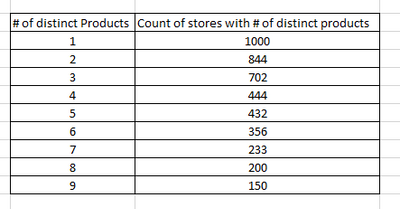
I need to know how many stores only have 1-9 products and have the ability to slice by date. Any suggestions are appreciated.


I need to generate a table that looks something similar to the table below:

Jthomas14_0-1666192813861.png


1 ACCEPTED SOLUTION
daXtreme
Solution Sage
Solution Sage

// You first have to create a table with
// all the numbers of distinct products.
// This will be a dimension table disconnected
// from any other. Here's how to create this
// via DAX (but should be in Power Query).

[# Distinct Products] = // calculcated table
var MaxNumberOfDistinctProducts =
    MAXX(
        VALUES( YourTable[Store Number] ),
        CALCULATE(
            // assuming Product Number identifies
            // a product uniquely
            DISTINCTCOUNT( YourTable[Product Number] )
        )
    )
 var Output = 
    SELECTCOLUMNS(
        GENERATESERIES( 0, MaxNumberOfDistinctProducts, 1 ),
        "# Dist Prods", [Value]
    )
 return
    Output
    
    
// Once you've got this... here's the measure:

[# Stores w/ # distinct prods] = // measure
var SelectedCounts = VALUES( '# Distinct Products'[# Dist Prods] )
// Bear in mind this measure obeys all currently
// active filters. This is important to understand.
var StoresWithDistProdCounts =
    FILTER(
        VALUES( YourTable[Store Number] ),
        CALCULATE(
            DISTINCTCOUNT( YourTable[Product Number] ) IN SelectedCounts
        )
    )
var Output = COUNTROWS( StoresWithDistProdCounts )
return
    Output
    
// By the way, please make sure your model does not have referential
// integrity problems. You can check for this using DAX Studio. This
// code has been written without actually runnig it over a model, so
// there might be some typos or similar issues. Please resolve them
// on your end. Thanks. On another note... you should never create
// models with one giant table due to the number of issues that such
// models pose. Instead, you should always build a proper star-schema.
// But it's up to you whether you want to avoid the mistakes of others
// or you want to go insane...

View solution in original post

1 REPLY 1
daXtreme
Solution Sage
Solution Sage

// You first have to create a table with
// all the numbers of distinct products.
// This will be a dimension table disconnected
// from any other. Here's how to create this
// via DAX (but should be in Power Query).

[# Distinct Products] = // calculcated table
var MaxNumberOfDistinctProducts =
    MAXX(
        VALUES( YourTable[Store Number] ),
        CALCULATE(
            // assuming Product Number identifies
            // a product uniquely
            DISTINCTCOUNT( YourTable[Product Number] )
        )
    )
 var Output = 
    SELECTCOLUMNS(
        GENERATESERIES( 0, MaxNumberOfDistinctProducts, 1 ),
        "# Dist Prods", [Value]
    )
 return
    Output
    
    
// Once you've got this... here's the measure:

[# Stores w/ # distinct prods] = // measure
var SelectedCounts = VALUES( '# Distinct Products'[# Dist Prods] )
// Bear in mind this measure obeys all currently
// active filters. This is important to understand.
var StoresWithDistProdCounts =
    FILTER(
        VALUES( YourTable[Store Number] ),
        CALCULATE(
            DISTINCTCOUNT( YourTable[Product Number] ) IN SelectedCounts
        )
    )
var Output = COUNTROWS( StoresWithDistProdCounts )
return
    Output
    
// By the way, please make sure your model does not have referential
// integrity problems. You can check for this using DAX Studio. This
// code has been written without actually runnig it over a model, so
// there might be some typos or similar issues. Please resolve them
// on your end. Thanks. On another note... you should never create
// models with one giant table due to the number of issues that such
// models pose. Instead, you should always build a proper star-schema.
// But it's up to you whether you want to avoid the mistakes of others
// or you want to go insane...

Helpful resources

Announcements
Power BI DataViz World Championships

Power BI Dataviz World Championships

Vote for your favorite vizzies from the Power BI World Championship submissions!

Sticker Challenge 2026 Carousel

Join our Community Sticker Challenge 2026

If you love stickers, then you will definitely want to check out our Community Sticker Challenge!

January Power BI Update Carousel

Power BI Monthly Update - January 2026

Check out the January 2026 Power BI update to learn about new features.

FabCon Atlanta 2026 carousel

FabCon Atlanta 2026

Join us at FabCon Atlanta, March 16-20, for the ultimate Fabric, Power BI, AI and SQL community-led event. Save $200 with code FABCOMM.