FabCon is coming to Atlanta
Join us at FabCon Atlanta from March 16 - 20, 2026, for the ultimate Fabric, Power BI, AI and SQL community-led event. Save $200 with code FABCOMM.
Register now!- Power BI forums
- Get Help with Power BI
- Desktop
- Service
- Report Server
- Power Query
- Mobile Apps
- Developer
- DAX Commands and Tips
- Custom Visuals Development Discussion
- Health and Life Sciences
- Power BI Spanish forums
- Translated Spanish Desktop
- Training and Consulting
- Instructor Led Training
- Dashboard in a Day for Women, by Women
- Galleries
- Data Stories Gallery
- Themes Gallery
- Contests Gallery
- QuickViz Gallery
- Quick Measures Gallery
- Visual Calculations Gallery
- Notebook Gallery
- Translytical Task Flow Gallery
- TMDL Gallery
- R Script Showcase
- Webinars and Video Gallery
- Ideas
- Custom Visuals Ideas (read-only)
- Issues
- Issues
- Events
- Upcoming Events
The Power BI Data Visualization World Championships is back! Get ahead of the game and start preparing now! Learn more
- Power BI forums
- Forums
- Get Help with Power BI
- DAX Commands and Tips
- Re: Count appearance of string in a comma-separate...
- Subscribe to RSS Feed
- Mark Topic as New
- Mark Topic as Read
- Float this Topic for Current User
- Bookmark
- Subscribe
- Printer Friendly Page

- Mark as New
- Bookmark
- Subscribe
- Mute
- Subscribe to RSS Feed
- Permalink
- Report Inappropriate Content
Count appearance of string in a comma-separated data column does not count values after the first co
I have two tables:
Products table has a single column with one product per field:

List table has several columns but the column I'm interested in has fields that can have as little as one product to as much as 17, all separated with a comma and no spaces in between:

The issue I'm facing and need help with is to correctly count each product either, ideally as as a measure. I tried two measures but they both gave me an incorrect count of blanks; there are no blank values either table.
What I found is that both measures count only the *first* value they find in the List column and then continue counting subsequent rows:

How can I correctly count all values in each field from the List table and have zero "blank" counts?
Thanks!
Solved! Go to Solution.


- Mark as New
- Bookmark
- Subscribe
- Mute
- Subscribe to RSS Feed
- Permalink
- Report Inappropriate Content
@Xboraxe
Please delete or deactivate that relationship or use
Customer Products at M0 =
CALCULATE (
    SUMX (
        VALUES ( Products[Product] ),
        SUMX (
            VALUES ( Query1[M0_LIST] ),
            INT ( CONTAINSSTRING ( Query1[M0_LIST], Products[Product] ) )
        )
    ),
    CROSSFILTER ( Query1[M0_LIST], Products[Product], NONE )
)- Mark as New
- Bookmark
- Subscribe
- Mute
- Subscribe to RSS Feed
- Permalink
- Report Inappropriate Content
Hi @Xboraxe
If the same product is repeated multiple times inside the string and you want to consider that in the counting then please use
Customer Products at M0 =
SUMX (
    VALUES ( Products[Product] ),
    SUMX (
        VALUES ( Query1[M0_LIST] ),
        VAR String = Query1[M0_LIST]
        VAR Items =
            SUBSTITUTE ( String, ",", "|" )
        VAR Length =
            COALESCE ( PATHLENGTH ( Items ), 1 )
        VAR T1 =
            GENERATESERIES ( 1, Length, 1 )
        VAR T2 =
            SELECTCOLUMNS ( T1, "@Item", PATHITEM ( Items, [Value] ) )
        RETURN
            COUNTROWS ( FILTER ( T2, [@Item] = Products[Product] ) )
    )
)- Mark as New
- Bookmark
- Subscribe
- Mute
- Subscribe to RSS Feed
- Permalink
- Report Inappropriate Content
Hi @tamerj1 , thank you. I tried using the first measure and still gave me the incorrect counts, using the second one gave me this result.

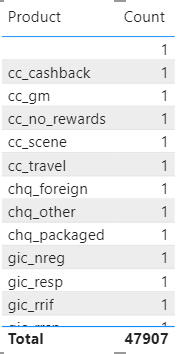
The same product is not repeated inside the string, but two clients can definitely have the same products but they would be listed in different rows.
- Mark as New
- Bookmark
- Subscribe
- Mute
- Subscribe to RSS Feed
- Permalink
- Report Inappropriate Content
- Mark as New
- Bookmark
- Subscribe
- Mute
- Subscribe to RSS Feed
- Permalink
- Report Inappropriate Content
Hi @tamerj1 , with your second measure I got a count of 1 for each product:
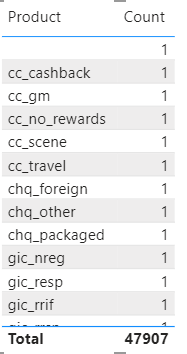
Also, the List table contains blank values/rows too, and as for active relationships I see that the Product and Lists table are connected in the Product[Products] column and the List[M0_LIST] column, one to many relationship. I don't know if this is causing the issue and hope this gives more clarity to my issue.
- Mark as New
- Bookmark
- Subscribe
- Mute
- Subscribe to RSS Feed
- Permalink
- Report Inappropriate Content
@Xboraxe
Please delete or deactivate that relationship or use
Customer Products at M0 =
CALCULATE (
    SUMX (
        VALUES ( Products[Product] ),
        SUMX (
            VALUES ( Query1[M0_LIST] ),
            INT ( CONTAINSSTRING ( Query1[M0_LIST], Products[Product] ) )
        )
    ),
    CROSSFILTER ( Query1[M0_LIST], Products[Product], NONE )
)- Mark as New
- Bookmark
- Subscribe
- Mute
- Subscribe to RSS Feed
- Permalink
- Report Inappropriate Content
- Mark as New
- Bookmark
- Subscribe
- Mute
- Subscribe to RSS Feed
- Permalink
- Report Inappropriate Content
Hi @Xboraxe
please try
Customer Products at M0 =
SUMX (
VALUES ( Products[Product] ),
SUMX (
VALUES ( Query1[M0_LIST] ),
INT ( CONTAINSSTRING ( Query1[M0_LIST], Products[Product] ) )
)
)

Helpful resources

Power BI Dataviz World Championships
The Power BI Data Visualization World Championships is back! Get ahead of the game and start preparing now!

Power BI Monthly Update - December 2025
Check out the December 2025 Power BI Holiday Recap!

FabCon Atlanta 2026
Join us at FabCon Atlanta, March 16-20, for the ultimate Fabric, Power BI, AI and SQL community-led event. Save $200 with code FABCOMM.

| User | Count |
|---|---|
| 19 | |
| 13 | |
| 8 | |
| 4 | |
| 4 |


| User | Count |
|---|---|
| 29 | |
| 19 | |
| 18 | |
| 11 | |
| 10 |


